The OG Outback [TTF]The Outback indicator
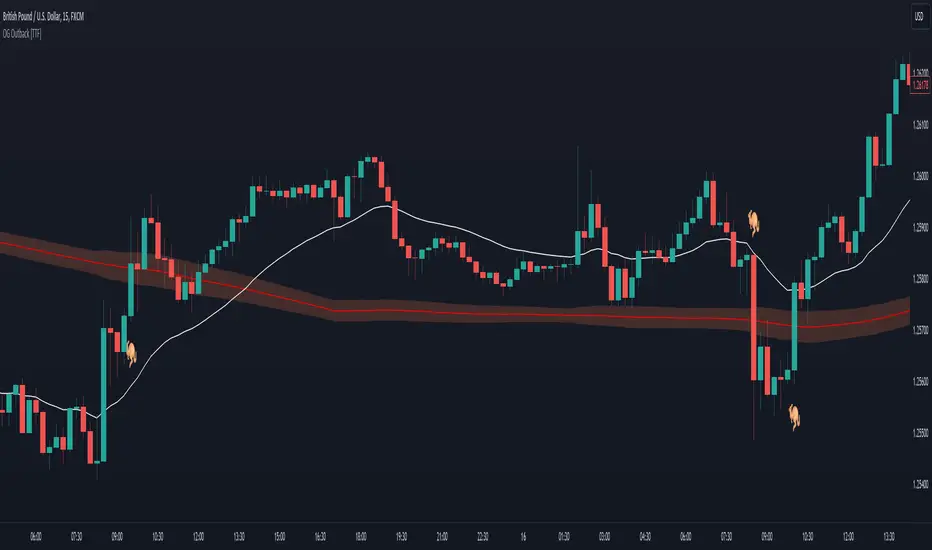
After a major overhaul of our Outback strategy, we decided that we would make our original version available for anyone to use.
The fundamental element of this indicator is based on price action relative to a slow moving average. That said, given that price will always tend towards a moving average, we have also implemented a method for helping filter out false signals leveraging a "consolidation cloud" and fast moving average. This, coupled with references to a customized version of the Relative Strength Index (RSI), has enabled us to provide significantly higher quality signals relating to price crossing a moving average.
Note: For this version, we have only prepared a single set of conditions and alerts (as noted by the 🦘 symbols). However it's worth noting there are several variations that can be done with some fundamental technical analysis and referencing additional indicators that can take this foundation and build upon it for a substantial increase in risk/reward and profit targets.
Kangaroo
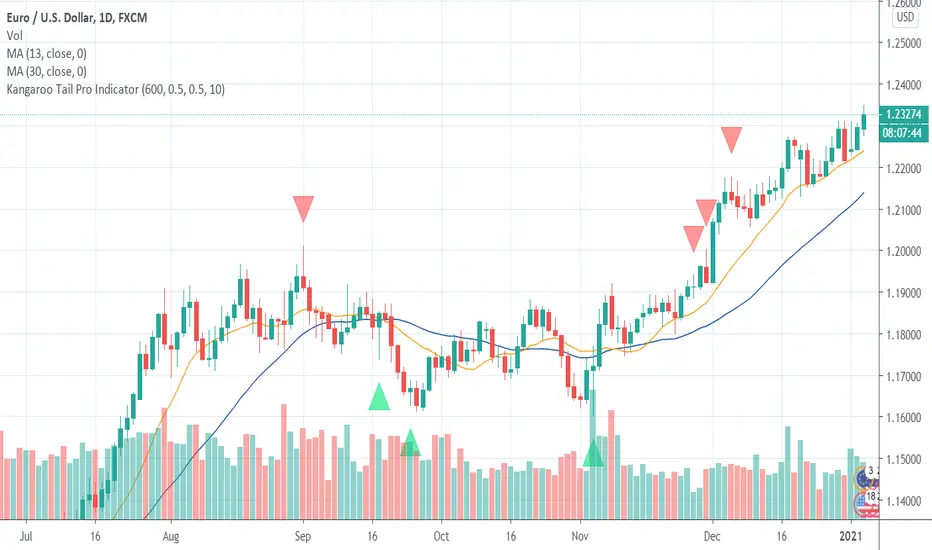
Kangaroo Tail Pro Indicator
Kangaroo Tail Indicator is a pattern recognition indicator for Forex, Stocks, Indices, Futures, Commodities and Cryptos.
The Kangaroo Tail is a multi-bar pattern.
The Kangaroo Tail is both simple and very effective pattern to trade.
The strategy that comes with the Kangaroo Tail is based on price action.
The indicator does what it was designed for: displaying Kangaroo Tail patterns. Don't expect to follow the up and down arrows and make money. Trading is not that simple. The Kangaroo Tail pattern is a starting point. The arrow is not a confirmed BUY and SELL signal in itself. The Kangaroo Tail indicator alerts you that the market might be at a turning point now. Then you must use other elements of your strategy (trend, momentum, support/resistance, volatility, daily bias, and other indicators) to confirm the signal and place a trade.
The Kangaroo Pro version lets users adjust the pattern definition. This version is meant for expert traders who want to use their own optimized settings for the pattern.
Inputs of the indicator are:
MaxBars: number of bars back used to calculate the indicator
Automatic(true/false): you can either use the defaults conservative settings (automatic=true) or use your own settings (automatic=false).
BuySignals (true/false): you can filter signals and decide to show BUY signals or not. Default settings is true (no filter).
SellSignals (true/false): you can filter signals and decide to show SELL signals or not. Default settings is true (no filter).
CandleSize: filter signals depending on the size of candle (0.5 to 1.5 recommended range of values)
BodyPercent: position of body compared to the complete candle range (0.2 to 0.4 recommended range of values)
RoomLeftBars: room on the left you want to have for valid pattern (counted as a number of bars, recommended values of 5 to 30).
Alerts:
The alerts are managed by TradingView trading platform features and not by the indicator itself. You must use Kangaroo Sell less than zero and Kangaroo Buy greater than zero as settings for the alerts.
Beware that TradingView limits the number of alerts you can receive according to the plan you subscribed with the platform.
Beware that alerts are managed by TradingView trading platform features and not by the indicator itself. We provide settings for alerts as a courtesy. If you have problems with alerts or need special settings then please contact TradingView support since alerting is not a feature managed by the indicator.
Trading rules:
For BUY: wait for a bullish Kangaroo Tail to print on a support zone after a down trend. Wait for price to break high of the Kangaroo Tail candle (5 pips above the high for H1 and higher time frames). Immediately enter in the trade once high is broken. You also can use a BUY STOP order placed 5 pips above the high of the candle (plus spread). Stop Loss should be placed below the low of the Kangaroo Tail candle. If order is not triggered in the next candle then trade is invalidated and should be canceled.
For SELL: wait for a bearish Kangaroo Tail to print on resistance zone after an up trend. Wait for price to break the low of the Kangaroo Tail candle (5 pips below the low for H1 and higher time frames). Immediately enter in the trade once low is broken. You also can use a SELL STOP order place 5 pips below the low of the candle. Stop Loss should be placed above the high of the Kangaroo Tail candle. If order is not triggered in the next candle then trade is invalidated and should be canceled.
The Kangaroo Tail indicator can be used with any time frame.
The Kangaroo Tail indicator can be used with any class of assets: Forex, Stocks, Indices, Futures, Commodities and Cryptos.
Beware that in accordance with TradingView rules, we cannot update this description over time. At the time you are reading this description it might be outdated. We recommend you to visit our website for up to date information.
Kangaroo Tail IndicatorKangaroo Tail Indicator is a pattern recognition indicator for Forex, Stocks, Indices, Futures, Commodities and Cryptos.
The Kangaroo Tail is a multi-bar pattern.
The Kangaroo Tail is both simple and very effective pattern to trade.
The strategy that comes with the Kangaroo Tail is based on price action.
The indicator does what he was designed for: displaying Kangaroo Tail patterns. Don't expect to follow the up and down arrows and make money. Trading is not that simple. The Kangaroo Tail pattern is a starting point. The arrow is not a confirmed BUY and SELL signal in itself. The Kangaroo Tail indicator alerts you that the market might be at a turning point now. Then you must use other elements of your strategy (trend, momentum, support/resistance, volatility, daily bias, and other indicators) to confirm the signal and place a trade.
Inputs of the indicator are:
MaxBars: number of bars back used to calculate the indicator
BuySignals (true/false): you can filter signals and decide to show BUY signals or not. Default settings is true (no filter).
SellSignals (true/false): you can filter signals and decide to show SELL signals or not. Default settings is true (no filter).
CandleSize: filter signals depending on the size of candle (0.5 to 1.5 recommended range of values)
Alerts:
The alerts are managed by TradingView trading platform features and not by the indicator itself. You must use Kangaroo Sell less than zero and Kangaroo Buy greater than zero as settings for the alerts.
Trading rules:
For BUY: wait for a bullish Kangaroo Tail to print on a support zone after a down trend. Wait for price to break high of the Kangaroo Tail candle (5 pips above the high for H1 and higher time frames). Immediately enter in the trade once high is broken. You also can use a BUY STOP order placed 5 pips above the high of the candle (plus spread). Stop Loss should be placed below the low of the Kangaroo Tail candle. If order is not triggered in the next candle then trade is invalidated and should be canceled.
For SELL: wait for a bearish Kangaroo Tail to print on resistance zone after an up trend. Wait for price to break the low of the Kangaroo Tail candle (5 pips below the low for H1 and higher time frames). Immediately enter in the trade once low is broken. You also can use a SELL STOP order place 5 pips below the low of the candle. Stop Loss should be placed above the high of the Kangaroo Tail candle. If order is not triggered in the next candle then trade is invalidated and should be canceled.
The Kangaroo Tail indicator can be used with any time frame.
The Kangaroo Tail indicator can be used with any class of asset: Forex, Stocks, Indices, Futures, Commodities and Cryptos.
Please contact me in private if you want to get access to the paid version of the indicator or use links of my signature to access our online store.
