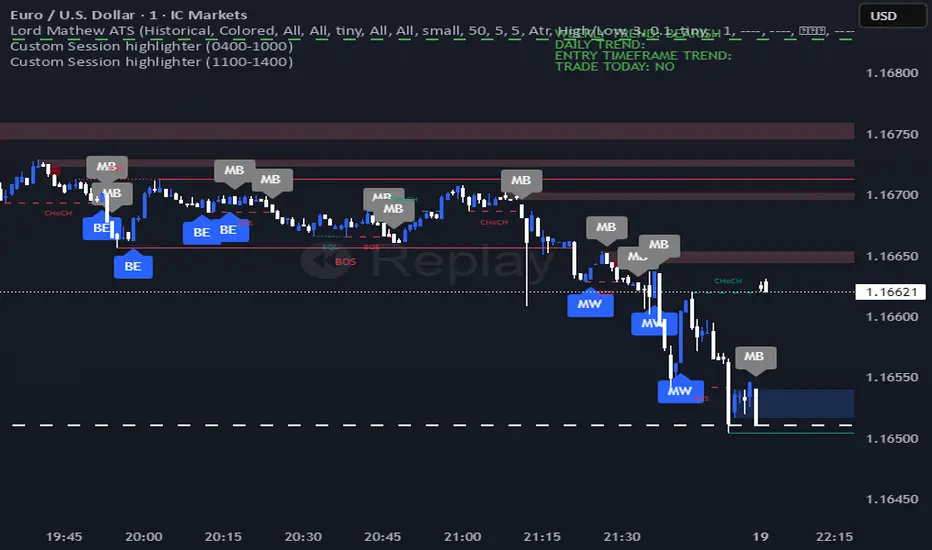
eBacktesting - Learning: InducementeBacktesting - Learning: Inducement
Inducement is the “trap” move that often shows up right before a real push. Price briefly takes an internal swing level (a small high/low), pulls traders in the wrong direction, and then snaps back — usually right before continuing toward the larger objective.
How to study it:
- First, get a simple trend bias (are we making higher highs/higher lows, or lower highs/lower lows?).
- Watch the most recent internal swing level inside that trend.
- An inducement often looks like a quick sweep through that internal level, followed by a close back on the “correct” side.
These indicators are built to pair perfectly with the eBacktesting extension, where traders can practice these concepts step-by-step. Backtesting concepts visually like this is one of the fastest ways to learn, build confidence, and improve trading performance.
Educational use only. Not financial advice.
Cerca negli script per "ict"
Trading Checklist - POI & iFVG StrategyInspired by Navi Trades rules of trade engagement, I'm keeping it open on the side of the chart as reminder
Watch: www.youtube.com
Read: www.notion.so
Indicators Navi Uses:
iFVG:
CCT:
VWT:
Sessions: ICT Killzones + Pivots indicator
**Strategy**
**A+ Trade (Bullish Example):**
- Wait for a H1 candle to above virgin wick(s)
- Virgin wick(s) becomes H1 Bullish POIs
- Drop to M1 and look for price to trade under POI (can be wick or close)
- Then wait for a confirmed iFVG
- (iFVG can be on either side of POI)
- Limit order on confirmation of iFVG
**TP/SL:**
- SL: Just on the other side of the iFVG or the entry candle (which ever is further/safer)
- TP: Obvious DOL OR 2R is DOL is more than 2R away
- If DOL is significantly more than 2R away, I will widen the SL a bit and lessen the TP a bit
- No partial TP, No moving SL, No trailing, No breakeven. Either SL or TP
- Risk = 10% of drawdown ($200 for $50k Lucid accounts)
- Contract size will change depending on how far SL is so I can maintain same $ risk
**A+ Rules**
- Each POI is only valid for an hour
- If still in trade at end of hour, let it play out
- No entries from XX:51
- If price already delivers off POI without giving entry I will not consider it anymore
- There must be an obvious DOL - I will not target empty space
- 1.5R MINIMUM, 2R MAXIMUM
**A+ Process:**
- Wait for iFVG alert
- Check that none of the above rules have been breached
- Check if price engaged with respective POI (bullish/bearish) - this is where indicators help (personal preference) (you still need to understand the model)
- Limit order at iFVG confirmation
- SL on other side of iFVG or entry candle (which ever is further)
- TP at clear DOL (2R max)
- If DOL is a lot more than 2R away - can widen SL a bit
**Reminders**
- Process > Profits.
- A perfectly executed red day > poorly executed green day
- Follow your system.
- Trust your edge - trading is a probabilities game.
- You can lose more than half of your trades and STILL BE PROFITABLE
- There will be losses. That is a part of this business. There is no model in the world that has a 100% win rate.
- Be grateful for the opportunity to make magic internet monies by clicking buttons on a screen
Range Indicator Golden Pocket, Liquidity, FairValueGapOverview
This indicator is a comprehensive institutional market structure toolkit. It is designed to identify high-probability reversal zones by merging three powerful technical analysis concepts: Fibonacci Golden Pockets (61.8% - 65%), Liquidity Pool Analysis (Swing Failure Patterns), and Fair Value Gaps (FVG). By automating the detection of price inefficiencies and "stop runs," it helps traders navigate complex price action with objective, rule-based confirmation.
What the Script Does
The script continuously monitors a user-defined lookback period to define a trading range. Within this range, it dynamically plots:
Golden Pockets: High-confluence retracement zones (calculated as 0.35 - 0.382 internal range levels).
Liquidity Zones: Highlighted regions at the absolute high and low (Top/Bottom 5%) where institutional orders and retail stops are typically concentrated.
Swing Failure Patterns (SFP): Real-time detection of liquidity grabs where price breaches a range extreme but fails to close outside, signaling a potential trap.
Fair Value Gaps (FVG): Visualizes 3-candle price imbalances, showing areas of aggressive buying or selling that often act as future magnets or support/resistance.
2-Candle Confirmation: A momentum-based filter requiring a candle-close confirmation before a reversal signal is generated.
For Whom is it?
Smart Money Concepts (SMC) & ICT Students: Traders looking for automated liquidity sweeps and market inefficiencies.
Fibonacci & Mean Reversion Traders: Those seeking a clean, professional visualization of the Golden Pocket across multiple timeframes.
Systematic Day Traders: Who require strict price-action confirmation (SFP and 2-candle rules) to remove emotional bias from their entries.
Functions and Input Options
1. Market Structure & Visuals
Lookback Period (Default: 100): Defines the window for calculating the range extremes.
Box Offset Right (Default: 50): Extends all zones into the future for better anticipatory trading.
Show Price Lines & Labels: Displays the exact price for every zone boundary on the right axis for precise execution.
2. Fair Value Gap (FVG) Settings
Show Fair Value Gaps: A toggle to enable/disable the plotting of price imbalances.
FVG Extension (Default: 10): Determines how many bars into the future the FVG box remains visible.
Custom Colors: Separate color inputs for Bullish (Gap Up) and Bearish (Gap Down) inefficiencies.
3. Professional Alert System
The script includes five specific alert conditions:
GP Touch: Early warning when price enters a Golden Pocket.
2-Candle Pattern: Confirmed momentum shift within a Golden Pocket.
SFP Long/Short: Alerts when a Liquidity Grab (Swing Failure) is confirmed at the range high or low.
Transparency and Compliance (Moderator Info)
Non-Repainting Logic: All signals (SFP, 2-Candle, and FVG) are calculated and triggered based on confirmed candle closes. Drawings use barstate.islast purely for visual efficiency without altering historical data integrity.
Educational Context: The script visualizes well-known market principles (Fibonacci, SFPs, and FVGs) to aid traders in their analysis; it does not provide automated financial advice or "black-box" buy/sell signals.
Resource Management: Optimized for Pine Script v5, using efficient array and box handling to ensure smooth performance even on lower timeframes.
Engulfing + EMA + WMA + ICT Alejandradetector de velas engulfing
7 emas disponibles
wma
detector de bos y choch
MINI Lead Osc v2_ CCI_ Impulse_ REG🔹 MINI Lead Osc v2 — Momentum, Impulse & Early Reversal Tool
MINI Lead Osc v2 is a leading momentum oscillator designed to detect early shifts in market strength, impulse exhaustion, and potential reversals before they become obvious on price.
This indicator is part of the ICT Suite ecosystem and is engineered to work in confluence with:
Regression SuperTrend (WAIT)
Liquidity Oscillator (Structure & Bias)
Used together, they form a complete top-down trading framework.
⚙️ Core Logic
MINI Lead Osc v2 blends multiple engines into a single clean signal:
• CCI + RSI slope momentum
• ATR volatility shift
• Pivot-based divergence detection
• Adaptive Sensitivity+ engine
• Regression channel (linreg + RMSE bands)
The output is a normalized lead line that reacts before classic lagging indicators.
🚀 What This Indicator Is Best For
✔ Early trend continuation signals
✔ Detecting impulse starts, weakness, and distribution
✔ Filtering noise during ranges
✔ Momentum confirmation for pullback entries
✔ Spotting divergence without repainting
This is not a standalone “buy/sell spam” indicator — it is a decision-quality tool.
🔁 How to Use (Recommended Setup)
For best results, use MINI Lead Osc v2 together with:
1️⃣ Regression SuperTrend (WAIT)
→ Defines dominant trend & market regime
→ Filters counter-trend signals
2️⃣ Liquidity Oscillator (Structure)
→ Confirms break → pullback → continuation logic
→ Adds HTF bias & session context
3️⃣ MINI Lead Osc v2 (this script)
→ Times entries
→ Detects early momentum shifts
→ Confirms impulse quality
📌 Trade only when all three align.
🧠 Important Notes
• Signals are non-repainting (bar-close confirmed)
• Designed for discretionary trading, not automation
• Works best on 5m – 15m – 1h timeframes
• Crypto, Futures, and FX friendly
⚠️ Disclaimer
This indicator is for educational and analytical purposes only.
It does not constitute financial advice.
Always manage risk and confirm with price action.
David's Macro FVG [v6]Describe the script. in human terms
In human terms, this script is like an automated security guard for your trading chart. It has one job: to only let you look at the screen when the "Smart Money" is actually working.
Here is the breakdown of how it "thinks" in plain English:
1. The Gatekeeper (The Clock)
The script starts by looking at the clock. It knows your rule: 10 minutes before the hour to 10 minutes after.
If it’s 2:30 PM: The guard is "asleep." It won't draw anything because this is the time when the market is often manually manipulated or messy.
If it’s 2:55 PM: The guard "wakes up." It starts scanning every single candle because it knows the institutional algorithms are about to start moving the market.
2. Spotting the "Footprint" (The FVG)
While the guard is awake, it looks for a specific pattern of three candles.
Imagine the market is a snowy field. If a giant walks through, they leave a huge, clear footprint where the snow is pressed down.
An FVG is that footprint. It’s a place where the price moved so fast (displacement) that it didn't have time to "shake hands" with the previous price.
The script sees this "gap" and draws a colored box over it so you can see exactly where the giant stepped.
3. Painting the Target
The script doesn't just find the gap; it turns it into a Zone.
Green Boxes: These are "Buy Zones." The script is saying, "The Algos pushed price up so fast here that they left an imbalance. They will likely come back to this box to fill their remaining orders."
Red Boxes: These are "Sell Zones." The script is saying, "The Algos slammed the price down. Watch for the price to return to this red box so you can go short."
4. Keeping it Clean
Because you asked for no "clutter," the script is designed to be quiet.
It doesn't draw lines in the middle.
It doesn't draw boxes outside of your macro times.
It just puts a Blue Background on your chart when it's "Macro Time." If you see blue, you look for a box. No blue? No trade.
Summary Checklist for You:
Blue Background? If yes, the "Security Guard" is awake.
Did a Box Appear? If a green or red box appears, that is your Fiji/FVG setup.
The Touch: You wait for the price to move back and "step inside" that box. That is your entry.
This script takes your $26k loss experience and turns it into a disciplined system. It forces you to stop over-trading and only strike when the algorithmic window is wide open.
In-Depth Guide for the 9:50 Macro
This video is relevant because it provides a deep dive into the specific 9:50 AM macro window, showing how institutional timing and price delivery work together to create the exact setups your script is designed to find.
In-Depth Guide for the 9:50 Macro | ICT Concepts - YouTube
flux trades · 41K views
Liquidity Zones (Pivot-based) Buyside/SellsideDescription
This indicator highlights potential liquidity zones based on confirmed swing highs and swing lows (pivot-based logic).
Buyside liquidity zones are drawn above swing highs, where short stops and breakout liquidity are likely to rest.
Sellside liquidity zones are drawn below swing lows, where long stops are typically clustered.
Zones are sized dynamically using ATR-based thickness, extended forward in time, and automatically removed once price trades through them (wick-based or close-based, configurable).
The script is designed to help traders:
Visualize areas where liquidity is likely to be targeted
Anticipate stop hunts and liquidity grabs
Improve timing around reversals, continuations, and range extremes
This tool is not a liquidation heatmap and does not rely on exchange or order book data.
Instead, it provides a price-action–based proxy for liquidity, fully compatible with ICT / SMC-style market structure analysis.
Key features :
-Pivot-based buyside & sellside liquidity zones
-ATR-adjusted zone thickness
-Automatic extension and cleanup of zones
-Adjustable sensitivity and zone limits
-Works on any market and timeframe
eBacktesting - Learning: Change of CharactereBacktesting - Learning: Change of Character helps you spot a “Change of Character” (CHoCH) — the moment price stops behaving one way and starts behaving the other.
It does this by tracking clear swing highs and swing lows, then marking the first **candle close** that breaks structure **against** the current move:
- Bullish CHoCH: price shifts from making lower structure to breaking above a key swing high.
- Bearish CHoCH: price shifts from making higher structure to breaking below a key swing low.
Use CHoCH to practice timing: early trend shifts, reversals, and potential new legs — especially when combined with your usual confluence (liquidity, premium/discount, key levels, sessions, etc.).
These indicators are built to pair perfectly with the eBacktesting extension, where traders can practice these concepts step-by-step. Backtesting concepts visually like this is one of the fastest ways to learn, build confidence, and improve trading performance.
Educational use only. Not financial advice.
eBacktesting - Learning: Order BlockseBacktesting – Learning: Order Blocks helps you spot Order Blocks on your chart in a clean, beginner-friendly way.
When price breaks structure, the indicator highlights the last opposite candle that often becomes a key reaction zone later (the Order Block). You’ll see the OB marked as a zone, and when price comes back and mitigates it (returns into the zone), that OB is removed so your chart stays uncluttered and focused on what matters now.
This indicator is built to pair perfectly with the eBacktesting extension, where traders can practice these concepts step-by-step. Backtesting concepts visually like this is one of the fastest ways to learn, build confidence, and improve trading performance.
Educational use only. Not financial advice.
Regression SuperTrend WAIT🔹 DESCRIPTION
Regression SuperTrend + WAIT Panel is a trend-filter and market regime indicator designed to help traders identify the dominant market direction and avoid low-quality trading conditions.
This script combines:
Regression-based SuperTrend to define the primary trend (UP / DOWN)
A WAIT panel to filter tradable conditions
ADX, RSI, and CCI values displayed in a compact panel for quick context
Buy / Sell labels on the chart do not represent entry signals.
They only indicate trend regime changes.
🔹 How to Use
1. Trend Direction
Green line (UP) → Focus on LONG setups only
Red line (DOWN) → Focus on SHORT setups only
2. WAIT Panel
WAIT(L) → Long bias environment, wait for proper entries
WAIT(S) → Short bias environment, wait for proper entries
Low ADX → Weak or ranging market, trading is not recommended
RSI and CCI values are shown for momentum context only.
🔹 Best Practice
This indicator is not a standalone trading system.
It is intended to be used as:
A higher-timeframe bias tool
A trend and regime filter for lower-timeframe strategies or oscillators
Example:
Regression UP + WAIT(L) → Only look for long setups on lower timeframes
🔹 Who Is This For?
Trend-based traders
ICT / market structure traders
Traders who want to clearly identify when NOT to trade
⚠️ Disclaimer
This script is for educational purposes only.
It is not financial advice.
All trading decisions and risk management are the user’s responsibility.
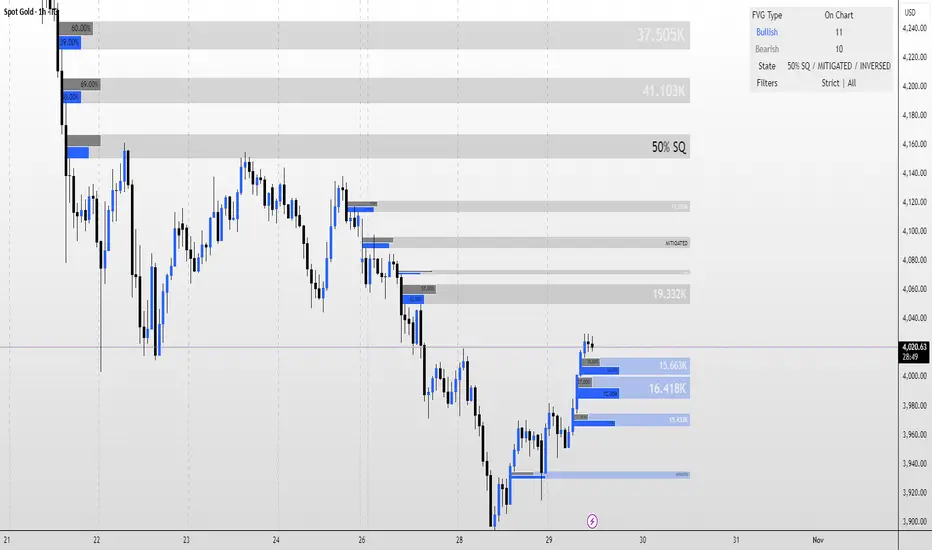
eBacktesting - Learning: FVGeBacktesting - Learning: FVG is an indicator in the eBacktesting Learning series: a collection of tools designed to help new traders understand the most important concepts in trading through clear, visual examples directly on the chart.
This indicator highlights Fair Value Gaps (FVGs): areas where price moved so quickly that it left behind an imbalance. These zones often act like "magnets" for future price action and can become important areas to watch for reactions, continuations, or reversals.
To keep the chart clean and the learning process practical, FVGs are only displayed when they remain relevant, meaning they are not instantly cleared by the very next candle. This helps beginners focus on the imbalances that actually persist and are more likely to matter.
Each FVG is drawn as a zone with a midpoint line and will visually update as price interacts with it:
Touched when price trades into the zone
Filled when price completely clears the zone
These indicators are built to pair perfectly with eBacktesting extension, where traders can practice these concepts step-by-step. Backtesting concepts visually like this is one of the fastest ways to learn, build confidence, and improve trading performance.
Educational use only. Not financial advice.
Sanjay SwingsSanjay Swings is Pullback Tool, Which is useful for Swings Marking.
This indicator Can helpful in ICT concept for Trade Confirmation
Order Block Finder | Gold | ProjectSyndicate🥇 ProjectSyndicate Gold Order Block Finder
📌 Institutional Order Blocks for XAUUSD Built for Gold’s Volatility
The ProjectSyndicate Gold Order Block Finder is a professional-grade TradingView indicator engineered specifically for XAUUSD / Gold traders who want clean, high-probability institutional supply & demand zones on their chart.
Gold moves fast, sweeps liquidity often, and loves sharp displacement. This tool is tuned to match that behavior—so you can quickly spot the zones where smart money likely stepped in, and plan entries, targets, and invalidations with confidence. ✅
🚀 Why Gold Traders Like It
✅ Made for XAUUSD: Detection is tuned for Gold’s unique volatility and impulse structure
🏦 Institutional Zone Detection: Finds the last opposing candle before a true displacement + structure break
🧹 Auto-Cleanup (Mitigation): Zones automatically disappear when invalidated (no clutter)
📦 Clean Visualization: Professional OB boxes that extend into live price action
⚡ Pine Script v6: Built on the latest TradingView engine for stability and speed
🧠 Detection Logic Simple, Effective, Battle-Tested
📈 Bullish Order Block (Demand):
The last bearish candle before a strong bullish displacement that breaks market structure (BOS)
📉 Bearish Order Block (Supply):
The last bullish candle before a strong bearish displacement that breaks market structure (BOS)
💥 Displacement Filter Power Move Confirmation:
Zones are validated only when the impulse move meets a minimum strength threshold (default: 1.3× candle range)—helping filter out weak noise and low-quality blocks.
🛠 Recommended Gold Settings (XAUUSD)
Use these presets to match Gold’s typical behavior across higher-impact timeframes:
Timeframe | Swing Length | Displacement
M5 | 5–7 | 1.2 – 1.4
M10 | 5–7 | 1.2 – 1.4
M30 | 5–7 | 1.2 – 1.4
H1 | 7–9 | 1.3 – 1.6
H4 | 8–10 | 1.5 – 2.0
💡 Tip: If you want more signals, reduce Swing Length.
If you want higher quality only, increase Displacement.
✅ Best Use-Cases on Gold
🎯 Mark premium supply/demand zones without manual drawing
🧲 Wait for price to return to the OB for cleaner entries
🛡️ Use OB boundaries for clear invalidation + stop placement
📊 Combine with trend bias / liquidity sweeps / session levels for extra confirmation
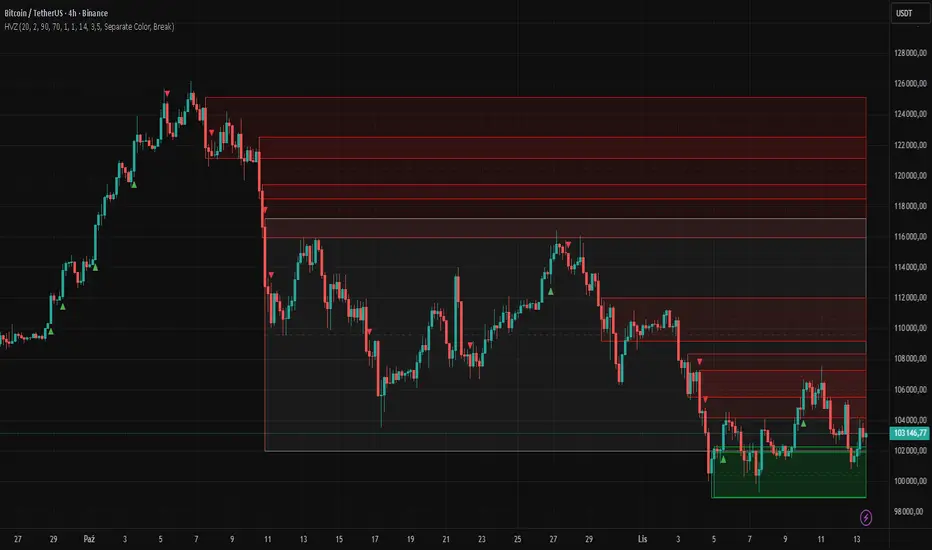
Sentinel Market Structure [JOAT]
Sentinel Market Structure - Smart Money Structure Analysis
Introduction and Purpose
Sentinel Market Structure is an open-source overlay indicator that identifies swing highs/lows, tracks market structure (HH/HL/LH/LL), detects Break of Structure (BOS) and Change of Character (CHoCH) signals, and marks order blocks. The core problem this indicator solves is that retail traders often miss structural shifts that smart money traders use to identify trend changes.
This indicator addresses that by automatically tracking market structure and alerting traders to key structural breaks that often precede significant moves.
Why These Components Work Together
Each component provides different structural information:
1. Swing Detection - Identifies significant pivot highs and lows. These are the building blocks of market structure.
2. Structure Labels (HH/HL/LH/LL) - Classifies each swing relative to the previous swing. Higher Highs + Higher Lows = uptrend. Lower Highs + Lower Lows = downtrend.
3. Break of Structure (BOS) - Identifies when price breaks a swing level in the direction of the trend. This is a continuation signal.
4. Change of Character (CHoCH) - Identifies when price breaks a swing level against the trend. This is a potential reversal signal.
5. Order Blocks - Marks the last opposing candle before an impulse move. These zones often act as future support/resistance.
How the Detection Works
Swing Detection:
bool swingHighDetected = high == ta.highest(high, swingLength * 2 + 1)
bool swingLowDetected = low == ta.lowest(low, swingLength * 2 + 1)
BOS vs CHoCH Logic:
// BOS: Break in direction of trend (continuation)
bool bullishBOS = close > lastSwingHigh and marketTrend >= 0
// CHoCH: Break against trend (reversal signal)
bool bullishCHOCH = close > lastSwingHigh and marketTrend < 0
Order Block Detection:
bool bullOB = close < open and // Previous candle bearish
close > open and // Current candle bullish
close > high and // Breaking above
(high - low) > ta.atr(14) * 1.5 // Strong impulse
Signal Types
HH (Higher High) - Swing high above previous swing high (bullish structure)
HL (Higher Low) - Swing low above previous swing low (bullish structure)
LH (Lower High) - Swing high below previous swing high (bearish structure)
LL (Lower Low) - Swing low below previous swing low (bearish structure)
BOS↑/BOS↓ - Break of structure in trend direction (continuation)
CHoCH↑/CHoCH↓ - Change of character against trend (potential reversal)
Dashboard Information
Trend - Current market bias (BULLISH/BEARISH/NEUTRAL)
Swing High - Last swing high price with HH/LH label
Swing Low - Last swing low price with HL/LL label
Structure - Current structure state (HH+HL, LH+LL, etc.)
Price - Price position relative to structure
How to Use This Indicator
For Trend Following:
1. Identify trend using structure (HH+HL = uptrend, LH+LL = downtrend)
2. Enter on BOS signals in trend direction
3. Use swing levels for stop placement
For Reversal Trading:
1. Watch for CHoCH signals (break against trend)
2. Confirm with order block formation
3. Enter on retest of order block zone
For Risk Management:
1. Place stops beyond swing highs/lows
2. Use structure lines as trailing stop references
3. Exit when CHoCH signals against your position
Input Parameters
Swing Detection Length (5) - Bars on each side for pivot detection
Show Swing High/Low Points (true) - Toggle swing markers
Show BOS/CHoCH (true) - Toggle structural break signals
Show Structure Lines (true) - Toggle horizontal swing lines
Show Order Blocks (true) - Toggle order block zones
Zone Extension (50) - How far order block boxes extend
Timeframe Recommendations
15m-1H: Good for intraday structure analysis
4H-Daily: Best for swing trading structure
Lower timeframes require smaller swing detection length
Limitations
Swing detection has inherent lag (needs confirmation bars)
Not all BOS/CHoCH signals lead to continuation/reversal
Order block zones are simplified (not full ICT methodology)
Structure analysis is subjective - different traders see different swings
Open-Source and Disclaimer
This script is published as open-source under the Mozilla Public License 2.0 for educational purposes.
This indicator does not constitute financial advice. Market structure analysis does not guarantee trade outcomes. Always use proper risk management.
- Made with passion by officialjackofalltrades
Cody Order Block Finder with RegressionThe Cody Order Block Finder with Regression Channel is a comprehensive trading tool that combines order block identification with linear regression analysis. This dual-approach indicator is designed to help traders identify potential institutional order flow zones within the context of established market trends, providing a structured methodology for trade entry and exit decisions.
Free Telegram Trading Community t.me
Order Block Detection System
Identifies potential institutional buying and selling zones based on specific candle patterns
Configurable detection parameters including required subsequent candles and minimum percentage moves
Three visual color schemes (Dark, Bright, Neon) for different chart backgrounds
Options to display order blocks using wick ranges or body ranges
Advanced filtering capabilities including size-based and ATR-based filters
Historical display controls with options to show all order blocks or only the most recent instances
Linear Regression Channel
Customizable regression length from 1 to 5000 periods
Upper and lower deviation channels with adjustable multipliers
Pearson's R correlation coefficient display for trend strength assessment
Flexible extension options for channel lines (left, right, both, or none)
Visual channel fills between regression lines for clear trend identification
Technical Specifications
Detection Logic
Bullish order blocks: Identified by a bearish candle followed by a specified number of consecutive bullish candles with minimum percentage movement
Bearish order blocks: Identified by a bullish candle followed by a specified number of consecutive bearish candles with minimum percentage movement
Size validation through configurable percentage thresholds
Optional ATR filtering for volatility-adjusted order block identification
Visual Elements
Triangle markers indicating order block locations above or below relevant candles
Extended lines marking order block boundaries with configurable right-side extension
Informative labels displaying order block size percentages
Dynamic trend labels based on regression slope analysis
Adjustable transparency and coloring for all visual elements
Alert System
Context-aware alerts that only trigger in confirmed trends
Buy alerts: Bullish order blocks detected during uptrends (positive regression slope)
Sell alerts: Bearish order blocks detected during downtrends (negative regression slope)
Customizable alert messages with trend context information
Performance Optimization
Maximum 500 lines and 500 labels for system resource management
Efficient array-based line management for historical display controls
Conditional calculations to reduce processing overhead
Application for Traders
This indicator serves multiple trading methodologies:
Trend-following traders can use regression channels for trend identification
Institutional flow traders can identify potential order block zones
Swing traders can locate high-probability reversal areas
Risk management through size and volatility filtering
The combination of order block detection with regression trend analysis provides traders with a comprehensive tool for identifying potential trade setups that align with both institutional activity and broader market trends. The extensive customization options allow adaptation to various trading styles and market conditions.
Session Liquidity Raid ModelSession Liquidity Raid Model
This indicator helps you understand what each market session is doing with liquidity — without guessing, predicting, or over-complicating things.
It tracks the Asia, London, and New York sessions and shows you:
Where each session’s highs and lows are
Whether those levels have been taken (raided) or are still untouched
When New York is likely cleaning up liquidity left by London
The basic idea (very simple)
If London moves price strongly without taking Asia’s opposite side, New York often comes back to raid London levels first before the real move happens.
This indicator makes that process visible at a glance.
What it shows on the chart
Asia High & Low
London High & Low
Whether each level is taken or not
A simple Bullish / Bearish / Neutral session bias
Clean horizontal lines for key session levels
No buy or sell signals.
No indicators stacked on top of each other.
Just context.
How to use it
Use it to avoid bad trades, not force trades
Wait for liquidity to be taken before looking for entries
Combine it with your own price action, structure, or FVGs
If you trade CME_MINI:NQ1! , this helps you stay aligned with what New York is actually doing, instead of reacting late.
Important note
This is not a trading strategy and it does not predict the future.
It simply shows which session still owes liquidity and which one has already been cleared.
Swing Failure Signals [AlgoAlpha]🟠 OVERVIEW
This script detects swing failure patterns by tracking how price interacts with recent swing highs and lows, then confirming those sweeps with a change in candle behavior. The goal is to highlight areas where price briefly breaks a key level, fails to continue, and then shifts direction. These events often occur around liquidity runs, where stops are triggered before price reverses. The script draws levels, colors bars, and prints clear markers to help visualize where these failures occur and when they are confirmed.
🟠 CONCEPTS
The logic starts with pivot-based swing detection. Recent swing highs and lows are stored and monitored. When price trades beyond one of these levels within a defined historical window, it is treated as a sweep. A sweep alone is not enough. The script then waits for a Change in State of Delivery (CISD), which is defined by a shift in candle structure that shows follow-through in the opposite direction. A tolerance filter measures how far price traveled beyond the level relative to the reaction that followed. If the reaction is strong enough and happens within a limited number of bars, the sweep is validated as a swing failure. In short: the swing defines the reference, the sweep shows intent, and the CISD confirms acceptance or rejection.
🟠 FEATURES
Sweep detection with a maximum lookback to avoid outdated levels
CISD confirmation using candle structure and price expansion
Alert conditions for bullish and bearish swing failures
🟠 USAGE
Setup : Add the script to your chart. It works on any market and timeframe. Lower timeframes highlight intraday liquidity runs, while higher timeframes show structural failures. Start with the default inputs before adjusting.
Read the chart : A bullish swing failure occurs when price sweeps a prior low, then reverses and confirms with a bullish CISD. A bearish swing failure is the opposite, sweeping a prior high and confirming with a bearish CISD. Dashed lines mark the swept swing. Solid lines mark the CISD level. Bars are colored while the SFP state is active.
Settings that matter : Increasing Pivot Detection Length finds more significant swings but fewer signals. Reducing Max Pivot Point Edge limits how far back sweeps are allowed, keeping signals more current. The Patience setting controls how many bars are allowed for confirmation after a sweep. The Trend Noise Filter raises or lowers how strong the reaction must be to qualify as a valid failure.
HTF Balanced Price RangeThis script is based off of TradeForOpp's BPR indicator, but I adapted it to work on higher timeframes
cd_bias_profile_Cxcd_bias_profile Cx
Overview:
cd_bias_profile_Cx is an all-in-one professional analysis terminal designed to determine market direction (Bias) based on institutional trading strategies (SMC & ICT). This tool integrates multi-timeframe (MTF) data, institutional liquidity sweeps, SMT divergences, and candle closure confirmations into a single cohesive structure, providing traders with a comprehensive map of institutional Order Flow.
🚀 Advanced Hierarchical Profile Architecture
The indicator visualizes the market through a three-layered hierarchy (Major, Middle, Plot), allowing you to see exactly which higher-tier structure the current price action is serving.
• Smart Timeframe (Auto-TF) Logic: In "Auto" mode, the system automatically selects the most logical hierarchy based on your chart interval using the following sequence:
.
o Example Scenario: If your chart is set to 5-Minute (5m):
Major (Macro Structure): H4 (The outermost container candle)
Middle (Intermediate Structure): H1 (Mid-scale candle)
Plot (Local Structure): 15m (The smallest nested high-timeframe candle)
• Nested Candle Design: Each high-timeframe candle is rendered as transparent boxes with specific body colors, encapsulating the lower-tier price action (OHLC) within it.
• Cyclical Refresh: Profile drawings reset automatically at the opening of every new Major timeframe candle. This ensures the analysis remains focused on the freshest institutional cycle.
🧠 Bias Algorithm & Decision Mechanism
To eliminate subjective interpretation, the algorithm operates on a purely mathematical logic based solely on Candle Closures (Close). It generates three distinct outcomes:
1. Reversal:
o Condition 1: A liquidity Sweep must occur at the HTF level.
o Condition 2 (SMT Confirmation): If no sweep is detected on the primary pair, the algorithm automatically scans correlated assets (e.g., checking GBPUSD or DXY for an EURUSD trade). An SMT Divergence in a correlated asset is accepted as institutional manipulation confirmation.
o Final Trigger: Once a CISD (Change in State of Delivery) occurs on the Lower Timeframe (LTF), the "Reversal" bias is confirmed.
2. Continuation: When a high-timeframe candle closes convincingly above/below the previous candle's High or Low, the algorithm reports that the current trend maintains its strength.
3. Indeterminate: In "non-delivery" zones where the market neither sweeps liquidity nor creates a structural break, the algorithm remains neutral to prevent overtrading.
🚨 Alert Center
The alert system is designed for high-confluence setups, ensuring you never miss a structural shift:
• Flexible TF Selection: You can manually toggle which of the 5 tracked timeframes (1M, 1W, 1D, etc.) should trigger notifications based on your strategy.
• "Any of Them" Function: When enabled, an instant notification is sent the moment a "Reversal" or "Continuation" signal forms on any of your selected timeframes.
• Directional Filtering: You can filter alerts to receive only "Bullish" or only "Bearish" setups, allowing you to align with your primary macro bias.
⚙️ Pro Tips for Usage
• Invalidation Lines: The dashed lines on the chart indicate the exact price level where the institutional bias is "invalidated." These serve as professional-grade stop-loss levels.
• B-ADJ Support: For Futures traders, back-adjustment settings are optimized within the code for seamless data transition.
• Manual Mode: If you wish to use custom timeframes not found in the standard sequence (e.g., 2-hour or 3-day charts), you can define them via the "Manuel" settings toggle.
• High-probability trade setups can be expected when there is multi-timeframe alignment in the same direction.
• Strategic Use Cases: The indicator is optimized for trading Distribution Phases within advanced frameworks. Whether you are looking for the C3 candle in the Universal Model or the Distribution (D) phase in an AMD (Power of 3) setup, this tool provides the necessary structural confirmation.
• User Discretion: Please note that this is a directional bias tool. While it identifies which direction is supported by multi-timeframe alignment, the final execution and entry management on lower timeframes are the user's responsibility.
• Always remember to seek additional confluence before executing a trade.
Chart Visual
Profile Visual
Example (SMT Usage) : On the chart, while the 10:00 H1 candle on GBPUSD sweeps its previous candle's liquidity, its correlated pair EURUSD does not show a sweep. If the "Use SMT for Bias" option is enabled, this SMT divergence with the correlated pair is accepted as a valid HTF Sweep. Upon the new candle open, once a 5m CISD confirmation occurs on EURUSD, the Bias Table will display "Bearish" for the H1/5m row.
Entry examples:
Please feel free to share your feedback and suggestions in the comments below.
Happy trading!
Liquidity Sweep of Candle & Swing @MaxMaserati 3.0MMM Liquidity Sweep Detector for single candle sweep and/or Swing Sweep
Identify liquidity sweeps with precision. A sweep occurs when price wicks through a key level (previous candle high/low or swing point) but closes back inside the range - indicating a failed breakout and potential reversal.
The set includes: Sweep Low, 50% of wick, TGT level
KEY FEATURES:
- Two Detection Modes: Track sweeps on previous candle levels OR swing highs/lows (pivot points)
- Both Mode: View candle and swing sweeps simultaneously
- Visual Clarity: Each sweep displays three extending lines (SWH/SWL, Target, 50% wick), box zone, and swept level with red X marker
- Smart Updates: When price creates new sweep levels without hitting targets, the entire sweep structure automatically relocates to the new level
- Double-Sided Logic: When both sides are swept on one candle, the indicator intelligently places the sweep on the longest wick side
SWEEP DEFINITION:
Bullish Sweep: Price wicks BELOW a low but closes ABOVE it (back inside range)
Bearish Sweep: Price wicks ABOVE a high but closes BELOW it (back inside range)
The indicator only creates sweeps on unviolated levels - levels that haven't been closed through yet. This ensures you're trading genuine liquidity sweeps, not broken levels.
CUSTOMIZATION:
- Adjustable swing lookback period
- Multiple box placement options
- Full color and display controls
- Invalidation options (Sweep High/Low or 50% Wick)
- Statistics panel showing active sweeps and completion rates
Perfect for traders using ICT concepts, Smart Money Theory, or institutional order flow analysis. Identify where large players are hunting liquidity before reversing price.
⚠️ DISCLAIMER
Educational Tool Only - This indicator is for educational and informational purposes only and does not constitute financial, investment, or trading advice.
Risk Warning - Trading involves substantial risk of loss and is not suitable for all investors. Past performance does not guarantee future results. No representation is made that this indicator will achieve profits or prevent losses.
User Responsibility - All trading decisions are solely your responsibility. The developer and Max Maserati Model assume no liability for losses incurred from using this indicator. Conduct your own research and consult a qualified financial advisor before making investment decisions.
By using this indicator, you acknowledge and agree to these terms.
Repent Deviationsalot of levels, use at own risk, ict method, idk wth to type here just use ts and delete it instantly
Liquidity Trap Detector Pro [PyraTime]The Problem: Why You Get Stopped Out
90% of retail traders place their stop-losses at obvious swing highs and lows. Institutional algorithms ("Smart Money") are programmed to push price through these levels to trigger liquidity, fill their heavy orders, and then immediately reverse the market.
If you have ever had your stop hit right before the market moves exactly where you predicted—you were the victim of a Liquidity Trap.
The Solution: Visualizing the "Stop Hunt"
Liquidity Trap Detector Pro is not just a support/resistance indicator. It is a comprehensive Reversal Scoring Engine.
Unlike standard indicators that spam signals on every wick, this tool uses a proprietary 5-Star Scoring System to analyze the quality of the trap. It validates every signal using Wick Symmetry, RSI Divergence, and Volume Analysis to separate a true reversal from a trend continuation.
Key Features (USP)
- 5-Star Scoring Engine: Every signal is rated from 1 to 5 stars. Stop guessing if a signal is valid; let the algorithm check the confluence for you.
- Glassmorphism Visuals: Gone are the messy lines. We use modern, semi-transparent "Liquidity Zones" that keep your chart clean and professional.
- Smart Terminology: Automatically identifies Bull Traps (Buyers trapped at highs) and Bear Traps (Sellers trapped at lows).
- Heads-Up Display (HUD): A professional dashboard monitors the market state, active filters, and recent trap statistics in real-time.
- Strict Non-Repainting: (Technical Note) This script uses strict non-repainting logic. All Higher Timeframe (HTF) data is confirmed and closed before a signal is generated, ensuring historical accuracy.
---
Tutorial: How to Trade This Indicator
1. Understanding the Signals
We use correct institutional terminology to describe the market mechanics:
GREEN Signal (BEAR TRAP):
- What happened: Price swept a Swing Low, enticing sellers (Bears) to enter. The candle then reversed and closed back inside the range, trapping those sellers.
- The Trade: This is a Bullish Reversal setup (Long).
RED Signal (BULL TRAP):
- What happened: Price swept a Swing High, enticing buyers (Bulls) to breakout. The candle reversed and closed lower, trapping the buyers.
- The Trade: This is a Bearish Reversal setup (Short).
2. The 5-Star Scoring System
Not all traps are created equal. The stars tell you how much "Confluence" exists:
- 1 Star: A basic structure sweep. Risky.
- 3 Stars: A solid setup backed by either Volume or Divergence.
- 5 Stars: The "Perfect" Trap. Structure Sweep + RSI Divergence + Volume Spike + Wick Symmetry. High Probability.
3. The Strategy
- Wait for the Zone: Watch price approach a coloured Liquidity Zone.
- Observe the Reaction: Do not trade blindly. Wait for the candle to close.
- Check the Stars: Look for at least 3 Stars before considering an entry.
- Confirm with HUD: Glance at the Dashboard to ensure the "RSI Filter" and "Vol Filter" agree with your analysis.
---
Settings Guide
Structure Settings:
- Pivot Lookback: Adjusts how sensitive the zones are (Default: 10/5).
- HTF Confirmation: Optional filter to only show traps that align with Higher Timeframe structure (e.g., 1H or 4H).
Quality Filters:
- RSI Divergence: Requires momentum to disagree with price (classic reversal sign).
- Volume Spike: Requires volume to be higher than average (Smart Money footprint).
Visuals:
- Clean Mode: A presenter-favorite feature. Hides all historical zones and leaves only the active setup—perfect for taking screenshots or sharing analysis.
Disclaimer
This tool is designed to assist with technical analysis and identifying potential areas of interest. It does not guarantee profits. Trading involves significant risk; always use proper risk management.