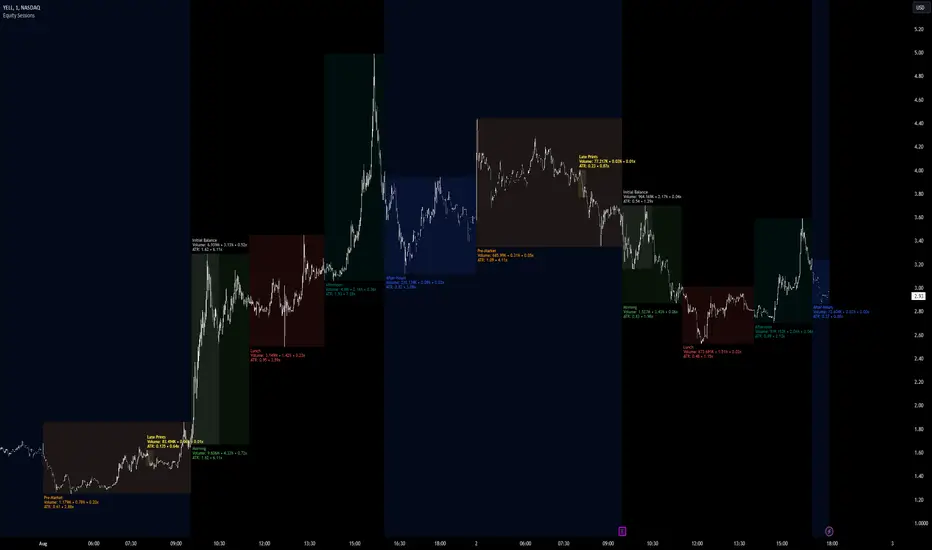
Equity Sessions [vnhilton]Note: Numbers in the chart above, particularly volume, are incorrect as I didn't have extra market data at the time of publication. Default settings are set for US markets.
(OVERVIEW)
This indicator was made specifically for equity markets which have pre-market and after-hours trading, though can be used for any other markets without these sessions, there are many other session indicators better suited for those markets. What makes this indicator different to the hundreds of session indicators out there will be highlighted in bold in the Features section below.
(FEATURES)
- After-Hours session can start earlier if the day ends short and starts after-hours trading earlier due to holidays for example
- Sessions constrained to regular trading hours can also adjust for short days as well
- Show volume for each session and also as a percentage/multiplier of day volume, average day volume with customisable period
- Show range for each session and also as a percentage/multiplier of the daily ATR with customisable period
- Lookback period for the boxes
- Customisable text size, placement, colour, name
- Customisable session lengths and constraints (regular trading hours or all including extending trading hours)
- Customisable border widths, styles and colours, and session background colour
- Toggles to show/hide sessions, volume, day volume, average day volume, session range and day ATR
Cerca negli script per "session"
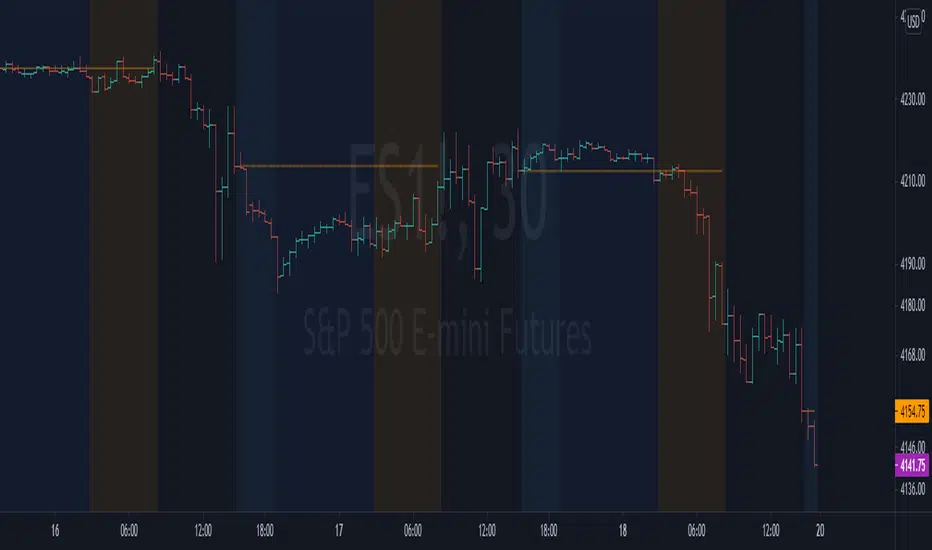
NYSE extended session backgroundThis script adds background to the chart to highlight different time areas in any chart.
The time areas are in relation to the open/close time of NYSE , both regular and extended session.
The background colors are the following by default:
NO COLOR : NYSE is open
DARK BLUE : NYSE is closed
LIGHT BLUE : NYSE post market session
ORANGE : NYSE pre market session
In addition, previous day close price line is shown during extended and closed sessions (orange line).
This script is useful to visualize any chart in relation to the NYSE timetable.
London_NYThis is a session indicator that is one color from beginning of London Session to end of New York Session.

Code for All 4 Forex Sessions W/ Background Highlight!!!This is one indicator including the New York Session, Australia Session, Asian Session, Europe Session. IMPORTANT - This template is set up based on East Coast (NY Time). Currently you have to go in to code to change times. Link in 1st Post to VIDEO walking you through the steps. Specific details in 1st Post.

Example Indicator: 3 Sessions Indicator [Nexo Mechanics]This indicator is a demo script inspired by the Forex 3-Session System. It visualises three major market sessions (Tokyo, London, New York) on-chart and shows a simple world clock.
What it demonstrates
How to detect sessions in different time zones and draw session boxes that update with the session high/low.
Optional Tokyo split into AM and PM blocks.
A compact World Clock table (London, New York, Tokyo) with local time and OPEN/CLOSED status.
Basic session open alerts (London, New York, Tokyo, Tokyo PM).
Notes
Sessions are intentionally limited to up to 60m charts for clarity/performance.
Some timeframes can show slightly misaligned boundaries if they don’t divide evenly into an hour.
Published for demo purposes. Not a robust or tested trading system.
Not financial advice.

LH Alert Orb & SessionsLH Alert Orb & Session Levels
LH Alert ORB & Sessions is a multi-module intraday trading overlay that combines an Opening Range Breakout (ORB) framework, automated session reference levels, and a “Sniper” alert engine designed to highlight higher-quality momentum entries during a defined New York trading window. It is optimized for index futures—especially NQ/MNQ—and is best used on a 5-minute chart for the intended balance of signal quality and structure clarity.
The indicator plots EMA 10/20/200 and VWAP for trend/mean reference, then generates Sniper Long/Short alerts only when multiple conditions align: directional EMA trend (10 vs 20), reclaim confirmation relative to VWAP and EMA200 within a configurable lookback window, optional “recent cross” validation, and optional RSI and volume expansion filters. To reduce low-quality signals, the Sniper engine includes comprehensive candle-quality rules (minimum body % to avoid dojis, max wick-to-body ratios to avoid wicky indecision candles, hammer-like rejection filtering, and an optional “wick battle” filter that blocks candles where either wick represents an outsized share of the candle range). Alerts can also be gated by proximity to the current ORB and, optionally, require that both VWAP and EMA200 are contained within the opening range to enforce tighter structure-based entries.
The ORB module supports a configurable opening-range duration and an optional custom session (default 08:00–08:15 UTC-5), draws the opening range box, OR High/Low/Mid levels, and optionally displays breakout markers and bias-aware target logic (all breakout signals and targets are disabled by default for a clean chart). Historical ORB drawings can be preserved or hidden based on preference.
In addition, the Sessions module continuously tracks and draws key market structure levels for Asia, London, and PreMarket sessions (High/Low and an average line for each), along with prior trading day high/low using a futures-style trading day definition (rolling at 18:00 New York time). Each level is fully style-customizable (color, line style, width), providing a complete intraday roadmap of session extremes and mean levels alongside the Sniper/ORB framework.
This script is intended for intraday charts only (it enforces a timeframe below 1D) and is designed to be used as an alert-driven decision aid—prioritizing confluence, structure, and candle quality to reduce noise while keeping all major components configurable via grouped settings.

Ultimate Key Liquidity LevelsThe Ultimate Key Liquidity Levels indicator is a comprehensive, professional-grade tool designed for traders seeking to identify and visualize critical price levels across multiple timeframes and sessions on TradingView. This clean and simple indicator overlays key liquidity zones directly on your chart, helping you spot potential support, resistance, and reversal areas with ease.
Functionality
At its core, the indicator plots essential liquidity levels derived from daily, weekly, and major trading sessions (Asia, London, New York). It includes highs, lows, opens, closes, and midpoints for both current and previous periods, allowing you to track dynamic price action in real-time. Advanced features like label consolidation merge nearby levels into intuitive combined labels (e.g., "CDH/PWH"), while optional mitigation removes touched or breached levels after a configurable delay. Built-in alerts notify you of price proximity, touches, or closes through any level, ensuring you never miss key market interactions.
Features
Multi-Timeframe Levels: Displays Current/Past Day (High/Low/Open/Close), Current/Past Week (High/Low/Open/Close), and Session-specific (Asia/London/NY High/Low/Mid) levels.
Customization Options: Toggle individual levels, adjust styles (colors, widths, dashed/solid/dotted lines), and shift lines/labels with global offsets for a personalized view.
Consolidation and Zones: Automatically combines close levels with customizable separators and thresholds; highlights merged areas with colored zones for better visibility.
Mitigation System: Optionally fade or remove levels once price interacts with them (via touch or close-through methods), with styling for mitigated lines.
Session Timezone Support: Configurable start/end times for Asia, London, and NY sessions in your preferred timezone.
Alert Integration: Set notifications for price approaching within X ticks, touching, or closing beyond any level—compatible with TradingView's pop-up, email, and mobile alerts.
Benefits and Advantages
This indicator stands out for its comprehensive coverage of liquidity hotspots, empowering you to make informed decisions based on institutional-level price points. Its professional-grade precision reduces chart clutter through smart consolidation, delivering a clean and simple user experience even on volatile instruments. Advantages include enhanced risk management (e.g. more accurate stop loss positioning around key levels), improved entry/exit timing, and seamless integration with any trading strategy— all without overwhelming your chart with unnecessary "clutter". Unlike basic pivot and swing tools, it offers session-specific insights and alerts, saving time and minimizing missed opportunities.
Use Cases
Day Trading: Monitor intraday session highs/lows for breakout or reversal setups during Asia, London or NY session opens.
Swing Trading: Use weekly levels like Previous Week Close (PWC) to identify longer-term support/resistance on higher timeframes.
Scalping: Leverage proximity alerts to enter trades as price nears consolidated zones, ideal for high-frequency, high-precision strategies.
Risk Management: Set stops or targets around key levels to protect positions in forex, stocks, futures, or crypto markets.
Backtesting and Analysis: Visualize historical liquidity for strategy optimization, with extendable lines for forward projections.
Whether you're a beginner simplifying your analysis or a pro refining edge detection, Ultimate Key Liquidity Levels provides a robust, user-friendly solution to elevate your trading. Add it to your chart today and unlock clearer market insights!

Trading Sessions + IB [midst]What It Does
Displays the three major global trading sessions (Asia, London, New York) with Initial Balance (IB) ranges and extension levels. Automatically detects instrument type (ES, NQ, Gold, Silver) and applies correct IB period.
Key Features
Session Boxes: Visual high-to-low range for each session
Initial Balance: First 60 minutes of session range with IB high/mid/low lines
IB Extensions: Automatic calculation of +/-25%, 50%, 100% levels
Live IB Tracker: Real-time statistics table showing IB range, analysis, and market structure
Fully Customizable: Colors, line styles, labels, and display options
Why Use This
Identify key support/resistance levels based on session structure
Track IB breakouts for high-probability trade setups
Use extensions as profit targets or reversal zones
Compare session ranges to gauge volatility
Spot session overlaps for increased liquidity
Default Times (Chicago/Central Time)
Asia: 5:00 PM - 2:00 AM
London: 2:00 AM - 11:00 AM
New York: 7:30 AM - 4:00 PM
How To Use
Add indicator to your chart (works best on 5-15 minute timeframes)
Indicator auto-detects ES, NQ, GC, SI and applies correct 60-minute IB
Watch for price action at IB levels and extensions
Use IB Tracker table for real-time market analysis
Customization
Adjust everything: session times, IB period, colors, line styles, labels, table position. Toggle historical sessions, IB boxes, lines, extensions, and more.
Supported Instruments: ES/MES, NQ/MNQ, GC/MGC (Gold), SI (Silver) - auto-detection included

True Session Opens [TakingProphets]True Session Opens
- Description
- True Session Opens plots “true” session open levels (horizontal) for major trading windows
- Optional vertical session boundary markers and bottom session labels
- Built to keep charts clean with a timeframe visibility filter and lookback pruning
- What This Is (In Plain English)
- When a session starts (New York time), the script captures that candle’s open price
- A horizontal line is drawn from the session start and extended bar-by-bar to the current bar
- Optional vertical lines mark session start and end boundaries
- Optional bottom labels show ASIA, LONDON, NY.AM, and NY.PM near the midpoint of each session
-----------------------------------------------------------------------------------------------
Sessions Tracked (New York Time)
-----------------------------------------------------------------------------------------------
- ASIA - 20:00 to 00:00
- LONDON - 02:00 to 05:00
- NY.AM - 09:00 to 11:30
- NY.PM - 13:00 to 16:00
- IMPORTANT
- Session detection is anchored to America/New_York
- Adjust session windows in Session Definitions if your instrument requires different killzones
-----------------------------------------------------------------------------------------------
How To Use
-----------------------------------------------------------------------------------------------
- Add this indicator to intraday charts for clean session reference levels
- Use session opens as reaction levels, anchors, or confluence with your model
- Enable verticals for timing context, disable them for a minimal chart
- Recommended Workflow
- Keep ASIA and LONDON enabled during London / NY overlap
- Keep NY.AM and NY.PM enabled for New York session context
- Lower timeframes (1m–15m) are recommended for best clarity
-----------------------------------------------------------------------------------------------
Settings Guide
-----------------------------------------------------------------------------------------------
- General
- Lookback
- Controls how far back session verticals remain visible
- Options: 1 Day, 3 Days, 5 Days, 1 Week, 1 Month
- Older session markers are pruned automatically for performance and cleanliness
- Highest Timeframe Visibility
- Prevents session visuals from displaying on higher timeframes
- Example: if set to 15m, sessions will not appear on 30m, 1H, or higher
- When exceeded, existing visuals are removed to keep the chart clean
- Session Definitions
- Defines session time windows (New York time)
- Modify these inputs if you want custom session ranges
- Session Opens
- Individual toggles for ASIA, LONDON, NY.AM, and NY.PM
- Custom color per session
- Adjustable line style and line width
- Configurable open label size
- Session Verticals
- Toggle vertical lines at session start and end
- Customize vertical line color and style
- Toggle bottom session name labels
-----------------------------------------------------------------------------------------------
Visual Output
-----------------------------------------------------------------------------------------------
- Horizontal Open Lines
- Plotted at the opening price of each session
- Right-pinned labels using short codes
- asia.open
- lo.open
- nyam.open
- nypm.open
- Vertical Session Lines (Optional)
- Vertical markers at session start and end
- Managed by lookback pruning
- Bottom Session Labels (Optional)
- Session names printed at the bottom of the chart
- Positioned near the midpoint of each session window
-----------------------------------------------------------------------------------------------
Best Practices
-----------------------------------------------------------------------------------------------
- Use 1m–15m for clean intraday session structure
- Disable verticals if you only want

WorldCup Dashboard + Institutional Sessions© 2025 NewMeta™ — Educational use only.
# Full, Premium Description
## WorldCup Dashboard + Institutional Sessions
**A trade-ready, intraday framework that combines market structure, real flow, and institutional timing.**
This toolkit fuses **Institutional Sessions** with a **price–volume decision engine** so you can see *who is active*, *where value sits*, and *whether the drive is real*. You get: **CVD/Delta**, volume-weighted **Momentum**, **Aggression** spikes, **FVG (MTF)** with nearest side, **Daily Volume Profile (VAH/POC/VAL)**, **ATR regime**, a **24h position gauge**, classic **candle patterns**, IBH/IBL + **first-hour “true close”** lines, and a **10-vote confluence scoreboard**—all in one view.
---
## What’s inside (and how to trade it)
### 🌍 Institutional Sessions (Sydney • Tokyo • London • New York)
* Session boxes + a highlighted **first hour**.
* Plots the **true close** (first-hour close) as a running line with a label.
**Use:** Many desks anchor risk to this print. Above = bullish bias; below = bearish. **IBH/IBL** breaks during London/NY carry the most signal.
### 📊 CVD / Delta (Flow)
* Net buyer vs seller pressure with smooth trend state.
**Use:** **Rising CVD + acceptance above mid/POC** confirms continuation. Bearish price + rising CVD = caution (possible absorption).
### ⚡ Volume-Weighted Momentum
* Momentum adjusted by participation quality (volume).
**Use:** Momentum>MA and >0 → trend drive is “real”; <0 and falling → distribution risk.
### 🔥 Aggression Detector
* ROC × normalized volume × wick factor to flag **forceful** candles.
**Use:** On spikes, avoid fading blindly—wait for pullbacks into **aligned FVG** or for aggression to cool.
### 🟦🟪 Fair Value Gaps (with MTF)
* Detects up to 3 recent FVGs and marks the **nearest** side to price.
**Use:** Trend pullbacks into **bullish FVG** for longs; bounces into **bearish FVG** for shorts. Optional threshold to filter weak gaps.
### 🧭 24h Gauge (positioning)
* Shows current price across the 24h low⇢high with a mid reference.
**Use:** Above mid and pushing upper third = momentum continuation setups; below mid = sell the rips bias.
### 🧱 Daily Volume Profile (manual per day)
* **VAH / POC / VAL** derived from discretized rows.
**Use:** **POC below** supports longs; **POC above** caps rallies. Fade VAH/VAL in ranges; treat them as break/hold levels in trends.
### 📈 ATR Regime
* **ATR vs ATR-avg** with direction and regime flag (**HIGH / NORMAL / LOW**).
**Use:** HIGH ⇒ give trades room & favor trend following. LOW ⇒ fade edges, scale targets.
### 🕯️ Candle Patterns (contextual, not standalone)
* Engulfings, Morning/Evening Star, 3 Soldiers/Crows, Harami, Hammer/Shooting Star, Double Top/Bottom.
**Use:** Only with session + flow + momentum alignment.
### 🤝 Price–Volume Classification
* Labels each bar as **continuation**, **exhaustion**, **distribution**, or **healthy pullback**.
**Use:** Align continuation reads with trend; treat “Price↑ + Vol↓” as a caution flag.
### 🧪 Confluence Scoreboard & B/S Meter
* Ten elements vote: 🔵 bull, ⚪ neutral, 🟣 bear.
**Use:** Execution filter—take setups when the board’s skew matches your trade direction.
---
## Playbooks (actionable)
**Trend Pullback (Long)**
1. London/NY active, Momentum↑, CVD↑, price above 24h mid & POC.
2. Pullback into **nearest bullish FVG**.
3. Invalidate under FVG low or **true-close** line.
4. Targets: IBH → VAH → 24h high.
**Range Fade (Short)**
1. Asia/quiet regime, **Price↑ + Vol↓** into **VAH**, ATR low.
2. Nearest FVG bearish or scoreboard skew bearish.
3. Invalidate above VAH/IBH.
4. Targets: POC → VAL.
**News/Impulse**
Aggression spike? Don’t chase. Let it pull back into the aligned FVG; require CVD/Momentum agreement before entry.
---
## Alerts (included)
* **Bull/Bear Confluence ≥ 7/10**
* **Intraday Target Achieved** / **Daily Target Achieved**
* **Session True-Close Retests** (Sydney/Tokyo/London/NY)
*(Keep alerts “Once per bar” unless you specifically want intrabar triggers.)*
---
## Setup Tips
* **UTC**: Choose the reference that matches how you track sessions (default UTC+2).
* **Volume threshold**: 2.0× is a strong baseline; raise for noisy alts, lower for majors.
* **CVD smoothing**: 14–24 for scalps; 24–34 for slower markets.
* **ATR lengths**: Keep defaults unless your asset has a persistent regime shift.
---
## Why this framework?
Because **timing (sessions)**, **truth (flow)**, and **location (value/FVG)** together beat any single signal. You get *who is trading*, *how strong the push is*, and *where risk lives*—on one screen—so execution is faster and cleaner.
---
**Disclaimer**: Educational use only. Not financial advice. Markets are risky—backtest and size responsibly.

Custom Time Range HighlightThis indicator highlights specific time ranges on your TradingView chart with customizable background colors and labels, making it easier to identify key trading sessions and ICT (Inner Circle Trader) Killzones. It is designed for traders who want to mark important market hours, such as major sessions (Asia, New York, London) or high-volatility Killzones, with full control over activation, timing, colors, and transparency.
Features
Customizable Time Ranges: Define up to 9 different time ranges, including one custom range, three major market sessions (Asia, New York, London), and five ICT Killzones (Asia, NY Open, NY Close, London Open, London Close).
Individual Activation: Enable or disable each time range independently via checkboxes in the settings. By default, only the ICT Killzones are active.
Custom Colors and Transparency: Set unique background and label colors for each range, with adjustable transparency for both.
Labeled Time Ranges: Each active range is marked with a customizable label at the start of the period, displayed above the chart for easy identification.
Priority Handling: If multiple ranges overlap, the range with the higher number (e.g., Asia Killzone over Custom Range) determines the background color.
CET Time Zone: Time ranges are based on Central European Time (CET, Europe/Vienna). Adjust the hours and minutes to match your trading needs.
Settings
The indicator settings are organized into three groups for clarity:
Custom Range: A flexible range (default: 15:30–18:00 CET) for user-defined periods.
Session - Asia, NY, London: Major market sessions (Asia: 01:00–10:00, New York: 14:00–23:00, London: 09:00–18:00 CET).
ICT Killzones - Asia, NY, London: High-volatility periods (NY Open: 13:00–16:00, NY Close: 20:00–23:00, London Open: 08:00–11:00, London Close: 16:00–18:00, Asia: 02:00–05:00 CET).
For each range, you can:
Toggle activation (default: only ICT Killzones enabled).
Adjust start and end times (hours and minutes).
Customize the label text.
Choose background and label colors with transparency levels (0–100).
How to Use
Add the indicator to your chart.
Open the settings to enable/disable specific ranges, adjust their times, or customize colors and labels.
The chart will highlight active time ranges with the selected background colors and display labels at the start of each range.
Use it to focus on key trading periods, such as ICT Killzones for high-probability setups or major sessions for market analysis.
Notes
Ensure your time ranges align with your trading instrument’s session times.
Overlapping ranges prioritize higher-numbered ranges (e.g., Asia Killzone overrides London Session).
Ideal for day traders, scalpers, or ICT strategy followers who need clear visual cues for specific market hours.
Feedback
If you have suggestions for improvements or need help with customization, feel free to leave a comment or contact the author!

Longhorn Algo Session LevelsThe Longhorn Algo Session Levels indicator automatically plots key intraday reference points across the Asia, London, and Pre-Market (New York) sessions. It is designed to help traders track session-to-session order flow, liquidity grabs, and directional bias as the trading day develops.
Features
Plots highs and lows for Asia, London, and Pre-Market sessions.
Calculates and displays each session’s Line in the Sand (LIS), defined as the session’s average price.
Marks Previous Day High (PDH) and Previous Day Low (PDL) for daily context.
Session ranges reset automatically with each new trading day (18:00 EST roll).
Fully customizable colors, styles, and line widths for every level.
Labels each level directly on the chart for clear identification.
How to Use
Identify where the New York session opens relative to prior Asia, London, and Pre-Market LIS levels.
Watch for liquidity sweeps around session highs/lows.
Use LIS stacking (Asia vs London vs Pre-Market) to gauge directional bias.
This tool is especially useful for futures, forex, and indices traders who rely on session behavior to anticipate market structure and intraday momentum shifts.

Market Sessions [odnac]
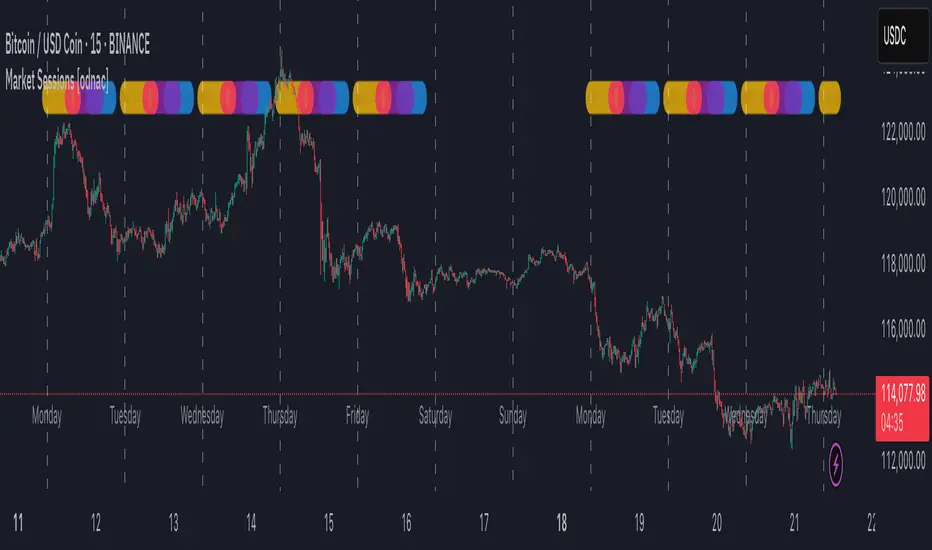
This indicator highlights the three main global market sessions (USA, Europe, Asia) and their overlaps directly on the chart.
It helps traders quickly identify active trading periods and potential high-liquidity overlaps.
Features:
Customizable start and end times for each session
Optional daily dividers with weekday labels
Session markers displayed as circles above the candles
Overlap sessions displayed in distinct colors
Adjustable opacity for better chart visibility
Option to hide weekends
Sessions included:
USA Market Session (default 13:30–20:00 UTC)
Europe Market Session (default 07:00–16:00 UTC)
Asia Market Session (default 00:00–09:00 UTC)
Overlaps: USA + Europe, USA + Asia, Europe + Asia
This tool is designed for intraday timeframes (1m–60m) and can be useful for scalping, day trading, or session-based strategies.
IPDA Logic sessions🔹What Does This Indicator Do?
This indicator helps traders visualize trading sessions (Asia, Frankfurt, London, New York) and analyze key price levels, including:
✅ Previous Day’s High/Low (PDH/PDL) – for liquidity tracking
✅ New York Midnight (NYM) & True Daily Open (TDO) – essential for IPDA Logic
✅ Fractals (local highs and lows) – helps identify reversal points
This is a powerful tool for scalpers, intraday traders, and swing traders who need to track price movements within different trading sessions and monitor liquidity zones.
🔹 Key Features of the Indicator
✅ Trading Sessions Visualization
Highlights Asia, Frankfurt, London, and New York sessions with different colors
Allows traders to enable/disable each session individually
Customizable time zones for personalized trading styles
✅ Key Price Levels
PDH/PDL (Previous High/Low) – helps determine major liquidity zones
Daily Open (DO) – a crucial price level for market structure
New York Midnight (NYM) – used in professional IPDA Logic analysis
✅ Fractals for Market Structure
Displays local swing highs and lows
Option to choose between 3-candle and 5-candle fractals for more precise analysis
Helps traders spot potential reversal zones
🔹 What Makes This Indicator Unique?
🔥 Combines Trading Sessions & Fractals – Most TradingView indicators show either sessions or fractals, but not both in a structured way.
🔥 Flexible Customization – Traders can adjust timeframes, colors, and styles to fit their needs.
🔥 Historical Session Analysis – Review past sessions to identify liquidity pools and price movements.
🔥 Works for Different Trading Styles – Scalpers & swing traders can both benefit from this tool.
📌 How to Use It?
✔ Add the indicator to your chart
✔ Select the sessions, key levels, and fractals you want to display
✔ Use these levels to analyze liquidity, reversals, and market trends
This indicator is designed for those who want a clear visualization of sessions and a better understanding of liquidity behavior. 🚀📊

Named SessionsShows London, New York and Tokyo sessions (and optionally Sydney).
Beginner-friendly - shows names of sessions, not just colors
Marks low and high of session
Shows if session is currently open
Session names can be customized
Session label is placed above or below depending on price move during session, visually indicating the trend (also works during open session)
Is displayed only on timeframes below 4H
How it works
Session trend is calculated simply by subtracting the session's opening price from the session's closing price (or current price if session is open).
If there is a gap before the session, the previous close is used instead of the first candle's open price.

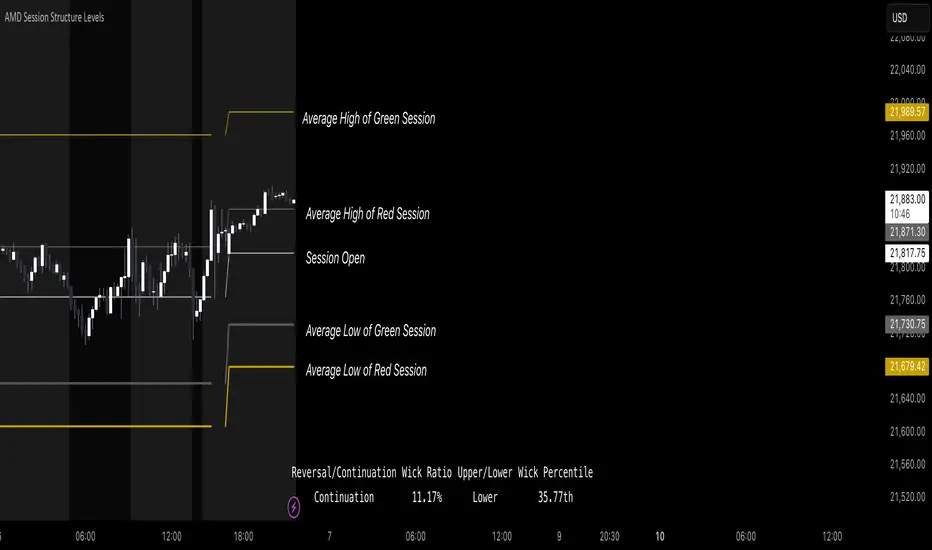
AMD Session Structure Levels# Market Structure & Manipulation Probability Indicator
## Overview
This advanced indicator is designed for traders who want a systematic approach to analyzing market structure, identifying manipulation, and assessing probability-based trade setups. It incorporates four core components:
### 1. Session Price Action Analysis
- Tracks **OHLC (Open, High, Low, Close)** within defined sessions.
- Implements a **dual tracking system**:
- **Official session levels** (fixed from the session open to close).
- **Real-time max/min tracking** to differentiate between temporary spikes and real price acceptance.
### 2. Market Manipulation Detection
- Identifies **manipulative price action** using the relationship between the open and close:
- If **price closes below open** → assumes **upward manipulation**, followed by **downward distribution**.
- If **price closes above open** → assumes **downward manipulation**, followed by **upward distribution**.
- Normalized using **ATR**, ensuring adaptability across different volatility conditions.
### 3. Probability Engine
- Tracks **historical wick ratios** to assess trend vs. reversal conditions.
- Calculates **conditional probabilities** for price moves.
- Uses a **special threshold system (0.45 and 0.03)** for reversal signals.
- Provides **real-time probability updates** to enhance trade decision-making.
### 4. Market Condition Classification
- Classifies market conditions using a **wick-to-body ratio**:
```pine
wick_to_body_ratio = open > close ? upper_wick / (high - low) : lower_wick / (high - low)
```
- **Low ratio (<0.25)** → Likely a **trend day**.
- **High ratio (>0.25)** → Likely a **range day**.
---
## Why This Indicator Stands Out
### ✅ Smarter Level Detection
- Uses **ATR-based dynamic levels** instead of static support/resistance.
- Differentiates **manipulation from distribution** for better decision-making.
- Updates probabilities **in real-time**.
### ✅ Memory-Efficient Design
- Implements **circular buffers** to maintain efficiency:
```pine
var float manipUp = array.new_float(lookbackPeriod, 0.0)
var float manipDown = array.new_float(lookbackPeriod, 0.0)
```
- Ensures **constant memory usage**, even over extended trading sessions.
### ✅ Advanced Probability Calculation
- Utilizes **conditional probabilities** instead of simple averages.
- Incorporates **market context** through wick analysis.
- Provides **actionable signals** via a probability table.
---
## Trading Strategy Guide
### **Best Entry Setups**
✅ Wait for **price to approach manipulation levels**.
✅ Confirm using the **probability table**.
✅ Check the **wick ratio for context**.
✅ Enter when **conditional probability aligns**.
### **Smart Exit Management**
✅ Use **distribution levels** as **profit targets**.
✅ Scale out **when probabilities shift**.
✅ Monitor **wick percentiles** for confirmation.
### **Risk Management**
✅ Size positions based on **probability readings**.
✅ Place stops at **manipulation levels**.
✅ Adjust position size based on **trend vs. range classification**.
---
## Configuration Tips
### **Session Settings**
```pine
sessionTime = input.session("0830-1500", "Session Hours")
weekDays = input.string("23456", "Active Days")
```
- Match these to your **primary trading session**.
- Adjust for different **market opens** if needed.
### **Analysis Parameters**
```pine
lookbackPeriod = input.int(50, "Lookback Period")
low_threshold = input.float(0.25, "Trend/Range Threshold")
```
- **50 periods** is a good starting point but can be optimized per instrument.
- The **0.25 threshold** is ideal for most markets but may need adjustments.
---
## Market Structure Breakdown
### **Trend/Continuation Days**
- **Characteristics:**
✅ Small **opposing wicks** (minimal counter-pressure).
✅ Clean, **directional price movement**.
- **Bullish Trend Day Example:**
✅ Small **lower wicks** (minimal downward pressure).
✅ Strong **closes near the highs** → **Buyers in control**.
- **Bearish Trend Day Example:**
✅ Small **upper wicks** (minimal upward pressure).
✅ Strong **closes near the lows** → **Sellers in control**.
### **Reversal Days**
- **Characteristics:**
✅ **Large opposing wicks** → Failed momentum in the initial direction.
- **Bullish Reversal Example:**
✅ **Large upper wick early**.
✅ **Strong close from the lows** → **Sellers failed to maintain control**.
- **Bearish Reversal Example:**
✅ **Large lower wick early**.
✅ **Weak close from the highs** → **Buyers failed to maintain control**.
---
## Summary
This indicator systematically quantifies market structure by measuring **manipulation, distribution, and probability-driven trade setups**. Unlike traditional indicators, it adapts dynamically using **ATR, historical probabilities, and real-time tracking** to offer a structured, data-driven approach to trading.
🚀 **Use this tool to enhance your decision-making and gain an objective edge in the market!**
TLA20 - Multi-Session Box and Level ToolTLA20 is a highly customizable indicator designed to enhance intraday analysis by marking predefined trading sessions, key levels, and midpoints directly on your charts. With its versatile features, TLA20 is ideal for traders looking to visualize multiple time zones, daily price ranges, and historical reference levels efficiently.
Key Features:
Session Visualization: Mark up to three custom trading sessions with distinct start and end times, adjustable for different time zones and weekend inclusions.
Dynamic Highlights: Automatically draw session highs, lows, midlines, and open prices with options to extend beyond session bounds.
Custom Styling: Configure border colors, styles, and fill options for each session box to match your chart preferences.
Historical Levels: Highlight previous daily highs/lows, weekly highs/lows, and monthly highs/lows for improved context in your trading.
Intuitive Adjustments: Enable or disable each feature and customize settings for precise alignment with your trading strategy.
Use Cases:
Track trading sessions across different markets and time zones.
Identify key price levels like session midpoints and opens for entry/exit strategies.
Overlay historical levels to recognize potential support and resistance areas.
This indicator does not provide direct trading signals but serves as a robust tool for enhancing technical analysis.
Disclaimer: The script is provided “as is” without warranties of any kind. Always test on a demo account before applying in live markets.

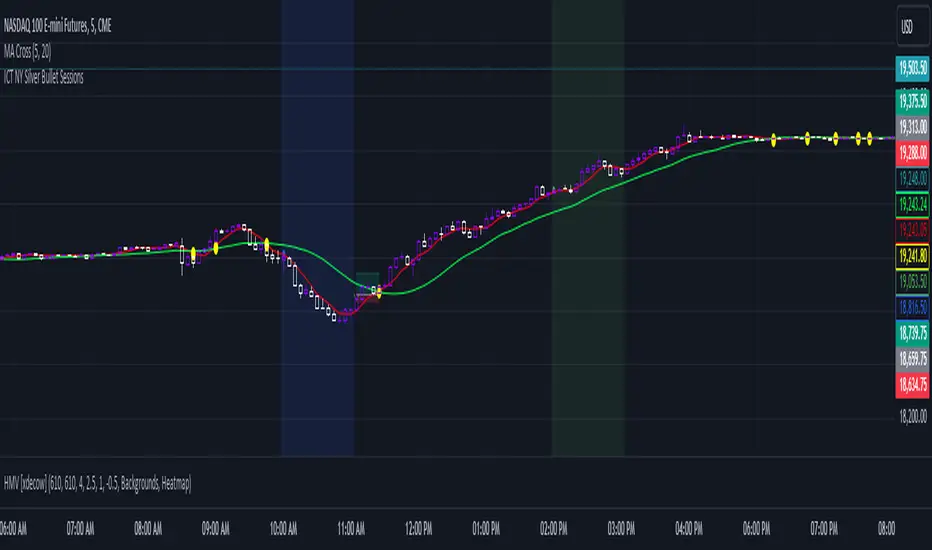
ICT NY Silver Bullet SessionsThe ICT NY Silver Bullet Sessions refer to two specific time windows within the New York trading session, during which traders aim to exploit short-term, high-probability price movements, particularly using price-action techniques inspired by the Inner Circle Trader (ICT) methodology. These sessions are typically associated with a higher likelihood of volatility and liquidity due to their proximity to key market hours, making them ideal for scalping or intraday trading strategies.
The Silver Bullet concept emphasizes precise entries and exits, taking advantage of institutional trading behaviors and order flow within these two specific time windows:
(I) The AM Silver Bullet Session (10:00 AM – 11:00 AM EST)
Time Frame: This session runs from 10:00 AM to 11:00 AM Eastern Standard Time (EST).
Significance: During this hour, the New York Stock Exchange (NYSE) has been open for about 30 minutes, which typically generates volatility as the market reacts to overnight price movements, economic news, or early U.S. session developments. Traders look for institutional price action setups like stop runs, liquidity grabs, or reversals.
Key Considerations: Traders often focus on major indices (such as the S&P 500 or NASDAQ), forex pairs, or commodities like gold and silver. The AM session is especially important for catching trends or retracements established in the London session or the early New York market hours.
(II) The PM Silver Bullet Session (02:00 PM – 03:00 PM EST)
Time Frame: This session occurs from 2:00 PM to 3:00 PM Eastern Standard Time (EST).
Significance: Known as the afternoon session, this time period aligns with institutional rebalancing and pre-close positioning, where significant liquidity enters the market as traders anticipate the upcoming New York close and London close (which happens at 11:00 AM EST). It is also a common time for institutional traders to initiate price moves that carry through into the end of the trading day.
Key Considerations: Traders monitor for key reversals, liquidity sweeps, or continuations of earlier trends. This is a prime time for trading major currencies and indices, as well as commodities like crude oil and metals, with a focus on exploiting liquidity imbalances.
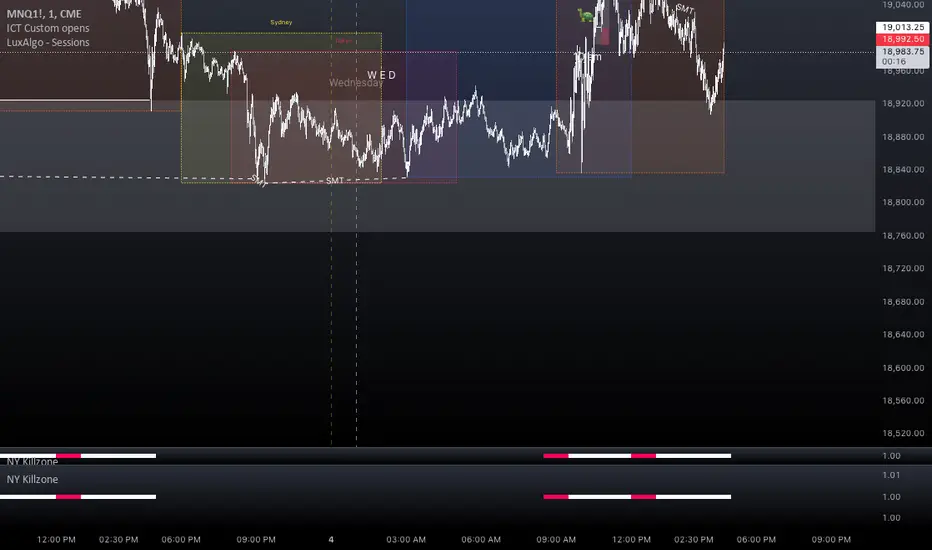
NY Killzone (Morning, Lunch, Afternoon)Indicator for New York session that splits Morning, Lunch and Afternoon part of the session.
Works on Time Frames of 30m and below.
GBPJPY Pro: 1H Trend + Prob + Sessions + Timer + Swings📊 GBPJPY – Table Explanation (High Volatility Control)
GBPJPY is fast and volatile.
The table is designed to protect you before profit.
🔹 Market Trend (1H)
The most important field for this pair.
Trading against the trend is very risky
👉 Always follow the 1H trend.
🔹 Session
Best trading times:
London
London–New York Overlap
👉 Avoid trading outside these sessions.
🔹 Candle Time Left
Extremely important for GBPJPY.
Entering before candle close can be dangerous
👉 Always wait for confirmation.
🔹 Buy / Sell Probability
50%+ can be acceptable due to strong moves
“READY” status is more important than the number
👉 Quality over quantity.
🔹 RSI / Volume
RSI moves fast
Strong volume often precedes sharp moves
⚠️ Result:
A defensive table that helps avoid late or emotional entries.

Multi-Session H/L - Sweep & Grab v5# Multi-Session High/Low Levels with Liquidity Sweep & Grab Detection
## Overview
This indicator automatically identifies and plots the High and Low levels of key trading sessions (Asia, London, New York AM, New York PM) and Previous Day levels. It features advanced **Liquidity Sweep** and **Liquidity Grab** detection based on ICT/SMC methodology.
## Key Features
### 📊 Multi-Session Tracking
- **Asia Session** - Captures the Asian trading range
- **London Session** - Tracks the London open volatility
- **New York AM Session** - Monitors the NY morning session
- **New York PM Session** - Follows the afternoon price action
- **Previous Day High/Low** - Key daily reference levels
### 💧 Liquidity Detection (ICT/SMC Concepts)
**Liquidity Grab:**
- Detected when price **wicks through** a level but **closes back** inside
- Single candle event with rejection
- Often signals a potential reversal
- Label shows: `"Session H/L (Grab)"`
**Liquidity Sweep:**
- Detected when price **closes beyond** the level
- Indicates liquidity has been fully taken
- Label shows: `"Session H/L (Swept)"`
### 🎯 Visual Features
- Lines automatically **stop at the candle** where liquidity was grabbed or swept
- Different line styles for Active / Grabbed / Swept levels
- Customizable colors for each session
- Optional session background highlighting
- Information table showing all levels and their status
### ⚙️ Customization Options
- Adjustable session times for any timezone (GMT+0 to GMT+5)
- Calculation timeframe selection
- Line width and style settings
- Label size options
- Toggle each session on/off
- "Stop Line on Grab" option
### 🔔 Alerts
- Separate alerts for **Liquidity Grab** events
- Separate alerts for **Liquidity Sweep** events
- Available for all sessions and Previous Day levels
## How to Use
1. **Identify Key Levels:** The indicator automatically marks session highs and lows
2. **Watch for Liquidity Events:** Monitor when price approaches these levels
3. **Grab = Potential Reversal:** A liquidity grab (wick rejection) often signals smart money has collected orders and price may reverse
4. **Sweep = Liquidity Taken:** A sweep (close beyond level) confirms the liquidity pool has been cleared
5. **Plan Your Trades:** Use these levels in confluence with other SMC concepts like Fair Value Gaps (FVG) and Order Blocks (OB)
## Status Colors in Table
- 🟢 **Green (Active)** - Level has not been touched
- 🟠 **Orange (Grab)** - Wick touched the level, potential reversal zone
- 🔴 **Red (Swept)** - Close beyond level, liquidity fully taken
## Settings Explained
| Setting | Description |
|---------|-------------|
| Calculation Timeframe | Timeframe used for session calculations |
| Timezone | Your broker's timezone (GMT+0 to GMT+5) |
| Extend Lines | Extend active lines into the future |
| Stop Line on Grab | If enabled, lines stop when grabbed (not just swept) |
| Swept/Grab Line Style | Visual differentiation for liquidity events |
## Notes
- Works on all markets (Forex, Crypto, Stocks, Indices, Commodities)
- Best used on timeframes from 1min to 1H
- Session times are fully customizable to match your time zone
- The indicator respects the ICT/SMC definition where a **Grab** is a single-candle wick rejection and a **Sweep** involves price closing beyond the level

Night Mode Session | ZeeZeeMon🇷🇺 Описание (Russian)
Night Mode Session Highlight
Night Mode Session Highlight — это визуальный индикатор, предназначенный для подсветки заданного временного диапазона на графике. Индикатор позволяет выделять ночную торговую сессию или любой другой временной интервал с помощью фоновой заливки, что упрощает анализ поведения цены в определённые часы.
Основные возможности
Подсветка выбранного временного диапазона на графике
Настройка времени сессии в формате HHMM–HHMM
Выбор таймзоны из выпадающего списка (IANA)
Настраиваемый цвет и прозрачность фоновой заливки
Корректная работа с интервалами, пересекающими полночь
Совместимость со всеми таймфреймами и инструментами
Параметры
Ночной режим (сессия) — временной интервал, который будет подсвечиваться (например, 0000-0800)
Таймзона — таймзона, относительно которой рассчитывается сессия
Цвет ночной подсветки — цвет и прозрачность фоновой заливки
Принцип работы
Индикатор проверяет, попадает ли текущий бар в заданную временную сессию с учётом выбранной таймзоны. Если условие выполняется, фон графика окрашивается выбранным цветом.
Назначение
Индикатор может использоваться для:
анализа ночной или азиатской сессии
визуального разделения торговых периодов
изучения волатильности и ликвидности в разные часы
вспомогательной визуальной фильтрации графика
Индикатор не генерирует торговых сигналов и не является торговой стратегией.
🇬🇧 Description (English)
Night Mode Session Highlight
Night Mode Session Highlight is a visual indicator designed to highlight a specific time range on the chart. It allows users to mark the night trading session or any custom time interval using background shading, making it easier to analyze price behavior during selected hours.
Key Features
Highlights a custom time session on the chart
Session time input in HHMM–HHMM format
Timezone selection via dropdown list (IANA)
Customizable background color and transparency
Correct handling of sessions crossing midnight
Works on all timeframes and instruments
Settings
Night Session — time range to be highlighted (e.g. 0000-0800)
Timezone — timezone used for session calculation
Night Background Color — background shading color and transparency
How It Works
The indicator checks whether the current bar belongs to the specified session using the selected timezone. If the condition is met, the chart background is filled with the chosen color.
Purpose
This indicator can be used for:
analyzing night or Asian trading sessions
visually separating trading periods
studying volatility and liquidity at different times
additional visual filtering of the chart
This indicator does not generate trading signals and is not a trading strategy.

Crypto Session Range 📄 INDICATOR DESCRIPTION (ENGLISH)
Crypto Session Range (Custom Timezone) is a lightweight and accurate session-based indicator designed specifically for cryptocurrency markets (24/7).
This indicator allows traders to define custom trading time windows using any global timezone, solving common issues found in traditional session indicators that are built for stock markets.
🔹 Key Features
Custom timezone support (e.g. America/Puerto_Rico, America/New_York, UTC)
Up to 3 configurable trading sessions
Visual background highlighting during active sessions
Automatic High & Low range tracking for each session
Optional range extension after the session ends
Works on all crypto pairs and timeframes
🔹 Who Is This For?
Crypto traders who want precise session control
Day traders, scalpers, and session-based strategies
Traders who operate during specific market windows (London / NY / custom)
🔹 Notes
This indicator is not restricted to exchange trading hours and is fully compatible with 24/7 markets like crypto, unlike many default session tools.
