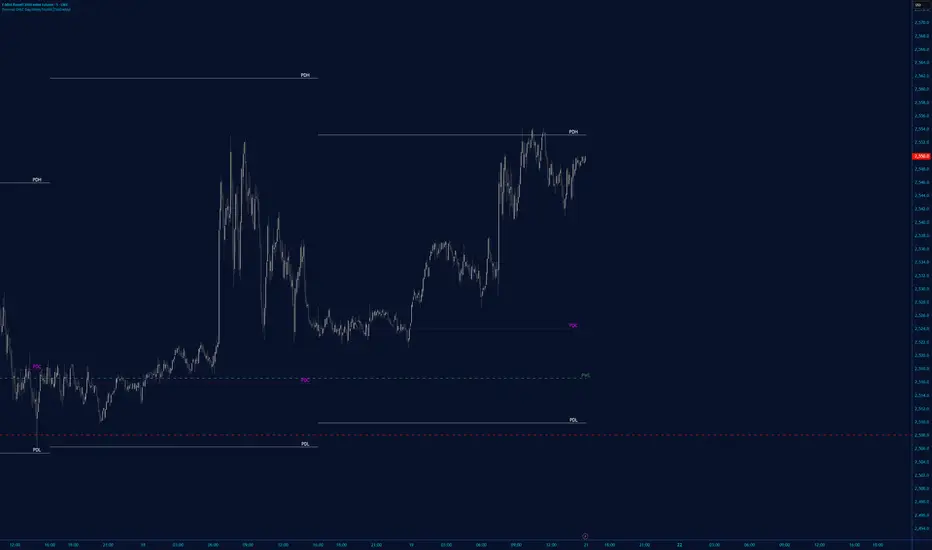
Opening 5m % Change (09:30 NY) - All Day vs 09:30 OpenThis indicator displays the real-time percentage change relative to the US market open at 09:30 (New York time).
It captures the 09:30 opening price and continuously updates the percentage change throughout the entire trading session, even if the chart is opened after the market open.
Green = price above the 09:30 open
Red = price below the 09:30 open
The value is shown in the top-right corner of the chart, stays visible all day, and updates live with price movements.
Designed to be lightweight, reliable, and easy to read, even when multiple charts are open.
Best used on US stocks, indices, and futures during regular trading hours.
GIORNO
Scalp Signal Pro# Scalp Signal Pro™
## Multi-Confluence Day Trading System for SPY, QQQ & IWM
---
## 📌 Overview
**Scalp Signal Pro™** is a professional-grade trading indicator specifically optimized for day trading and scalping major ETFs on 4-minute and 15-minute timeframes. Unlike simple crossover indicators that generate excessive noise, SSP uses a sophisticated multi-confluence scoring system that analyzes 15+ technical factors simultaneously, only triggering signals when multiple conditions align perfectly.
The indicator was designed with one goal: **Quality over Quantity**. Rather than flooding your chart with signals, SSP waits for high-probability setups where trend, momentum, volume, and price action all confirm the same direction.
---
## 🎯 Key Features
### 1. Multi-Confluence Scoring Engine
Every potential signal is scored across 15 technical factors:
- RSI momentum and extremes
- MACD crossovers and histogram strength
- 4-EMA stack alignment (9/21/50/200)
- VWAP position and bounces
- ADX trend strength with DI confirmation
- Volume spikes and buying/selling pressure
- Stochastic RSI crosses in extreme zones
- Bollinger Band bounces and squeezes
- Candlestick patterns (engulfing, hammer, shooting star)
- Momentum and Rate of Change
- Key level proximity (support/resistance)
- RSI divergence detection
Signals only trigger when the combined score reaches your threshold (default: 9 points).
### 2. Smart Quality Filters
Before any signal appears, it must pass 8 strict quality gates:
- ✅ Trend alignment (price vs EMAs and VWAP)
- ✅ Momentum confirmation (multiple indicators agree)
- ✅ Volume validation (above average required)
- ✅ Candle quality (no weak/indecision candles)
- ✅ No counter-signals (avoid overbought longs, oversold shorts)
- ✅ Trending market (ADX confirmation)
- ✅ Anti-chop filter (avoid consolidation zones)
- ✅ Session timing (avoid lunch hour chop)
### 3. Real-Time MTF Analysis Panel
A beautiful dashboard displaying market conditions across 5 timeframes:
- **Momentum** (0-200 scale) - Overall directional strength
- **Sentiment** (0-100 scale) - Bullish vs bearish bias
- **Volatility** (0-100 scale) - Current vs historical volatility
- **Bias Indicator** - Clear BULLISH / BEARISH / NEUTRAL reading
### 4. Automatic Key Levels
Six critical support/resistance levels plotted automatically:
- **PDH/PDL** - Previous Day High/Low (Cyan)
- **2DH/2DL** - 2 Days Ago High/Low (Orange)
- **PWH/PWL** - Previous Week High/Low (Pink)
Signals at these levels receive bonus scoring for higher probability setups.
### 5. Dynamic EMA Cloud
Visual trend identification using EMA 9/21 cloud:
- Green cloud = Bullish trend
- Red cloud = Bearish trend
- Cloud acts as dynamic support/resistance for retest entries
---
## 📊 How It Works
### Signal Generation Process
```
Step 1: Calculate confluence score (15 factors)
↓
Step 2: Check if score ≥ minimum threshold (default: 9)
↓
Step 3: Validate through 8 quality filters
↓
Step 4: Verify session timing and cooldown
↓
Step 5: Display CALL or PUT signal
```
### CALL Signal (Bullish)
Appears as green ▲ below the candle when:
- Price is above EMA 21 and VWAP
- EMA 9 is above EMA 21 (bullish structure)
- Momentum indicators confirm upward direction
- Volume is above average
- Candle is green (bullish)
- Not at resistance or in overbought condition
### PUT Signal (Bearish)
Appears as red ▼ above the candle when:
- Price is below EMA 21 and VWAP
- EMA 9 is below EMA 21 (bearish structure)
- Momentum indicators confirm downward direction
- Volume is above average
- Candle is red (bearish)
- Not at support or in oversold condition
---
## ⚙️ Recommended Settings
### For SPY / QQQ / IWM
| Setting | 4-Minute | 15-Minute |
|---------|----------|-----------|
| Signal Strength | 8-9 | 9-10 |
| Cooldown Bars | 12-15 | 5-8 |
| Stop Loss | 0.6-0.8 ATR | 0.8-1.0 ATR |
| Take Profit | 1.0-1.2 ATR | 1.2-1.5 ATR |
| Strict Mode | ON | ON |
| Session Filter | ON | ON |
### Optimal Trading Hours (EST)
- ✅ **Morning Session:** 9:35 AM - 11:30 AM
- ✅ **Afternoon Session:** 1:30 PM - 4:00 PM
- ❌ **Avoid:** 11:30 AM - 1:30 PM (lunch chop)
- ❌ **Avoid:** First 5 minutes after market open
---
## 📈 Trading Strategies
### Strategy 1: Direct Signal Entry
1. Wait for CALL or PUT signal to appear
2. Confirm MTF panel shows matching bias
3. Enter on signal candle close
4. Stop loss: Below/above recent swing
5. Take profit: 1.5x stop distance
### Strategy 2: EMA Cloud Retest (Higher Win Rate)
1. Signal appears (CALL or PUT)
2. Wait for price to pull back to EMA cloud
3. Enter when price bounces off cloud in signal direction
4. Tighter stop loss = Better risk/reward
### Strategy 3: Key Level Bounce
1. Price approaches PDL, 2DL, or PWL (for CALL)
2. Wait for CALL signal at the level
3. Confirm with bullish candle pattern
4. Enter with stop below the level
5. PWH/PWL bounces have highest probability
### Strategy 4: Breakout Confirmation
1. Price breaks above PDH or PWH
2. Wait for pullback to broken level
3. CALL signal appears on retest
4. Enter with stop below the level
---
## 🎨 Visual Elements
### Signal Labels
- **CALL** - Green label below candle with score and R:R
- **PUT** - Red label above candle with score and R:R
### EMA Cloud
- Green shaded area when EMA 9 > EMA 21
- Red shaded area when EMA 9 < EMA 21
### EMA 200
- Red line showing major trend direction
### Key Levels
- Horizontal lines at PDH/PDL (cyan), 2DH/2DL (orange), PWH/PWL (pink)
### MTF Panel
- Dark themed dashboard with color-coded values
- Emoji icons for quick identification
- Pulsing bias indicator
---
## ⚠️ Important Notes
### What This Indicator Does
- ✅ Identifies high-probability entry points
- ✅ Filters out low-quality signals
- ✅ Shows multi-timeframe market context
- ✅ Plots important support/resistance levels
- ✅ Provides clear visual signals
### What This Indicator Does NOT Do
- ❌ Guarantee winning trades
- ❌ Replace proper risk management
- ❌ Work in all market conditions
- ❌ Predict the future
### Best Practices
1. Always use stop losses
2. Risk only 1-2% per trade
3. Trade with the MTF panel bias
4. Avoid signals during news events
5. Be patient - quality over quantity
6. Backtest before live trading
---
## 📋 Settings Reference
### Entry Rules
| Setting | Range | Default | Description |
|---------|-------|---------|-------------|
| Signal Strength | 6-12 | 9 | Minimum score to trigger signal |
| Strict Mode | ON/OFF | ON | Require all filters to pass |
| Cooldown Bars | 3-50 | 15 | Bars between signals |
| Session Filter | ON/OFF | ON | Only trade prime hours |
### Risk Management
| Setting | Range | Default | Description |
|---------|-------|---------|-------------|
| ATR Period | 5-20 | 10 | ATR calculation period |
| Stop Loss | 0.3-2.0 | 0.8 | Stop distance × ATR |
| Take Profit | 0.5-3.0 | 1.2 | Target distance × ATR |
### Moving Averages
| Setting | Range | Default | Description |
|---------|-------|---------|-------------|
| Fast EMA | 5-20 | 9 | Fast EMA for signals |
| Mid EMA | 10-50 | 21 | Mid EMA for trend |
| Slow EMA | 30-100 | 50 | Slow EMA for context |
| Trend EMA | 100-500 | 200 | Major trend direction |
### Display
| Setting | Options | Default | Description |
|---------|---------|---------|-------------|
| Panel Size | Small/Normal/Large | Small | MTF panel size |
| Panel Position | 9 positions | Top Right | Panel location |
| Show EMA Cloud | ON/OFF | ON | Display cloud |
| Show EMA 200 | ON/OFF | ON | Display trend EMA |
| Show Labels | ON/OFF | ON | Display signal labels |
| Show Panel | ON/OFF | ON | Display MTF panel |
---
## 🔔 Alerts
Three alert conditions available:
- 🟢 **CALL Signal** - Long entry opportunity
- 🔴 **PUT Signal** - Short entry opportunity
- ⚡ **Any Signal** - Either direction
Set alerts to "Once Per Bar Close" for reliable notifications.
---
## 📊 Performance Expectations
With proper settings and discipline:
- **Signals per day:** 2-6 (quality filtered)
- **Best timeframes:** 4m, 5m, 15m
- **Best instruments:** SPY, QQQ, IWM
- **Recommended account:** Paper trade first
---
## ⚖️ Disclaimer
This indicator is for educational and informational purposes only. It is not financial advice. Past performance does not guarantee future results. Trading involves substantial risk of loss. Always do your own research and never risk more than you can afford to lose.
---
## 📞 Support
If you have questions or suggestions:
- Use the comments section below
- Report bugs via TradingView messages
- Leave a review if you find value
---
**Good luck and happy trading! 🎯📈**
*Scalp Signal Pro™ - Quality Signals for Serious Traders*
ICT Complete Toolkit v2📌 OVERVIEW
The ICT Complete Toolkit is a comprehensive trading indicator designed for traders who follow Inner Circle Trader (ICT) methodology. It combines multiple ICT concepts into a single, cohesive tool: Market Structure Shift (MSS), Fair Value Gaps (FVG), Liquidity Levels, Killzones, Bias Analysis, and optional Buy/Sell signals.
This indicator is built for intraday traders working on timeframes from 1-minute to 30-minute charts, though many features (like HTF FVG and Bias Dashboard) provide valuable context on any timeframe.
════════════════════════════════════════
⭐ WHAT MAKES THIS INDICATOR UNIQUE
This is NOT just another ICT indicator. Here's what sets it apart from free open-source alternatives:
1. INTEGRATED SIGNAL LOGIC (Not Found in Free Scripts)
Unlike standalone FVG or MSS indicators, this toolkit generates Buy/Sell signals only when multiple conditions align:
• Sweep Mode signals require: Liquidity sweep (PDH/PDL/Session high-low) → MSS confirmation → FVG formation → Active Killzone
• This multi-layer filtering dramatically reduces false signals compared to simple FVG or MSS indicators
2. PROPRIETARY SESSION ATR WITH LIVE RANGE PERCENTAGE
No other public indicator offers this feature. The Session ATR dashboard shows:
• Average True Range calculated per session (Asia, London, NY AM, NY PM) - not a generic daily ATR
• Live Range %: Real-time display of how much of the session's typical range has been used (e.g., "75%" means the session has moved 75% of its average range)
• This helps traders avoid entering exhausted moves and set realistic profit targets
3. CONTEXT-AWARE FVG DISPLAY
Most FVG indicators show ALL Fair Value Gaps. This toolkit only displays FVGs that form after a valid Market Structure Shift, filtering out noise and showing only FVGs with structural context.
4. HTF FVG WITH ADVANCED MITIGATION OPTIONS
The Higher Timeframe FVG feature includes three mitigation detection methods not commonly found together:
• Any touch (including wick)
• Close inside FVG
• Touch CE line (Consequent Encroachment - 50% midpoint)
5. UNIFIED WORKFLOW IN ONE INDICATOR
Instead of managing 5-7 separate indicators (Killzones, FVG, MSS, PDH/PDL, Bias, etc.), everything is integrated with shared logic. Components communicate: signals respect Killzone timing, FVGs respect MSS context, and the Bias Dashboard informs trade direction.
════════════════════════════════════════
💎 WHY THIS INDICATOR IS WORTH PAYING FOR
TIME SAVED:
• No need to configure and align multiple free indicators
• Pre-built workflow means you start trading ICT concepts immediately
• All timeframe conversions, session calculations, and signal logic handled automatically
REDUCED ERRORS:
• Integrated components eliminate conflicting signals from separate indicators
• Built-in filters (Killzone-only signals, MSS-context FVGs) prevent common mistakes
FEATURES NOT AVAILABLE FOR FREE:
• Session-specific ATR with live range % (proprietary calculation)
• Multi-condition signal generation (Sweep mode)
• Unified dark/light theme support for all dashboards
• Multiple groups of PO3 (Power of Three) HTF candles visualization on current chart
ONGOING DEVELOPMENT:
• Active maintenance and feature updates
• Support via website and email
════════════════════════════════════════
🔗 WHY THESE COMPONENTS WORK TOGETHER
This is NOT a random mashup of indicators. Each component serves a specific role in a complete trading workflow, and they are designed to work as an integrated system:
THE CORE LOGIC: Liquidity → Structure → Entry → Timing
1. Liquidity Levels (PDH/PDL/PWH/PWL) → WHERE smart money hunts stops
These levels identify where retail traders place stop losses. Institutional players target these levels to fill large orders. The indicator tracks these levels so you know where potential reversals may occur.
2. Killzones → WHEN institutional players are active
Not all hours are equal. The indicator highlights specific session windows when banks and institutions execute large orders. Trading outside these windows often results in choppy, directionless price action. Killzones tell you when to pay attention.
3. Market Structure Shift (MSS) → CONFIRMATION that direction changed
After liquidity is swept, you need confirmation that the move is reversing. MSS detects when price breaks a swing point in the opposite direction, signaling that the "trap" is complete and a new trend may begin.
4. Fair Value Gaps (FVG) → WHERE to enter
Once structure shifts, FVGs provide precise entry zones. These imbalances act as magnets for price and offer low-risk entry points with clear invalidation levels.
5. HTF FVG → CONTEXT from higher timeframes
Lower timeframe FVGs can be noise. HTF FVGs show you where the bigger players left imbalances, providing confluence when your LTF setup aligns with a higher timeframe zone.
6. Bias Dashboard → DIRECTION filter
Before taking any trade, you need to know the overall trend. The Bias Dashboard uses Supertrend + RSI + Moving Average triple confirmation to show you whether higher timeframes support your trade direction.
7. Session ATR & Range → EXPECTATION management
Knowing how much a session typically moves helps you set realistic targets and avoid entering when the move is already exhausted.
HOW THEY CONNECT:
BIAS (Direction)
↓
KILLZONE (Timing) → Only trade during active sessions
↓
LIQUIDITY SWEEP (Trap) → Wait for PDH/PDL/Session high-low sweep
↓
MSS (Confirmation) → Structure shifts in bias direction
↓
FVG (Entry) → Enter on retracement into the gap
↓
HTF FVG (Confluence) → Extra confidence if aligned with HTF zone
↓
SESSION ATR (Target) → Set targets based on remaining session range
This is the complete ICT intraday workflow in one indicator. Each component answers a specific question, and together they form a systematic approach to identifying high-probability trade setups.
════════════════════════════════════════
🔍 WHAT THIS INDICATOR DOES
1. MARKET STRUCTURE SHIFT (MSS) DETECTION
The indicator identifies changes in market structure by tracking swing highs and swing lows. A Bullish MSS occurs when price breaks above a swing high after forming a higher low. A Bearish MSS occurs when price breaks below a swing low after forming a lower high.
How it works:
• Swing points are identified using a configurable number of consecutive bullish or bearish bars (default: 2)
• When price closes beyond a previous swing point in the opposite direction, an MSS line is drawn
• MSS lines extend to the right until they are broken or a new structure forms
2. FAIR VALUE GAPS (FVG) - CURRENT TIMEFRAME
Fair Value Gaps represent price imbalances where a candle's range doesn't overlap with the candle two bars prior, leaving a "gap" in fair value. These zones often act as magnets for price.
How it works:
• Bullish FVG: The low of bar is higher than the high of bar , creating an upward gap
• Bearish FVG: The high of bar is lower than the low of bar , creating a downward gap
• FVGs are displayed as semi-transparent boxes and remain visible until price returns to fill them
• FVGs are only shown when they occur after a valid MSS, ensuring they appear in the context of a structural shift
3. HIGHER TIMEFRAME (HTF) FVG
See Fair Value Gaps from higher timeframes (15m, 1H, 4H, Daily) directly on your chart. These represent larger imbalances created by institutional order flow.
Configuration options:
• Mode - Until Inversed: FVG remains visible until price closes completely beyond it
• Mode - Until Mitigated: FVG disappears based on your mitigation criteria:
- Any touch: Removed when any part of a candle touches the FVG
- Close inside: Removed only when price closes within the FVG
- Touch CE line: Removed when price touches the 50% midpoint (Consequent Encroachment)
4. LIQUIDITY LEVELS (PDH/PDL/PWH/PWL)
Displays Previous Day High, Previous Day Low, Previous Week High, and Previous Week Low. These levels represent areas where retail stop losses typically cluster, making them targets for liquidity sweeps before reversals.
How it works:
• Levels are calculated at the start of each new day/week using the prior period's actual high and low
• Lines extend across the current period with customizable style (solid, dashed, dotted), width, and color
• Labels clearly identify each level
5. SESSION KILLZONES
Highlights the four major trading sessions when institutional activity is highest:
• Asia Session (default: 20:00-00:00 NY time)
• London Session (default: 02:00-05:00 NY time)
• NY AM Session (default: 09:30-11:00 NY time)
• NY PM Session (default: 13:30-16:00 NY time)
All times are in New York timezone. Each session is displayed as a colored box, and times are fully customizable.
6. SESSION ATR DASHBOARD
A table displaying the Average True Range for each session, calculated from the high-low range of completed sessions over a configurable lookback period (default: 14 days).
Additional feature - KZ Range:
Shows the current session's range as a percentage of its ATR. For example, if NY AM typically moves 40 pips and the current range shows 75%, the session has already used most of its average movement.
7. OPENING RANGE
Displays the high and low of the first candle (5m or 15m) when the NY AM session opens. Price often sweeps above or below this range before reversing—a concept sometimes called the "Judas swing."
The Opening Range box extends for a maximum of 30 minutes or until price closes beyond the range.
8. BIAS DASHBOARD
A multi-timeframe trend analysis table using triple confirmation:
Calculation method:
• Supertrend (ATR Length: 10, Factor: 3.0) - Determines primary trend direction
• RSI (Length: 14) - Confirms momentum (above 50 = bullish, below 50 = bearish)
• Moving Average - EMA 50 for 5m/15m timeframes, EMA 200 for 1H/4H/Daily
Bias levels:
• Strong Bullish: All three indicators aligned bullish
• Bullish: Supertrend + RSI bullish, MA not yet confirming
• Neutral: Supertrend and RSI disagree
• Bearish: Supertrend + RSI bearish, MA not yet confirming
• Strong Bearish: All three indicators aligned bearish
9. BUY/SELL SIGNALS
Optional automated signals based on ICT concepts:
Signal Type - Any/Scalp:
Generates signals whenever an MSS occurs followed by an FVG, without additional filtering. Suitable for scalping strategies.
Signal Type - Sweep:
Higher-probability signals that only trigger when:
• A liquidity sweep occurs (price takes out PDH, PDL, or the previous session's high/low)
• Followed by a Market Structure Shift
• With a Fair Value Gap forming for entry
Signals can be filtered to only appear during active Killzones.
10. REVERSAL CANDLE PATTERNS
Identifies six candlestick reversal patterns, each requiring 3 consecutive bars in the opposite direction within the last 4 bars:
• Engulfing (E): Current candle fully engulfs the previous candle including wicks
• Hammer (H): Lower wick ≥2x body size, appearing after downtrend (bullish)
• Hanging Man (HM): Same structure as hammer but after uptrend (bearish)
• Inverted Hammer (IH): Upper wick ≥2x body size, after downtrend (bullish)
• Shooting Star (SS): Upper wick ≥2x body size, after uptrend (bearish)
• John Wick (JW): 50%+ of candle is wick with ≤15% wick on opposite side
11. BREAKER BLOCKS
When an FVG is "broken" (price closes through it), the zone may act as the opposite—former support becomes resistance and vice versa. Enable Breaker Blocks to track these flipped zones.
12. PO3 (POWER OF THREE) HTF CANDLES
Displays higher timeframe candles (1H, 4H, Daily) directly on your chart to the right of current price. This helps you visualize where current price sits within the larger candle's range without switching timeframes.
Configure up to 3 groups with different timeframes and candle counts.
════════════════════════════════════════
🎯 HOW TO USE THIS INDICATOR
FOR TREND-FOLLOWING ENTRIES:
1. Check the Bias Dashboard for higher timeframe direction
2. Wait for price to enter a Killzone (London or NY sessions recommended)
3. Look for a liquidity sweep of PDH/PDL or session highs/lows
4. Wait for Market Structure Shift in the direction of your bias
5. Enter on the Fair Value Gap retracement
FOR SCALPING:
1. Enable Buy/Sell Signals with "Any/Scalp" mode
2. Focus on active Killzones
3. Use signals as entry triggers, with FVG zones as entry prices
4. Consider reversal candle patterns for additional confirmation
FOR SWING ANALYSIS:
1. Enable HTF FVG (1H, 4H, Daily)
2. Use "Until Mitigated" mode with "Touch CE line" for precise levels
3. Mark weekly levels (PWH/PWL) as major targets
4. Use the PO3 candles to understand higher timeframe structure
════════════════════════════════════════
⚙️ KEY SETTINGS EXPLAINED
• Consecutive Bars for Market Structure - Controls swing point sensitivity (higher = fewer, more significant swings)
• Max MSS Lines - Limits displayed MSS lines for chart clarity
• HTF FVG Mode - Choose between "Until Inversed" or "Until Mitigated"
• HTF Mitigation Type - How strictly FVGs are considered filled
• Show Signals Only in KZ - Filter signals to active sessions only
• Signal Type - "Sweep" for higher quality, "Any/Scalp" for more signals
• Session ATR Days - Lookback period for average session range calculation
• Dark Theme - Toggle for better visibility on dark chart backgrounds
════════════════════════════════════════
📊 BEST PRACTICES
1. Start with defaults - The indicator is pre-configured with sensible settings
2. Less is more - Don't enable every feature at once; focus on what you understand
3. Higher timeframe first - Check Daily/4H bias before taking lower timeframe trades
4. Respect Killzones - The best setups occur during active sessions
5. Wait for confirmation - MSS + FVG together is more reliable than either alone
════════════════════════════════════════
⚠️ IMPORTANT NOTES
• This indicator works best on intraday timeframes (1m to 30m) for Killzones and MSS/FVG
• HTF FVG and Bias Dashboard provide value on any timeframe
• All session times are in New York timezone
• Signals are tools for analysis, not guaranteed trade entries
• Always use proper risk management
════════════════════════════════════════
🔄 UPDATES
This indicator is actively maintained. Feature requests and bug reports are welcome.
VORB DJB Trades V1VORB by DJB Trades (Version 1) is a complete intraday framework built around the New York session Opening Range Breakout (ORB), combined with higher-timeframe VWAPs and precise Fair Value Gap mapping.
This tool is designed to give you context, levels and confluence at a glance – no more stacking 5 different indicators on your chart.
🔶 Core ORB Logic (NY Session)
• Uses the 09:30–09:45 NY time 15-minute ORB range.
• Draws an ORB box from high to low during the ORB window.
• Projects clean high/low ORB lines across the session (up to your chosen end time, default 18:00 NY).
• Displays the ORB size in points above the box
• 1 point = 4 ticks (futures-style logic).
This gives an instant sense of how “wide” or “tight” the opening drive was, and how much room you have for trend or mean-reversion plays.
📐 Daily VWAP (Intraday Bias)
• Custom anchor time (default 18:00, NY session close style).
• Plots Daily VWAP plus +/-1 standard deviation bands.
• Full styling controls: colors, line widths, band fill etc.
• You can limit visibility to specific timeframes via dropdown (e.g. only show on 1–5m, or just intraday).
VWAP +/-1 deviation bands gives you intraday bias and “fair value” zones to frame trades around the ORB.
🕒 Higher Timeframe VWAPs (Weekly, Monthly, Yearly)
All three higher-TF VWAPs are calculated the same way (volume-weighted, streaming) but anchored at different structural points:
• Weekly VWAP – resets at the start of each week
• Monthly VWAP – resets at the start of each month
• Yearly VWAP – resets at the start of each year
Each has:
• Main VWAP line
• ±/-1 standard deviation bands
• Independent color / width / band fill settings
• Timeframe visibility controls (“show from TF” & “show up to TF”) so you can do things like:
⁃ Weekly VWAP only from 5m and above
⁃ Monthly on 1h and higher
⁃ Yearly only on Daily/Weekly/Monthly
Use these as higher-timeframe bias references and key dynamic value areas above/below the ORB.
📊 1m FVGs (Outside ORB & VWAP Bands)
For precision entries:
• Detects 1-minute Fair Value Gaps (classic 3-candle pattern):
⁃ Bullish FVG: low > high
⁃ Bearish FVG: high < low
• Only plots FVGs that are:
⁃ Outside the ORB range, and
⁃ Outside the Daily VWAP +/-1 bands
• FVG boxes are auto-extended to the right (4× original width) for clear “liquidity pockets”.
• Separate colors for bullish and bearish FVGs.
This helps you focus only on “clean” imbalances away from the opening chop and mid-range value.
⚙️ Customisation & Use
• Works best on US indices, FX and futures during the NY session.
• Optimised for 1m–15m ORB trading, but higher-TF VWAPs shine on 5m, 15m, 1h and Daily.
• Every visual element (ORB box, lines, VWAPs, bands, FVGs, label text/bg) is fully customisable in the settings.
⚠️ Disclaimer
This script is for educational and informational purposes only.
It does not constitute financial advice or a signal service.
Always test on a demo account and use your own risk management before trading live.
Day of WeekDay of Week is an indicator that runs in a separate panel and colors the panel background according to the day of the week.
Main Features
Colors the background of the lower panel based on the day of the week
Includes all days, from Monday to Sunday
Customizable colors
Time Offset Correction
TradingView calculates the day of the week using the exchange’s timezone, which can cause visual inconsistencies on certain symbols.
To address this, the indicator includes a configurable time offset that allows the user to synchronize the calculated day with the day displayed on the chart.
By simply adjusting the Time Offset (hours) parameter, the background will align correctly with the visible chart calendar.
Daily contextThis indicator automatically marks the Previous Day’s High and Low, as well as the market’s midnight opening price.
These levels are updated at the start of each new trading day and remain visible throughout the entire session.
By providing key daily reference points, the indicator helps establish a clear market context and allows traders to immediately understand where price is positioned relative to the previous day’s range and the daily open.
Liquidity Hunt Detector PDH/PDL [SmartFoxy]Liquidity Hunt Detector PDH/PDL
The Liquidity Hunt Detector (LHD) is designed to identify and anticipate liquidity grabs around the:
• Previous Day High (PDH);
• Previous Day Low (PDL).
It builds dynamic trigger levels that highlight where price may deliver its first impulse before reaching PDH/PDL.
The Liquidity Hunt Detector (LHD) identifies high-probability reversals and continuations around the Previous Day High (PDH) and Previous Day Low (PDL).
It dynamically tracks the market’s move from the session open, builds trigger levels toward PDH/PDL, and highlights where liquidity is most likely to be taken.
When price taps a Trigger Up/Down level, the indicator generates Long/Short signals with optional confirmation from the integrated MA Ribbon , ensuring only high-quality, trend-aligned setups are shown.
When price interacts with these trigger levels, the indicator generates signals that help traders evaluate the market structure and prepare for potential entries.
Designed for Forex, Crypto, Indices, Stocks , the LHD provides a clean and intuitive structure for navigating intraday liquidity grabs, session impulses, and directional bias shifts.
The indicator is built from three fully independent modules, each of which can be used separately:
Liquidity Hunt Detector (LHD)
Moving Average Ribbon (MA Ribbon)
Previous Day High/Low (PDH/PDL) levels
Liquidity Hunt Detector (LHD) Logic
1.1 Display LHD – Enables or disables the entire Liquidity Hunt Detector module.
1.2 Max Days – Number of previous days used to generate PDH/PDL levels.
1.3 GMT – Corrects all time-based calculations based on your broker/session timezone.
1.4 Calculation Method (Point A Logic)
1) Static Method
Point A = the session’s opening price.
Trigger lines are calculated strictly as a percentage of the move A → PDH or A → PDL.
Intraday fluctuations do not affect the calculation.
2) Dynamic Method
Point A updates using the current intraday high/low:
• If price forms a new low, Point A updates for the PDH-side calculations;
• If price forms a new high, Point A updates for the PDL-side calculations.
This produces trigger lines that reflect the true live market structure rather than a fixed opening reference.
1.5 Main OTT Time (Operational Trading Time)
This is the core time window during which the indicator:
• updates Point A;
• calculates trigger levels;
• validates PDH/PDL;
• draws AB / AC movement structure;
• generates entry signals.
Outside this window, no new signals or recalculations occur.
⚠ If your broker’s first candle opens at a non-standard time (e.g., 00:08), adjust the OTT start time to avoid visual artifacts.
1.6 Show Line A – Displays the opening price level (Point A) until the end of the OTT window.
Style, width, and color are customizable.
1.7 Show Line AB — Price Movement Toward PDH.
Static Method – Single line: A → PDH
Dynamic Method – Two segments:
• A → Daily Low;
• Daily Low → PDH.
If PDH is swept, the “B” label switches to Sweep PDH.
1.8 Show Line AC – Price Movement Toward PDL.
Static Method – Single line: A → PDL
Dynamic Method – Two segments:
• A → Daily High;
• Daily High → PDL.
If PDL is swept, the “C” label switches to Sweep PDL.
1.9 Show Trigger Up Line (LONG Trigger) – Defines the level where the Long signal can activate.
By default, at 50% of the A → PDH movement.
When price touches this line, the script may:
• show a LONG label;
• trigger an alert.
All visual parameters are customizable.
1.10 Show Trigger Up Line (LONG Trigger)
Same logic as Trigger Up, but based on A → PDL.
1.11 Show Main Zone (OTT Zone) – Visual background highlighting of the active OTT window.
Helps instantly see:
• whether signals are allowed;
• how much time remains in the trading window?
Color and opacity are adjustable.
1.12 Upper Zone (toward PDH) – Tracks the protected area towards PDH.
Updates dynamically with new highs.
1.13 Lower Zone (toward PDL) – Tracks the zone toward PDL.
Updates dynamically with new lows.
1.14 Show Labels – Displays reference labels (A, B, C, Trigger Up, Trigger Down).
Label size is customizable.
1.15 Add Price – Adds the exact price value to each label.
1.16 Change Color after Sweep PDH or PDL – After PDH or PDL is broken, the indicator automatically recolors lines and labels to visually confirm the sweep.
1.17 Show SHORT Label – Displays the SHORT entry label when all conditions for a bearish signal are met.
Style parameters are set in the previous blocks.
1.18 Alert on Bearish Trigger Down – Triggers an alert when the price activates the bearish trigger.
1.19 Show LONG Label – Displays the LONG entry label when bullish conditions are met.
Style parameters are set in the previous blocks.
1.20 Alert on Bullish Trigger Up – Triggers an alert when the price activates the bullish trigger.
1.21 Alerts Active Time – Defines a custom time interval during which trigger signals are allowed.
Even if price touches a trigger level,
❗ signals will NOT be generated outside this allowed time.
Useful for:
• avoiding Asian session signals;
• reducing noise in low-liquidity periods.
1.22 Labels and Alerts Display Mode
Two settings modes:
• On Trigger (Instant Mode) – Signals appear immediately when price touches the trigger.
• On Candle Close (Conservative Mode) – Signals form only after the candle closes beyond the trigger level.
A more conservative option.
1.23 Delay LHD Signal Until MA Ribbon Confirms Direction – If enabled, LHD signals will NOT fire until the MA Ribbon produces a matching directional signal.
Logic:
• Price hits the trigger → LHD conditions become “armed”;
• The indicator waits;
• When MA Ribbon confirms trend direction (Long/Short);
• The final LHD label + alert is generated.
This ensures LHD trades are filtered and aligned with MA-based trend confirmation.
⚠ Works only when the MA Ribbon module is active.
Previous D/W/M HLOCHey traders,
Here's a simple Multi-Timeframe indicator that essentially turns time and price into a box. It'll take the previous high, low, opening price, or closing price from one of the three timeframes of your choice (day, week, or month). For whatever reason I can't get the opening price to function consistently so if you find improvements feel free to let me know, this will help traders who prefer to use opening price over closing price.
Naturally this form of charting is classical and nature and some key figures you could use to study its usage are
- Richard W. Schabacker (1930s)
- Edwards & Magee (1948)
- Peter Brandt
- Stacey Burke (more on the intraday side - typically our preference)
It's usage put plainly:
- Quantifying Accumulation or Distribution
- Revealing Energy Build-Up (Compression)
- Framing Breakouts and False Breakouts
- Structuring Time
- Identifying opportunities to trade a daily, weekly, or monthly range.
Profitsmaxx DayProfitProfitsMaxx DayProfit is the ultimate all-in-one indicator designed for traders who want consistent, high-quality trade signals across any coin and any timeframe. Built for day traders, it delivers precise entry and exit alerts that adapt seamlessly to market conditions — whether you’re trading crypto, forex, or indices.
Powered by advanced algorithms that combine market structure, momentum, and trend analysis, ProfitsMaxx Day Profit helps traders capture profitable moves while minimizing false signals. It’s trusted by both beginners and experienced traders as a reliable tool for daily trading success.
With its clear visuals, intuitive interface, and multi-market compatibility, Day Profit stands as the all-time best ProfitsMaxx indicator — giving you the edge to trade smarter, react faster, and grow your profits with confidence.
👉 Available now at www.profitsmaxx.com
Sessions [Trade Tribe HQ]Color-coded session ranges with ADR% labels to help you trade smarter, not harder.
This tool marks New York, London, Tokyo, and Sydney sessions, showing their ranges, highs/lows, VWAPs, and ADR%.
🔹 Key Features
Colored session boxes (NY, London, Tokyo, Sydney)
Session highs & lows, VWAP, and trendlines
Dashboard showing active sessions, volume, and %ADR
ADR% labels at session close
🔹 How It Helps
Spot session traps, moves, and reversals faster
Manage expectations using ADR% (no chasing over-extended moves)
Identify overlap zones (London → NY) for volatility spikes
Simplify cycle tracking across global markets
Market Sessions Marker—making it easy to see where the energy has been spent and where opportunity is building next.
Created with ❤️ by TraderChick – part of the Trade Tribe HQ community.
If you found this tool useful, check out my profile for more strategies, classes, and resources.
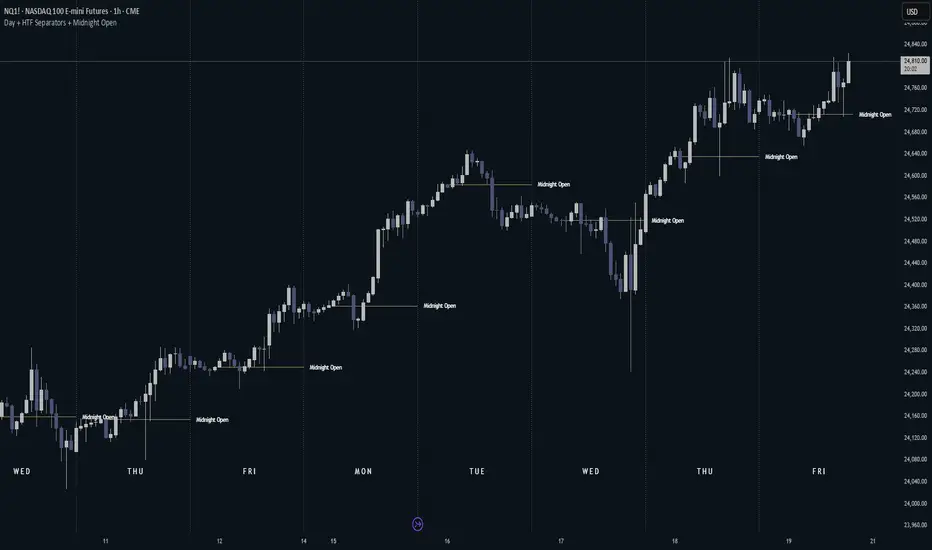
Day + HTF Separators + Midnight OpenOverview
The Day + HTF Separators + Midnight Open indicator is a versatile and easy-to-use tool for traders who want to track key price levels and time-based market events. It draws vertical lines to mark the start of each day, 4-hour period, and 1-hour period, adds labels to show the day of the week, and plots a horizontal line at a customizable hourly open price (defaulting to midnight, referred to as the "Time-Designated Open" or TDO). This indicator is perfect for day traders, swing traders, and anyone analyzing price action in Futures, forex, cryptocurrencies, or other markets on TradingView.
Designed for intraday charts (e.g., 1-minute, 5-minute, or 1-hour), this indicator offers extensive customization options, letting you toggle features, change colors, adjust line styles, and position labels. It’s built to be lightweight, ensuring smooth performance even on charts with lots of historical data.
Key Features
1. Daily Separators
What It Does: Draws a vertical line at the start of each new trading day to help you see daily boundaries clearly.
How It Works:
Places a vertical line at the beginning of each day, spanning the full price range of the opening moment.
Lines extend across the chart, making it easy to spot daily transitions.
Keeps up to 300 past daily lines visible, automatically managing older ones to stay within TradingView’s limits.
Customization:
Show/Hide: Always shown on intraday charts but tied to the "Show Days of Week Labels" setting for consistency.
Color: Choose any color (default: a medium gray).
Style: Pick Solid, Dashed, or Dotted lines (default: Dotted).
Why Use It: Helps you track daily price ranges, identify daily open/close levels, and plan trades around daily market cycles.
2. Day of the Week Labels
What It Does: Displays the day of the week (e.g., "MON" for Monday) at a specific hour each day, making it easy to know which day you’re analyzing.
How It Works:
Shows labels like "MON", "TUE", "WED", "THU", "FRI", "SAT", or "SUN" at the bottom of the chart.
Labels appear at a user-chosen hour (default: 5:00 AM) each day.
Only works on intraday charts (e.g., 5-minute or 1-hour).
Customization:
Show/Hide: Turn on/off with "Show Days of Week Labels" (default: on).
Color: Set the label text color (default: dark gray).
Hour: Choose any hour from 0:00 to 23:00 for label placement (default: 5:00 AM).
Why Use It: Great for traders who need to track specific days for events like economic releases or to spot weekly patterns in price action.
3. 4-Hour Separators
What It Does: Marks the start of each 4-hour period with a vertical line, ideal for aligning with higher timeframe trends.
How It Works:
Draws vertical lines every 4 hours, covering the price range of the starting moment.
Lines extend across the chart for clear visibility.
Stores up to 100 past 4-hour lines, reusing older ones for efficiency.
Customization:
Show/Hide: Enable/disable with "Show 4H Separator" (default: off).
Color: Choose any color (default: gray, slightly transparent).
Style: Select Solid, Dashed, or Dotted lines (default: Dotted).
Why Use It: Perfect for swing traders or those combining intraday trading with 4-hour chart analysis, such as identifying key support or resistance levels.
4. 1-Hour Separators
What It Does: Draws vertical lines to mark the start of each hour, helping short-term traders track hourly price movements.
How It Works:
Places a vertical line at the start of each hour, spanning the price range.
Lines extend across the chart and support up to 100 historical lines.
Customization:
Show/Hide: Enable/disable with "Show 1H Separator" (default: off).
Color: Pick any color (default: a light gray, slightly transparent).
Style: Choose Solid, Dashed, or Dotted lines (default: Dotted).
Why Use It: Ideal for scalpers or day traders focusing on hourly trends, session changes, or short-term price action.
5. Time-Designated Open (TDO) Lines
What It Does: Plots a horizontal line at the opening price of a chosen hour (default: midnight, 00:00) each day, with an optional label to mark the price level, helping you track key price points across multiple days.
How It Works:
Draws a horizontal line at the open price of the selected hour (e.g., midnight) in your chosen timezone (default: New York time).
Lines start at the chosen hour and extend to the current moment on the chart (or a few bars beyond, based on settings) or until 5:00 PM New York time (market close for Futures).
Supports up to 100 past TDO lines, keeping historical opens visible for comparison.
Adds a label (e.g., "TDO") at the end or start of the line, which is invisible by default due to full transparency.
Lines and labels only appear if both the main toggle and TDO-specific toggle are enabled.
Customization:
Show/Hide Line and Label: Turn on/off with "Enable Candle Open Line/Label" and the TDO-specific toggle (both default: on).
Show/Hide Label: Enable/disable the label separately with "Enable Candle Open Label" (default: on).
Hour: Select any hour from 00:00 to 23:00 (default: 00:00).
Label Text: Customize the label name (default: "TDO").
Line Color: Choose any color (default: light cyan).
Line Style: Pick Solid, Dashed, or Dotted (default: Solid).
Label Text Color: Set the label text color (default: gray, fully transparent).
Label Background Color: Choose the label background color (default: black).
Label Transparency: Adjust transparency for both label text and background (default: fully transparent, invisible).
Label Size: Select Tiny, Small, Normal, or Large (default: Small).
Label Position: Place the label at the right or left of the line with "Stick Label to Right" (default: right) and adjust spacing with "Label Padding" (default: 1 bar).
Line Length: Shorten the left side with "Enable Left-Side Trimming" (default: off) and set the trim length with "Left Trim Bars" (default: 8 bars). Extend the right side with "Line Padding" (default: 2 bars).
Timezone: Choose from New York, UTC, London, Paris, Tokyo, Shanghai, Singapore, or Sydney (default: New York).
Max History: Set how many past TDO lines to show (default: 100).
Multi-Day Plotting:
Plots a TDO line for the chosen hour (e.g., 00:00) each day, based on historical data.
Each line starts at the open price of that hour and extends to the current moment or 5:00 PM New York time (for Futures).
Past TDO lines stay visible, letting you compare daily open prices over time (up to 100 days, adjustable).
How to Use
Add to Your Chart:
Add the indicator to an intraday chart (e.g., 1-minute, 5-minute, or 1-hour) for any market (Futures, forex, crypto, etc.).
It works best on intraday timeframes to show all features.
Customize Settings:
Open the settings panel in TradingView.
Turn on/off features like daily separators, DOW labels, 1-hour/4-hour separators, or TDO lines.
Adjust colors, line styles, and label positions to fit your chart’s look.
Set the TDO hour (e.g., 00:00 for midnight or 03:00 for London open) and timezone to match your market.
Make TDO labels visible by reducing "Label Transparency" or changing "Label Text Color" to an opaque color.
Analyze the Chart:
Use daily separators to spot daily price ranges and key levels.
Check DOW labels to track specific days for trading events or weekly trends.
Use 1-hour/4-hour separators to align with short-term or higher timeframe strategies.
Monitor TDO lines to identify key opening price levels across days, useful for support/resistance or breakout trading.
Test and Adjust:
Toggle the main TDO switch or specific TDO toggle to hide/show the TDO line.
Reduce "Label Transparency" to 0 or change "Label Text Color" to make TDO labels visible.
Performance: The indicator is optimized to handle up to 300 daily lines, 100 4-hour lines, 100 1-hour lines, and 100 TDO lines, ensuring it runs smoothly on long charts.
Markets: Best for intraday charts. The 5:00 PM New York close is designed for futures; switch to UTC for forex or crypto.
Labels: TDO labels are invisible by default (fully transparent). Adjust "Label Transparency" or "Label Text Color" to make them visible.
Time Context: As of September 17, 2025, 6:08 PM EDT, TDO lines on stock charts stop updating at 5:00 PM New York time. Use historical data or change the timezone for continuous markets.
Limitations
Only works on intraday charts (e.g., 1-minute to 1-hour).
TDO lines stop at 5:00 PM New York time for Futures; adjust the timezone for 24/7 markets.
TDO labels are hidden by default (fully transparent); change transparency or color to see them.
Limited to 500 total lines and labels due to TradingView’s restrictions, managed automatically.
Feedback
If something isn’t working (e.g., missing lines or labels), please share:
The market and timeframe (e.g., EUR/USD, 5-minute).
Your settings (e.g., TDO hour, timezone, transparency).
A description or screenshot of the issue. This indicator is designed to make your trading easier with clear visuals for time-based analysis. Happy trading!
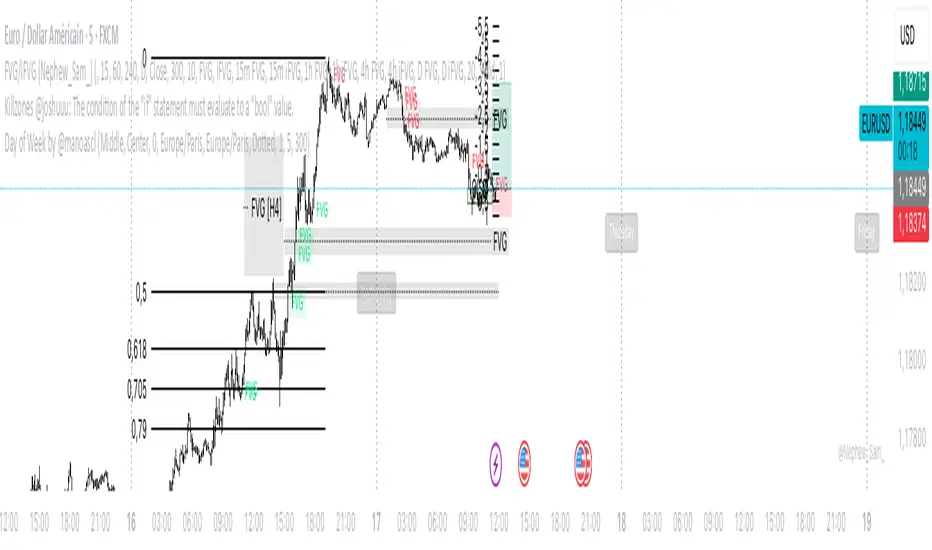
Day of Week by @manoascl Day of Week by @manoascl - version 1.8
One-line summary
This indicator draws vertical lines and labels at 00:00 of your chosen timezone for selected weekdays, helping you see daily structure, spot recurring weekly patterns, and prepare for upcoming trading days.
What it does
Draws vertical lines at 00:00 (calendar midnight) of the selected timezone for chosen weekdays (Mon–Sun).
Optionally adds a weekday label at the start of the day (top/middle/bottom alignment) with a user-defined offset in minutes.
Maintains stable label Y-positions via a configurable lookback window.
Projects future day markers (up to 30) in the same style, optionally filtering to your selected weekdays.
Fully customizable visuals: line color/width/style (solid/dashed/dotted), label background and text colors, label anchoring.
How it works (concepts & calculations)
Day boundary (midnight): Computes dayStartTz = timestamp(timezone, year, month, day, 0, 0, 0) so the boundary is true calendar midnight for the selected TZ.
Day change detection: Uses ta.change(dayStartTz) != 0 to detect the first bar of a new day (non-repainting).
Weekday naming: Determines the weekday using a midday shift (+12h) to avoid edge effects near midnight.
Drawing: When the weekday passes your filter, draws a vertical line (high→low) and an optional label positioned at the start of the day.
Future projection (DST-safe): Rebuilds future markers with timestamp(timezone, Y, M, D + k, 0, 0, 0) so daylight-saving transitions don’t drift.
Stability: Top/middle/bottom label Y-levels are derived from ta.highest/ta.lowest over a user lookback, preventing jitter.
How to use it
Add the indicator to your chart.
In Timezone, pick your region (or choose Custom and type an IANA TZ like Pacific/Tahiti).
Select the weekdays to display (e.g., only trading days, highlight Mondays, etc.).
Choose label position (top/middle/bottom), anchor (left/center/right), and set a minute offset if you want labels slightly inside the day.
Enable future projection to see upcoming day starts for planning around key weekdays (FOMC Wednesdays, NFP Fridays).
Tweak line style/width and colors to match your chart theme.
Practical applications for traders
Intraday: Instantly see where each local-time day begins; segment your session analysis cleanly.
Swing: Emphasize recurring weekdays (e.g., Monday opens, Friday profit-taking).
Event-driven: Pre-mark news-heavy weekdays and preview them with future projection.
Pattern studies: Compare behavior by weekday (range expansion, reversals, gaps) with consistent local-time boundaries.
Limitations
Visual aid only; no trading signals are generated.
Timezone must be chosen explicitly; if you pick a TZ different from your chart’s display, lines will follow the selected TZ by design.
Market holidays and custom sessions are not detected; lines still mark calendar midnight even if the market is closed.
On very small timeframes and long histories, many objects can impact performance—reduce lookback or future count if needed.
This work is licensed under a Attribution-NonCommercial-ShareAlike 4.0 International (CC BY-NC-SA 4.0) creativecommons.org
© @manoascl
ICT NDOG/NWOGICT NDOG / NWOG — Opening Gap Visualizer
Plots daily (NDOG) and weekly (NWOG) opening gaps.
An opening gap is the price range between the previous close and the new session’s open.
Features:
• Optional border lines at gap high/low.
• Optional Consequent Encroachment line (50%).
• Optional Quadrant lines (25% and 75%).
• Color customization
• Custom NDOG and NWOG amount (separated)
*Also included in ICT ULT (All In One) Indicator
*Feel free to suggest improvement in the comments
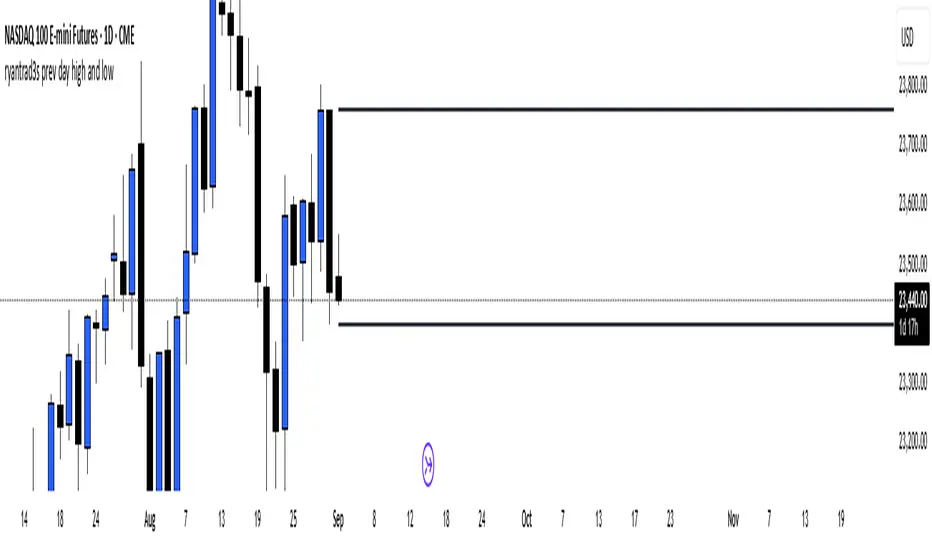
ryantrad3s prev day high and lowThis indicator can help you find the Daily high and low a lot faster than what it usually does, having this indicator equipped will make it a lot more convenient for any trader that uses anything to do with Daily highs and lows. Hope this helps.
Previous Day High & Low (PDH / PDL) with HistoryThis indicator automatically plots the Previous Day High (PDH) and Previous Day Low (PDL) on your chart.
✨ Features:
📅 Multiple days of history (choose how many days to keep, or unlimited).
🎨 Custom colors and line styles (solid, dashed, dotted).
🔎 Show or hide levels once touched by price.
🏷️ Optional labels (“PDH” and “PDL”) that follow the line to the right edge.
🚀 Works on any market, any timeframe.
🔧 Use cases:
Identify key liquidity levels.
Track daily ranges for intraday trading.
Combine with other strategies for confluence.
Previous Day/Week High, Low, Midpoint LinesI put together this script as I couldn’t find exactly what I was looking for on Tradingview.
The script plots the previous day and week high and low as well as the midpoint of the range between the daily and weekly high and low. These lines stop printing once a price candle crosses the lines.
This may be of use to you. Enjoy!
JL - DWM OHLCThis indicator plots the following price levels on your chart automatically AND will not show up if you are using a timeframe bigger than 60 minutes, 1 day, or 1 week.
Here are the price levels that are automatically plotted for you, and so you know the styling is different for Daily, Weekly, Monthly levels so you can easily distinguish between them:
- Prior Day: High / Low / Close
- Current Day: Open
- Prior Week: High / Low / Close
- Current Week: Open
- Prior Month: High / Low / Close
- Current Month: Open
These plots are timeframe dependent and will not plot on subsequently higher timeframes, here is how they work:
Daily Price Levels are only shown on timeframes that are smaller than 60 minutes.
Weekly Price Levels are only shown on timeframes smaller than 1 Day.
Monthly Price Levels are only shown on timeframes smaller than 1 Week.
This way, you can turn on the indicator and not have to think about turning off certain price levels if you switch to a larger / longer timeframe than what you typically use.
For example, Daily OHLC price levels will quickly clutter the 60 minute chart, and likely you don't need to know the HLC of the Prior Day if you are looking at the 60 minute chart. Therefor it may be helpful to automatically hide the Daily price level plots, and only show the Weekly and Monthly plots on the 60 minute timeframe.
I hope you find this indicator helpful, thanks for reading.
1H/3m Concept [RunRox]🕘 1H/3m Concept is a versatile trading methodology based on liquidity sweeps from fractal points identified on higher timeframes, followed by price reversals at these key moments.
Below, I will explain this concept in detail and provide clear examples demonstrating its practical application.
⁉️ WHAT IS A FRACTALS?
In trading, a fractal is a technical analysis pattern composed of five consecutive candles, typically highlighting local market turning points. Specifically, a fractal high is formed when a candle’s high is higher than the highs of the two candles on either side, whereas a fractal low occurs when a candle’s low is lower than the lows of the two adjacent candles on both sides.
Traders use fractals as reference points for identifying significant support and resistance levels, potential reversal areas, and liquidity zones within price action analysis. Below is a screenshot illustrating clearly formed fractals on the chart.
📌 ABOUT THE CONCEPT
The 1H/3m Concept involves marking Higher Timeframe (HTF) fractals directly onto a Lower Timeframe (LTF) chart. When a liquidity sweep occurs at an HTF fractal level, we remain on the same LTF chart (since all HTF fractals are already plotted on this lower timeframe) and wait for a clear Market Structure Shift (MSS) to identify our potential entry point.
Below is a schematic illustration clearly demonstrating how this concept works in practice.
Below is another 💡 real-chart example , showing liquidity in the form of a 1H fractal, swept by a rapid impulse move. Immediately afterward, a clear Market Structure Shift (MSS) occurs, signaling a potential entry point into the trade.
Another example is shown below, where we see our hourly fractal, from which price clearly reacts, providing an opportunity to search for an entry point.
As illustrated on the chart, the fractal levels from the higher timeframe are clearly displayed, but we’re working directly on the 5-minute chart. This allows us to remain on one timeframe without needing to switch back and forth between charts to spot such trading setups.
🔍 MTF FRACTALS
This concept can be applied across various HTF-LTF timeframe combinations. Although our examples illustrate 1H fractals used on a 5-minute chart, you can effectively utilize many other timeframe combinations, such as:
30m HTF fractals on 1m chart
1H HTF fractals on 3m chart
4H HTF fractals on 15m chart
1D HTF fractals on 1H chart
The key idea behind this concept is always the same: identify liquidity at fractal levels on the higher timeframe (HTF), then wait for a clear Market Structure Shift (MSS) on the lower timeframe (LTF) to enter trades.
⚙️ SETTINGS
🔷 Trade Direction – Select the preferred trading direction (Long, Short, or Both).
🔷 HTF – Choose the higher timeframe from which fractals will be displayed on the current chart.
🔷 HTF Period – Number of candles required on both sides of a fractal candle (before and after) to confirm fractal formation on the HTF.
🔷 Current TF Period – Sensitivity to the impulse that sweeps liquidity, used for identifying and forming the MSS line.
🔷 Show HTF – Enable or disable displaying HTF fractal lines on your chart. You can also customize line style and color.
🔷 Max Age (Bars) – Number of recent bars within which fractals from the selected HTF will be displayed.
🔷 Show Entry – Enable or disable displaying the MSS line on the chart.
🔷 Enable Alert – Activates TradingView alerts whenever the MSS line is crossed.
You can also enable 🔔 alerts, which notify you whenever price crosses the MSS line. This significantly simplifies the process of identifying these setups on your charts. Simply configure your preferred timeframes and wait for notifications when the MSS line is crossed.
🔶 We greatly appreciate your feedback and suggestions for improving the indicator!
Enhanced Cumulative Volume Delta + MAThe Enhanced Cumulative Volume Delta (CVD) indicator is designed to help traders analyze the cumulative buying and selling pressure in the market by examining the delta between the up and down volume. By tracking this metric, traders can gain insights into the strength of a trend and potential reversals. This indicator uses advanced volume analysis combined with customizable moving averages to provide a more detailed view of market dynamics.
How to Use This Indicator:
Volume Delta Visualization:
The indicator plots the cumulative volume delta (CVD) using color-coded candles, where teal represents positive delta (buying pressure) and soft red represents negative delta (selling pressure).
Moving Averages:
Use the moving averages to smooth the CVD data and identify long-term trends. You can choose between SMA and EMA for each of the three available moving averages. The first and third moving averages are typically used for short-term and long-term trend analysis, respectively, while the second moving average can serve as a medium-term filter.
Arrow Markers:
The indicator will display arrows (green triangle up for crossing above, red triangle down for crossing below) when the CVD volume crosses the 3rd moving average. You can control the visibility of these arrows through the input parameters.
Volume Data:
The indicator provides error handling in case no volume data is available for the selected symbol, ensuring that you're not misled by incomplete data.
Practical Applications:
Trend Confirmation: Use the CVD and moving averages to confirm the overall trend direction and strength. Positive delta and a rising CVD can confirm an uptrend, while negative delta and a falling CVD indicate a downtrend.
Volume Breakouts: The arrows marking when the CVD crosses the 3rd moving average can help you spot potential volume breakouts or reversals, making them useful for entry or exit signals.
Volume Divergence: Pay attention to divergences between price and CVD, as these can often signal potential trend reversals or weakening momentum.
Day Pattern IndicatorDay Pattern Indicator
The Day Pattern Indicator is designed to help traders analyze daily trends and patterns in their selected markets. This tool highlights specific days of the week on the chart with unique, semi-transparent colored bars. Each day is customizable, allowing users to toggle the visibility of Monday through Sunday to focus on days most relevant to their trading strategy. Ideal for identifying potential patterns in cryptocurrency, forex, or stock markets, the indicator is perfect for traders seeking insights into weekday or weekend market behavior. Simple, effective, and visually intuitive!
Abdozo - Highlight First DaysAbdozo - Highlight First Days Indicator
This Pine Script indicator helps traders easily identify key timeframes by highlighting the first trading day of the week and the first day of the month. It provides visual markers directly on your chart, helping you stay aware of potential market trends and turning points.
Features:
- Highlight First Day of the Week (Monday): Automatically marks Mondays to help you track weekly market cycles.
- Highlight First Day of the Month: Spot the start of each month with ease to analyze monthly performance and trends.
Previous Day and Week RangesI've designed the "Previous Day and Week Ranges" indicator to enhance your trading strategy by clearly displaying daily and weekly price levels. This tool shows Open-Close and High-Low ranges for both daily and weekly timeframes directly on your trading chart.
Key Features :
Potential Support and Resistance: The indicator highlights previous day and week ranges that may serve as key support or resistance levels in subsequent trading sessions.
Customizable Display Options: Offers the flexibility to show or hide daily and weekly ranges based on your trading needs.
Color Customization: Adjust the color settings to differentiate between upward and downward movements, enhancing visual clarity and chart readability.
This indicator is ideal for traders aiming to understand market dynamics better, offering insights into potential pivot points and zones of price stability or volatility.