Lunar Phases AdvancedHigh Precision Lunar Phases Advanced Indicator
Our Beautiful Companion in the Night:
At New Moon, the Moon sits between Earth and the Sun. The Near side is completely dark, so the Moon is unseen (except during a solar eclipse). At Full Moon, the Near side of the Moon is on the opposite side of Earth from the Sun, so sunlight hits the entire face we see—creating that big, beautifully bright Ball in the night sky. Due to tidal locking, we never see the Far side of the moon from Earth's surface.
Right after New Moon, a thin Waxing Crescent appears low in the western sky at dusk, growing into the half-lit First Quarter, then a bulging Waxing Gibbous until reaching Full Moon which rises exactly as the Sun sets. After Full, it shrinks through Waning Gibbous, Last Quarter (half-lit visible in the early morning sky), finishing with a Waning Crescent (thin sliver again) just before disappearing at dawn for the next New Moon.
The Moon’s orbit is elliptical, so its distance from Earth varies. When Full and near Perigee(closest approach) it appears larger and up to 30% brighter leading way to the name, Super Moon. Near Apogee(farthest distance) the Moon will look smaller and dimmer, or Micro Moon. These extreme alignments tend to cluster in "seasons" because the point of closest approach slowly drifts around the orbit, completing a full cycle every 18.6 years.
Chart zoomed out to highlight the seasonal Super Moon behavior:
This indicator places markers on your chart for every New/Full Moon. Super Moon events use larger circles, Micro Moon events use smaller ones (both optional based on distance at event). There are background colors for Apogee and Perigee events, with optional diamond markers.
Chart with Full/New Moon markers and phase background colors:
Extended Functionality
This advanced version builds on the core Phase detection by adding Lunar orbit extremes with event tilt values:
Precise Perigee (closest approach) and Apogee (farthest away) markers optionally appear as red diamonds above the bar for Perigee and green diamonds below for Apogee.
Background tint shows whether the Moon is currently approaching Perigee (cyan shade) or Apogee (violet shade), giving instant visual context for distance expansion and contraction.
Chart with Apogee/Perigee markers and approaching background colors:
Accuracy:
New and Full Moon times are typically within ±few minutes
Distances are typically within ±10–100 km
Tilt values are typically within ±0.01° of astronomically true.
The Info Table expands to three columns:
Current — live phase name and live geocentric distance
Next Phase — upcoming New or Full Moon, countdown timer, and expected distance
Next Extreme — upcoming Perigee or Apogee, countdown timer, and expected distance
Settings:
Thresholds group:
"Full"/"New" checkboxes turn SuperMoon and MicroMoon individually on or off for each
Distance inputs let you set your own km cutoffs for what counts as super or micro (defaults are common values around 369,000 km and 405,000 km)
Start Date and End Date control the time range the script scans for events (default 2010–2028)
BackGround Color group:
"Current Phase" checkbox turns the Waxing/Waning background colors on or off
Color pickers let you choose your own Waxing (default purple shade) and Waning (default blue shade)
"Approaching" checkbox turns the Apogee/Perigee background colors on or off
Color pickers let you choose your own Perigee (default cyan shade) and Apogee (default violet shade)
Information group:
"Show Info Table" turns the top-right panel on or off
"(New/Full)" checkbox adds detailed labels directly on New/Full bars with user selected time-zone, distance, and Lunar tilt from Earths Ecliptic
"(Peri/Apo)" checkbox adds detailed labels directly on Peri/Apo bars with user selected time-zone, distance, and Lunar tilt from Earths Ecliptic
Drop down time-zone for label
Powered by multiple 50-term approximations of the ELP2000-82B lunar theory.
Disclaimer: The script was developed with assistance from Grok 4.1, always under human supervision and decision-making.
Pattern armonici

Lunar Phases & DistanceHigh Precision Lunar Phases & Distance Indicator
Our Beautiful Companion in the Night:
At New Moon, the Moon sits between Earth and the Sun. The side facing us is completely dark, so the Moon is invisible (except during a solar eclipse). At Full Moon, the Moon is on the opposite side of Earth from the Sun, so sunlight hits the entire face we see—creating that big, beautifully bright Ball in the night sky.
Right after New Moon, a thin Waxing Crescent appears low in the western evening sky, growing into the half-lit First Quarter, then a bulging waxing gibbous until reaching Full Moon. After Full, it shrinks through Waning Gibbous, Last Quarter (half-lit visible in the morning sky), finishing with a Waning Crescent (thin sliver again) just before disappearing at the next New Moon.
The Moon’s orbit is elliptical, so its distance from Earth varies. When Full and near Perigee(closest approach) it appears larger and up to 30% brighter leading way to the name, Super Moon. Near Apogee(farthest distance) the Moon will look smaller and dimmer, or Micro Moon. These extreme alignments tend to cluster in "seasons" because the point of closest approach slowly drifts around the orbit, completing a full cycle every 18.6 years.
This indicator places clear markers on your chart for every exact New and Full Moon. Super Moon events use larger circles, Micro Moon events use smaller ones (both optional based on distance at event).
Chart zoomed out to highlight the seasonal behavior:
Accuracy:
New and Full Moon times are typically within ±few minutes & Distances are typically within ±10–100 km of astronomically true.
A small info table sits in the top-right corner and shows:
Current phase name (e.g., "Waxing Gibbous" or "Super Full Moon")
Live geocentric distance to the Moon right now
Name of the next New or Full Moon, with a countdown timer (days:hours:minutes)
Expected distance at that upcoming event
Settings
Thresholds group:
Two "Enable" checkboxes completely turn supermoon and micromoon highlighting on or off
Distance inputs let you set your own km cutoffs for what counts as super or micro (defaults are common values around 367,000 km and 405,000 km)
Start Date and End Date control the time range the script scans for events (default 2010–2028)
BackGround group:
"Current Phase" checkbox turns the waxing/waning background colours on or off
Colour pickers let you choose your own waxing (default soft purple) and waning (default soft blue) shades
Information group:
"Show Info Table" turns the top-right panel on or off
"(New/Full)" debug checkbox adds detailed labels directly on New/Full bars with exact UTC time and distance (useful for verification)
Powered by the open-source (telephonejack/LunarSolver/1) library using multiple 50-term approximations of the ELP2000-82B lunar theory.
Disclaimer: The script was developed with assistance from Grok 4.1, always under human supervision and decision-making.

ScalpAtlas [JOAT]ScalpAtlas - Volatility, Structure, Confluence & Risk Console
IMPORTANT NOTES (READ FIRST)
This is an indicator (not a strategy). It does not place trades. It provides a structured decision framework: context + levels + sizing.
This script is written in Pine Script v6 and is intended to be used on standard candlestick charts .
All numbers shown in the console (S/R, SL/TP) are displayed using the symbol’s tick size formatting for maximum price precision.
No external indicators are required. The design goal is to keep the chart clean and use the Execution Console as the primary “operator panel”.
Source code visibility: This script is published as Protected Source (closed-source) . The purpose is to protect the work from unauthorized re-uploads/copies and to keep a stable versioning path for ongoing maintenance. This description is intentionally detailed so you can understand what the indicator does and how to use each feature without needing access to the implementation.
Protected Source / Closed-Source Clarification
Protected source does not mean “trust me”. It means the internal implementation is not publicly viewable.
The operational behavior is documented here: what is plotted, what each console cell means, what each input controls, and how to use the output.
If you see re-uploads or near-identical copies elsewhere, treat them with caution and rely on the official publication details and visuals.
Overview
ScalpAtlas is a regime-aware scalping and intraday decision suite designed to unify:
Volatility context (ATR or Gaussian bands)
Non‑repainting higher-timeframe structure (confirmed HTF pivot Support/Resistance)
Multi-timeframe momentum (DMI/ADX across 5m, 15m, 1h)
Volume pressure + absorption proxies (volume Z-score, wick/body efficiency, wick skew)
VWAP regime context (deviation and directional bias)
Actionable risk sizing (account/risk inputs, friction, point value, per-stop ladder sizing)
Instead of cluttering the chart with dozens of labels, the script consolidates critical information into a single right-side ScalpAtlas Execution Console so you can make fast decisions with consistent formatting.
What Makes It “A Suite” (Originality & Usefulness)
This script is not a simple mashup of common indicators. It is a coordinated workflow:
Structure defines where decisions should happen (confirmed HTF pivot zones).
Volatility bands define whether price is “extended” or “discounted” relative to the current regime.
MTF momentum (ADX/DMI) defines trend strength and directional alignment.
VWAP deviation adds context for mean-reversion vs continuation bias.
Flow metrics approximate absorption/stop activity (wick-based efficiency + volume deviation).
Risk console translates context into actionable sizing (ticks, risk per contract, quantity).
The purpose is to reduce discretionary guesswork by presenting a consistent, tick-accurate operational picture in one place.
1) Chart Visuals - What You See on the Chart
A) Volatility Bands (ATR or Gaussian)
The script plots a basis line and upper/lower volatility envelopes.
ATR mode : adapts to changing volatility via ATR.
Gaussian mode : uses standard deviation logic for statistical dispersion.
A subtle fill is used between bands for quick “zone recognition”.
How to use:
When price is near the lower band , the script treats it as a discount zone (context for long ideas if other filters agree).
When price is near the upper band , the script treats it as a premium zone (context for short ideas if other filters agree).
B) Dynamic Candle Coloring (optional)
When enabled, candles are tinted based on location vs the basis line. This is a visual aid only.
Above basis: warmer/bullish tint.
Below basis: cooler/bearish tint.
C) Market Structure Lines (optional)
The script draws Support (S) and Resistance (R) using confirmed higher-timeframe pivots.
Support line: dashed, light-brown tone.
Resistance line: dashed, rose tone.
Labels “S” and “R” are updated on the latest bar only (no spam).
Non‑repainting structure policy:
Structure levels are derived from a higher timeframe and intentionally confirmed. This means:
Levels appear only when a pivot is confirmed.
Levels can update when a new confirmed pivot replaces the previous one.
D) Optional “Chart Signals” (OFF by default)
To keep charts clean, signal labels and auxiliary overlays are gated behind Show Chart Signals . When ON, the script may display:
Long/Short signal labels (only on confirmed bars).
Dynamic SL/TP lines for active signal context.
Order block shading (a lightweight heuristic layer).
E) Background Strength Tint
A subtle background tint reflects the presence and strength of the current signal state.
2) ScalpAtlas Execution Console - Full Glossary
The Execution Console is the primary UI. It is designed to read like an operations dashboard.
Header Row (Row 0)
Column 0 : Script console title.
Column 1 : Symbol.
Column 2 : Chart timeframe.
Column 3 : Session context (London/NY vs Asia) based on current exchange time window.
Column 4 : VWAP header (shows VWAP or VWAP+VOL if a volume burst is present).
Column 5 : Band mode currently selected (ATR or Gaussian).
Row 1 - Momentum
5m / 15m / 1h ADX cells : trend strength + direction via DMI/ADX.
Cell color reflects directional bias and trend strength.
An “inside bar” state is highlighted distinctly to warn about compression.
VWAP % : percent deviation of price from VWAP (tick-safe computations).
EFF % : “efficiency” of the current bar (body size relative to total range).
How to use Momentum row:
Higher ADX across 15m and 1h increases the probability that trend-following logic is appropriate.
Inside-bar highlighting suggests compression and potential expansion risk (wait for confirmation).
VWAP deviation helps decide continuation vs mean-reversion bias.
Row 2 - Flow
Z : volume Z-score relative to its moving average and standard deviation.
Abs(B) : bullish absorption proxy (uses wick/balance/volume deviation mechanics).
Abs(S) : bearish absorption proxy.
Skew : wick skew (upper vs lower wick dominance).
IMB : imbalance flag (range/body relationship vs ATR context).
How to use Flow row:
High Z + strong Abs(B) near support can strengthen a long thesis.
High Z + strong Abs(S) near resistance can strengthen a short thesis.
Skew helps interpret whether rejection is happening on one side of the candle range.
IMB warns that the bar is “inefficient” (potential displacement / imbalance conditions).
Row 3 — Risk
Bal : account balance input.
R$ : base risk amount derived from risk % (before volatility adjustment).
PV : point value used for sizing (either symbol point value or your manual value).
ATRSL % : ATR-based stop model expressed as percent of price.
Fr : friction % (commissions/slippage buffer). This impacts the stop ladder computations.
Row 4 - Levels
S : current support level (tick-formatted).
R : current resistance level (tick-formatted).
Tick : symbol minimum tick size.
RR : risk:reward ratio used for projected TP.
Adj : volatility-adjusted risk % and corresponding risk amount.
Row 5 - Setup (Real-time operator row)
Signal : LONG / SHORT / NEUTRAL.
Str : composite strength score (0–100) based on momentum/volume/VWAP/absorption context.
SL : dynamic stop level derived from structure + buffer (tick-formatted).
TP : projected take-profit using RR ratio (tick-formatted).
Qty : calculated contract quantity based on your risk model.
Rows 6–17 - Money Management Ladder
This section models multiple stop configurations and shows the implied risk per contract and sizing.
Columns
SL : stop model name (ATR or % ladder).
SL% : selected stop percent plus friction.
Ticks : the implied stop distance in ticks.
Risk/ct : dollar risk per contract for that stop distance.
Qty : suggested quantity for that stop model.
How to use the ladder:
Pick a stop model that matches current volatility and structure spacing.
If the calculated Qty is too large/small, adjust risk %, friction, or point value (or select a different stop model).
Use the ladder as a “sanity check” to avoid accidental oversizing.
3) How the Signal Framework Works (High-Level, No Code)
The script evaluates a confluence framework that adapts to regime:
Trend regime (trend-following bias)
Requires higher ADX confirmation across higher timeframes.
Uses directional alignment across 5m/15m/1h momentum.
Uses VWAP bias and band position for timing.
Requires volume expansion (burst) to reduce low-liquidity signals.
Range / sweep regime (mean-reversion / liquidity sweep bias)
Looks for sweeps through structure (support/resistance) and reversal back inside.
Uses absorption proxies + volume expansion as confirmation.
Strength Score
The strength score is intended to prioritize only the best conditions:
Trend strength contribution (ADX)
Volume participation contribution (relative volume)
VWAP displacement contribution
Absorption contribution
Imbalance contribution
4) Inputs & Settings — Full Reference
Volatility Bands
Band Type : ATR or Gaussian.
Band Length : smoothing length used by basis and dispersion.
Band Multiplier : envelope width factor.
Market Structure
Pivot Lookback : sensitivity of pivot detection.
Structure Timeframe : HTF used to derive pivots.
Show Structure Lines : toggle dashed S/R lines and labels.
Momentum Heatmap
ADX Length : DMI/ADX length.
Strong Trend Threshold : minimum ADX used for trend regime classification.
Volume Analysis
Volume MA Length : baseline volume moving average length.
Volume Burst Multiplier : defines when current volume is a “burst”.
Risk Management
Account Balance : used for sizing.
Max Risk Per Trade (%) : base risk percent (volatility-adjusted internally for stability).
Friction (%) : commission/slippage buffer included in stop model calculations.
Risk:Reward Ratio : used to project TP.
Use Symbol Point Value : uses exchange-provided point value when available.
Manual Point Value : fallback when symbol point value is incorrect/missing.
Structure Buffer (ticks) : adds a tick buffer beyond structure for SL placement.
Scalping Money Management
Show ATR stop loss : includes ATR-based stop model in the ladder.
ATR timeframe : timeframe used for ATR stop computation.
Stop loss length : ATR length used for the ATR model.
Stop loss ladder (%) : configurable percent stops from 0.10% to 1.00% (each can be toggled).
Visual Settings
Show Execution Console
Console Position
Console Text Size
Show Chart Signals (keeps the chart clean when OFF)
Fill Opacity
Line Width
Dynamic Candle Coloring
5) Recommended Workflow (Practical Use)
Step 1 — Calibrate risk inputs
Set Account Balance.
Set Risk % conservatively.
Set Friction to reflect your real costs.
Confirm Point Value is correct for your instrument.
Step 2 — Select your structure timeframe
For intraday/scalping, use a higher timeframe that provides stable pivots (e.g., 15m/30m/1h depending on your chart timeframe).
Step 3 — Use the console to decide regime
If 15m & 1h ADX are strong and direction aligns, treat conditions as trend regime.
If not, be more selective and consider sweep/mean-reversion contexts.
Step 4 — Validate location
Prefer longs near support / lower band when context supports it.
Prefer shorts near resistance / upper band when context supports it.
Step 5 — Use SL/TP + Qty as the final gate
Confirm SL makes structural sense.
Confirm Qty is reasonable.
If not reasonable, do not force the trade—adjust stop model or risk.
7) Limitations & Best-Use Guidance
This tool does not know your broker execution, slippage, or fills. The risk ladder is a planning model.
Volume-based logic depends on the quality of volume data for the symbol/exchange.
Structure pivots are confirmed by design; you may see levels update only after confirmation.
Order block shading is a lightweight heuristic layer and is not a full SMC mapping engine.
Avoid making decisions on non-standard chart types (Heikin Ashi / Renko / etc.) if you want consistency with price-based stops and risk sizing.
Disclaimer
This script is for educational and informational purposes only. It does not constitute financial advice. Trading involves risk, and you are responsible for your own decisions, sizing, and risk controls. Always test settings and workflows in a simulated environment before using them in live markets.
-Made with passion by officialjackofalltrades

ATLAS v1.4 (Swing + Scalper)Updates made to ATLAS.
ATLAS is the new A.I. based trade approver. ATLAS uses trading strategies, patterns, and rules to make decisions on when to enter, wait or ignore trade ideas. ATLAS will sent you trade alerts based on the pairs that you choose or in the near future, allow you to submit screenshots, images, text and other formats of trade evaluations or entries and ATLAS will advise you on if your trade is valid or not.

Algo_LongOnly_H1_SS26Strategy Overview: Hull Suite Trend Follower
This H1 quantitative strategy utilizes a multi-variant Hull Moving Average (HMA) engine to capture swing momentum with minimal lag. By dynamically switching between HMA, EHMA, and THMA, the algorithm filters market noise and identifies high-probability trend shifts.
Key Features
Adaptive Smoothing: Leverages the Hull Suite to eliminate price lag while maintaining sensitivity to trend reversals.
Directional Versatility: Configurable for Long-Only, Short-Only, or Bi-directional execution.
Time-Bounded Backtesting: Integrated date-range engine for precise historical performance analysis.
Visual Intelligence: Real-time trend visualization via a dynamic cloud band for immediate bias confirmation.

Photon Price Action Scanner [JOAT]Photon Price Action Scanner - Multi-Pattern Recognition with Adaptive Filtering
Introduction and Purpose
Photon Price Action Scanner is an open-source overlay indicator that automates the detection of 15+ candlestick patterns while filtering them through multiple confirmation layers. The core problem this indicator solves is pattern noise: raw candlestick pattern detection produces too many signals, most of which fail because they lack context. This indicator addresses that by combining pattern recognition with trend alignment, volume-weighted strength scoring, velocity confirmation, and an adaptive neural bias filter.
The combination of these components is not arbitrary. Each filter addresses a specific weakness in standalone pattern detection:
Trend alignment ensures patterns appear in favorable market structure
Volume-weighted strength filters out weak patterns with low conviction
Velocity confirmation identifies momentum behind the pattern
Neural bias filter adapts to recent price behavior to avoid counter-trend signals
What Makes This Indicator Original
While candlestick pattern scanners exist, this indicator's originality comes from:
1. Multi-Layer Filtering System - Patterns must pass through trend, strength, velocity, and neural bias filters before generating signals. This dramatically reduces false positives compared to simple pattern detection.
2. Adaptive Neural Bias Filter - A custom momentum-adjusted EMA that learns from recent price action using a configurable learning rate. This is not a standard moving average but an adaptive filter that accelerates during trends and smooths during consolidation.
3. Pattern Strength Scoring - Each pattern receives a strength score based on volume ratio and body size, allowing traders to focus on high-conviction setups rather than every pattern occurrence.
4. Smart Cooldown System - Prevents signal overlap by enforcing minimum bar spacing between pattern labels, keeping charts clean even when "Show All Patterns" is enabled.
How the Components Work Together
Step 1: Pattern Detection
The indicator scans for 15 candlestick patterns using precise mathematical definitions:
// Example: Bullish Engulfing requires the current bullish candle to completely
// engulf the previous bearish candle with a larger body
isBullishEngulfing() =>
bool pattern = close < open and close > open and
open <= close and close >= open and
close - open > open - close
pattern
// Example: Three White Soldiers requires three consecutive bullish candles
// with each opening within the previous body and closing higher
isThreeWhiteSoldiers() =>
bool pattern = close > open and close > open and close > open and
close < close and close < close and
open > open and open < close and
open > open and open < close
pattern
Step 2: Strength Calculation
Each detected pattern receives a strength score combining volume and body size:
float volRatio = avgVolume > 0 ? volume / avgVolume : 1.0
float bodySize = math.abs(close - open) / close
float baseStrength = (volRatio + bodySize * 100) / 2
This ensures patterns with above-average volume and large bodies score higher than weak patterns on low volume.
Step 3: Trend Alignment
Patterns are checked against the trend direction using an EMA:
float trendEMA = ta.ema(close, i_trendPeriod)
int trendDir = close > trendEMA ? 1 : close < trendEMA ? -1 : 0
Bullish patterns in uptrends and bearish patterns in downtrends receive priority.
Step 4: Neural Bias Filter
The adaptive filter uses a momentum-adjusted EMA that responds to price changes:
neuralEMA(series float src, simple int period, simple float lr) =>
var float neuralValue = na
var float momentum = 0.0
if na(neuralValue)
neuralValue := src
float error = src - neuralValue
float adjustment = error * lr
momentum := momentum * 0.9 + adjustment * 0.1
neuralValue := neuralValue + adjustment + momentum
neuralValue
The learning rate (lr) controls how quickly the filter adapts. Higher values make it more responsive; lower values make it smoother.
Step 5: Velocity Confirmation
Price velocity (rate of change) must exceed the average velocity for strong signals:
float velocity = ta.roc(close, i_trendPeriod)
float avgVelocity = ta.sma(velocity, i_trendPeriod)
bool velocityBull = velocity > avgVelocity * 1.5
Step 6: Signal Classification
Signals are classified based on how many filters they pass:
Strong Pattern : Pattern + strength threshold + trend alignment + neural bias + velocity
Ultra Pattern : Strong pattern + gap in same direction + velocity confirmation
Watch Pattern : Pattern detected but not all filters passed
Detected Patterns
Classic Reversal Patterns:
Bullish/Bearish Engulfing - Complete body engulfment with larger body
Hammer - Long lower wick (2x body), small upper wick, bullish context
Shooting Star - Long upper wick (2x body), small lower wick, bearish context
Morning Star - Three-bar bullish reversal with small middle body
Evening Star - Three-bar bearish reversal with small middle body
Piercing Line - Bullish candle closing above midpoint of previous bearish candle
Dark Cloud Cover - Bearish candle closing below midpoint of previous bullish candle
Bullish/Bearish Harami - Small body contained within previous larger body
Doji - Body less than 10% of total range (indecision)
Advanced Patterns (Optional):
Three White Soldiers - Three consecutive bullish candles with rising closes
Three Black Crows - Three consecutive bearish candles with falling closes
Tweezer Top - Equal highs with reversal candle structure
Tweezer Bottom - Equal lows with reversal candle structure
Island Reversal - Gap isolation creating reversal structure
Dashboard Information
The dashboard displays real-time analysis:
Pattern - Current detected pattern name or "SCANNING..."
Bull/Bear Strength - Volume-weighted strength scores
Trend - UPTREND, DOWNTREND, or SIDEWAYS based on EMA
RSI - 14-period RSI for momentum context
Momentum - 10-period momentum reading
Volatility - ATR as percentage of price
Neural Bias - BULLISH, BEARISH, or NEUTRAL from adaptive filter
Action - ULTRA BUY/SELL, BUY/SELL, WATCH BUY/SELL, or WAIT
Visual Elements
Pattern Labels - Abbreviated codes (BE=Engulfing, H=Hammer, MS=Morning Star, etc.)
Neural Bias Line - Adaptive trend line showing filter direction
Gap Boxes - Cyan boxes highlighting price gaps
Action Zones - Dashed boxes around strong pattern areas
Velocity Markers - Small circles when velocity confirms direction
Ultra Signals - Large labels for highest conviction setups
How to Use This Indicator
For Reversal Trading:
1. Wait for a pattern to appear at a key support/resistance level
2. Check that the Action shows "BUY" or "SELL" (not just "WATCH")
3. Confirm the Neural Bias aligns with your trade direction
4. Use the strength score to gauge conviction (higher is better)
For Trend Continuation:
1. Identify the trend using the Trend row in the dashboard
2. Look for patterns that align with the trend (bullish patterns in uptrends)
3. Ultra signals indicate the strongest continuation setups
For Filtering Noise:
1. Keep "Show All Patterns" disabled to see only filtered signals
2. Increase "Pattern Strength Filter" to see fewer, higher-quality patterns
3. Enable "Velocity Confirmation" to require momentum behind patterns
Input Parameters
Scan Sensitivity (1.0) - Overall detection sensitivity multiplier
Pattern Strength Filter (3) - Minimum strength score for strong signals
Trend Period (20) - EMA period for trend determination
Show All Patterns (false) - Display all patterns regardless of filters
Advanced Patterns (true) - Enable soldiers/crows/tweezer detection
Gap Analysis (true) - Enable gap detection and boxes
Velocity Confirmation (true) - Require velocity for strong signals
Neural Bias Filter (true) - Enable adaptive trend filter
Neural Period (50) - Lookback for neural bias calculation
Neural Learning Rate (0.12) - Adaptation speed (0.01-0.5)
Timeframe Recommendations
1H-4H: Best balance of signal frequency and reliability
Daily: Fewer but more significant patterns
15m-30m: More signals, requires tighter filtering (increase strength threshold)
Limitations
Pattern detection is mechanical and does not consider fundamental context
Neural bias filter may lag during rapid trend reversals
Gap detection requires clean price data without after-hours gaps
Strength scoring favors high-volume patterns, which may miss valid low-volume setups
- Made with passion by officialjackofalltrades

Harmonic patternsThis indicator is an automated technical analysis tool designed to identify 16 different harmonic and geometric price patterns, ranging from classic Gartley and Bat patterns to exotic models like the Nen Star and Black Swan. Unlike standard detectors, this script incorporates a proprietary Similarity Rating System to help traders distinguish between high-probability setups and approximate formations.
Technical Logic and Methodology
The script utilizes a pivot-based ZigZag algorithm with a default lookback of 18 pivots to identify structural swing highs and lows. Once pivots are established, the system calculates the internal Fibonacci retracement and extension ratios between five key points (X, A, B, C, and D).
Ratio Validation: The script compares real-time price action against ideal harmonic ratios (e.g., 0.618 for Gartley’s B-point) within a user-defined error margin.
Similarity Rating: A percentage-based score is calculated by measuring the cumulative deviation of all legs from their mathematical ideals. Only patterns exceeding the 79% Similarity Threshold are displayed to ensure signal quality.
Dynamic Targets: Take Profit (TP) zones are calculated based on the vertical distance of the XA leg, projected from the D-point at 0.618, 1.0, and 1.618 levels.
How to Use
Filter Patterns: Use the "General Settings" to adjust the "Pattern Size" (bars) and the "Similarity Rating" to filter out low-quality setups.
Execution: Once a pattern is labeled (e.g., "🦋 GARTLEY"), the script draws dynamic TP boxes. Traders typically look for price rejection at the D-point before targeting TP1 or TP2.
Alerts: The script includes a universal alert condition that triggers as soon as a valid, high-rating pattern completes at the D-point.

CT Traders Soportes y ResistenciasThis indicator displays dynamic support and resistance zones based on pure price action.
The zones are built using significant pivot points and are grouped by price proximity, creating areas where the market has reacted multiple times in the past. The higher the number of reactions within a zone, the more relevant the level becomes.
The indicator is designed primarily for cryptocurrency markets but can be applied to any asset and timeframe. It is useful for identifying potential entry and exit areas, as well as key structural levels and breakouts.
Different colors are used to clearly distinguish support zones, resistance zones, and areas where price is currently trading, allowing for quick and intuitive chart analysis.
This script is provided for educational purposes only and does not constitute financial advice.

Cosmic Volume Analyzer [JOAT]
Cosmic Volume Analyzer - Astrophysics Edition
Overview
Cosmic Volume Analyzer is an open-source oscillator indicator that applies astrophysics-inspired concepts to volume analysis. It classifies volume into buy/sell categories, calculates volume flow, detects accumulation/distribution phases, identifies climax volume events, and uses gravitational and stellar mass analogies to visualize volume dynamics.
What This Indicator Does
The indicator calculates and displays:
Volume Classification - Categorizes each bar as CLIMAX_BUY, CLIMAX_SELL, HIGH_BUY, HIGH_SELL, NORMAL_BUY, or NORMAL_SELL
Volume Flow - Percentage showing buy vs sell pressure over a lookback period
Buy/Sell Volume - Separated volume based on candle direction
Accumulation/Distribution - Phase detection using Money Flow Multiplier
Volume Oscillator - Fast vs slow volume EMA comparison
Gravitational Pull - Volume-weighted price attraction metric
Stellar Mass Index - Volume ratio combined with price momentum
Black Hole Detection - Identifies extremely low volume periods (liquidity voids)
Supernova Events - Detects extreme volume with extreme price movement
Orbital Cycles - Sine-wave based cyclical visualization
How It Works
Volume classification uses volume ratio and candle direction:
classifyVolume(series float vol, series float close, series float open) =>
float avgVol = ta.sma(vol, 20)
float volRatio = avgVol > 0 ? vol / avgVol : 1.0
if volRatio > 1.5
if close > open
classification := "CLIMAX_BUY"
else
classification := "CLIMAX_SELL"
else if volRatio > 1.2
// HIGH_BUY or HIGH_SELL
else
// NORMAL_BUY or NORMAL_SELL
Volume flow separates buy and sell volume over a period:
calculateVolumeFlow(series float vol, series float close, simple int period) =>
float currentBuyVol = close > open ? vol : 0.0
float currentSellVol = close < open ? vol : 0.0
// Accumulate in buffers
float flow = (buyVolume - sellVolume) / totalVol * 100
Accumulation/Distribution uses the Money Flow Multiplier:
float mfm = ((close - low) - (high - close)) / (high - low)
float mfv = mfm * vol
float adLine = ta.cum(mfv)
if adLine > adEMA and ta.rising(adLine, 3)
phase := "ACCUMULATION"
else if adLine < adEMA and ta.falling(adLine, 3)
phase := "DISTRIBUTION"
Gravitational pull uses volume-weighted price distance:
gravitationalPull(series float vol, series float price, simple int period) =>
float massCenter = ta.vwma(price, period)
float distance = math.abs(price - massCenter)
float mass = vol / ta.sma(vol, period)
float gravity = distance > 0 ? mass / (distance * distance) : 0.0
Signal Generation
Signals are generated based on volume conditions:
Buy Climax: Volume exceeds 2 standard deviations above average on bullish candle
Sell Climax: Volume exceeds 2 standard deviations above average on bearish candle
Strong Buy Flow: Volume flow exceeds positive threshold (default 45%)
Strong Sell Flow: Volume flow exceeds negative threshold (default -45%)
Supernova: Volume 3x average AND price change 3x average
Black Hole: Volume 2 standard deviations below average
Dashboard Panel (Top-Right)
Volume Class - Current volume classification
Volume Flow - Buy/sell flow percentage
Buy Volume - Accumulated buy volume
Sell Volume - Accumulated sell volume
A/D Phase - ACCUMULATION/DISTRIBUTION/NEUTRAL
Volume Strength - Normalized volume strength
Gravity Pull - Current gravitational metric
Stellar Mass - Current stellar mass index
Cosmic Field - Combined cosmic field strength
Black Hole - Detection status and void strength
Signal - Current actionable status
Visual Elements
Volume Ratio Columns - Colored bars showing normalized volume
Volume Flow Line - Main oscillator showing flow direction
Flow EMA - Smoothed flow for trend reference
Volume Oscillator - Area plot showing fast/slow comparison
Gravity Field - Area plot showing gravitational pull
Orbital Cycle - Circle plots showing cyclical pattern
Stellar Mass Line - Line showing mass index
Climax Markers - Fire emoji for buy climax, snowflake for sell climax
Supernova Markers - Diamond shapes for extreme events
Black Hole Markers - X-cross for liquidity voids
A/D Phase Background - Subtle background color based on phase
Input Parameters
Volume Period (default: 20) - Period for volume calculations
Distribution Levels (default: 5) - Granularity of distribution analysis
Flow Threshold (default: 1.5) - Multiplier for flow significance
Accumulation Period (default: 14) - Period for A/D calculation
Gravitational Analysis (default: true) - Enable gravity metrics
Black Hole Detection (default: true) - Enable void detection
Stellar Mass Calculation (default: true) - Enable mass index
Orbital Cycles (default: true) - Enable cyclical visualization
Supernova Detection (default: true) - Enable extreme event detection
Suggested Use Cases
Identify accumulation phases for potential long entries
Watch for distribution phases as potential exit signals
Use climax volume as potential exhaustion indicators
Monitor volume flow for directional bias
Avoid trading during black hole (low liquidity) periods
Watch for supernova events as potential trend acceleration
Timeframe Recommendations
Best on 15m to Daily charts. Volume analysis requires sufficient trading activity for meaningful readings.
Limitations
Volume data quality varies by exchange and instrument
Buy/sell separation is based on candle direction, not actual order flow
Astrophysics concepts are analogies, not literal physics
A/D phase detection may lag during rapid transitions
Open-Source and Disclaimer
This script is published as open-source under the Mozilla Public License 2.0 for educational purposes. It does not constitute financial advice. Past performance does not guarantee future results. Always use proper risk management.
- Made with passion by officialjackofalltrades

Finastrotrader - Two Drive Harmonic Pattern Indicator V4_2512_28This indicator identified when the price comes down for a 2nd retest of the low/high and paints the pattern accordingly. The indicator identifies the following
1) The next direction of the move
2) Paints where the reversal could occur to enter the trade
3) Two Target Zones following a reversal to book profits

TRharmonic Lite [Public]# TRharmonic Lite - Parameter Guide
## 🎯 General Settings
| Parameter | Default | Description |
|-----------|---------|-------------|
| **Min ZigZag Depth** | 10 | **Minimum ZigZag Bar Size** - The minimum number of bars between pivot points for the smallest patterns. Lower values detect shorter-term (smaller) patterns. |
| **Max ZigZag Depth** | 200 | **Maximum ZigZag Bar Size** - The maximum number of bars between pivot points for the largest patterns. Higher values detect longer-term (larger) patterns. |
| **Noise Filter Strength** | 2.0 | Filters out market noise. Higher = fewer false signals, Lower = more sensitive detection |
| **Dedup Bar Range** | 50 | Prevents duplicate detection of the same pattern within this bar range |
### ⚠️ IMPORTANT
Min/Max ZigZag Depth refers to the **number of bars between pivot points**:
- `Min ZigZag Depth = 10` → Detects small patterns with at least 10 bars between pivots
- `Max ZigZag Depth = 200` → Detects large patterns with up to 200 bars between pivots
The system automatically creates multiple ZigZag depths between these two values and scans for patterns at each level.
---
## 📊 Display Settings
| Parameter | Default | Description |
|-----------|---------|-------------|
| **Max Active Patterns** | 5 | Maximum number of patterns displayed simultaneously on chart |
| **Show Harmonic Patterns** | ✅ | Show/hide pattern drawings |
| **Show Trading Prices** | ✅ | Show/hide Entry, SL, TP lines |
| **Trade Display Start Offset** | 5 | How many bars after pattern completion the trading lines start |
| **Trade Display Line Width** | 20 | Width of trading lines (in bars) |
| **Trade Display Gap** | 5 | Gap between multiple pattern trading displays |
---
## 🚨 Alert Settings
| Parameter | Default | Description |
|-----------|---------|-------------|
| **Enable Pattern Alerts** | ✅ | Enable/disable pattern detection alerts |
| **Alert on Pattern Completion** | ✅ | Send alert when pattern completes at D point |
---
## 🕵️ Trade Tracking Settings
| Parameter | Default | Description |
|-----------|---------|-------------|
| **Max Tracking Duration** | 160 | Maximum bars a pattern stays visible on chart |
| **Alert Tracking Duration** | 60 | Maximum bars for TP/SL hit alerts |
---
## 📈 MACD Confirmation Settings
| Parameter | Default | Description |
|-----------|---------|-------------|
| **Enable MACD Confirmation** | ✅ | Require MACD confirmation for pattern validation |
| **MACD Fast Length** | 8 | Fast EMA period |
| **MACD Slow Length** | 13 | Slow EMA period |
| **MACD Signal Length** | 5 | Signal line period |
---
## 🎨 Pattern Colors & Enable
Each pattern has its own color and enable/disable option:
| Pattern | Emoji | Description | Default Color |
|---------|-------|-------------|---------------|
| **Gartley** | 💎 | Classic harmonic pattern | Red |
| **Crab** | 🦀 | Extended CD leg pattern | Gold |
| **Shark** | 🦈 | Aggressive reversal pattern | Royal Blue |
| **5-0** | 0️⃣ | Retracement-based pattern | Brown |
| **AB=CD** | 🔤 | Foundational harmonic structure | Silver |
---
## How It Works
1. **ZigZag Detection**: The indicator creates multiple ZigZag layers between Min and Max depth
2. **Pattern Scanning**: Each layer is scanned for harmonic patterns (Gartley, Crab, Shark, 5-0, AB=CD)
3. **MACD Confirmation**: If enabled, patterns must align with MACD momentum direction
4. **Alert System**: Sends alerts on pattern completion and TP/SL hits
5. **Trade Tracking**: Monitors each pattern for target/stop hits and updates accordingly
---
## About TRharmonic Lite
**TRharmonic Lite** is a streamlined, public version of the full **TRharmonic Ultimate v8** indicator.
| Feature | Lite (Public) | Ultimate (Premium) |
|---------|---------------|-------------------|
| **Patterns** | 5 patterns | 28 patterns |
| **Pattern Types** | Gartley, Crab, Shark, 5-0, AB=CD | All Classic, Advanced, Anti, Swan, and Exotic patterns |
| **MACD Confirmation** | ✅ | ✅ |
| **Trade Tracking** | ✅ | ✅ |
| **Alert System** | Basic Alerts | Advanced Alerts + Telegram Integration |
| **Display Table** | ❌ | ✅ |
| **Log Scale Support** | ❌ | ✅ |
| **Theme Options** | Basic | Dark/Light/Custom with 28 unique colors |
The Lite version provides essential harmonic pattern detection with the same core ZigZag engine and MACD confirmation system used in the full Ultimate version.
For access to all 28 harmonic patterns and premium features, please contact **@TRharmonic** on TradingView.
---
© 2025 TRharmonic - All Rights Reserved
*TRharmonic Lite is provided for educational and informational purposes only. Trading involves risk. Past performance is not indicative of future results.*

Harmonic Liquidity Waves [JOAT]Harmonic Liquidity Waves
Overview
Harmonic Liquidity Waves is an open-source oscillator indicator that combines multiple volume-based analysis techniques into a unified liquidity flow framework. It integrates VWAP calculations, Chaikin Money Flow (CMF), Money Flow Index (MFI), and Klinger Volume Oscillator (KVO) with custom harmonic wave calculations to provide a comprehensive view of volume dynamics and money flow.
What This Indicator Does
The indicator calculates and displays:
Liquidity Flow - Volume-weighted price movement accumulated over a lookback period
Harmonic Wave - Multi-depth smoothed oscillator derived from liquidity flow
Chaikin Money Flow (CMF) - Classic accumulation/distribution indicator
Money Flow Index (MFI) - Volume-weighted RSI showing buying/selling pressure
Klinger Volume Oscillator (KVO) - Trend-volume relationship indicator
Wave Interference - Combined constructive/destructive wave patterns
Volume Profile POC - Point of Control from simplified volume distribution
How It Works
The core liquidity flow calculation tracks volume-weighted price changes:
calculateLiquidityFlow(series float vol, series float price, simple int period) =>
float priceChange = ta.change(price)
float volumeFlow = vol * math.sign(priceChange)
// Accumulated over period using buffer array
float avgFlow = flowSum / period
avgFlow
The harmonic oscillator applies multi-depth smoothing:
harmonicOscillator(series float flow, simple int depth, simple int period) =>
float harmonic = 0.0
for i = 1 to depth
float wave = ta.ema(flow, period * i) / i
harmonic += wave
harmonic / depth
CMF measures accumulation/distribution using the Money Flow Multiplier:
float mfm = ((close - low) - (high - close)) / (high - low)
float mfv = mfm * vol
float cmf = ta.sum(mfv, period) / ta.sum(vol, period) * 100
Signal Generation
Liquidity shift signals occur when:
Bullish Shift: Smoothed wave crosses above signal line
Bearish Shift: Smoothed wave crosses below signal line
Strong signals require volume indicator confirmation:
Strong Bull: Bullish shift + CMF > 0 + MFI > 50 + KVO > 0
Strong Bear: Bearish shift + CMF < 0 + MFI < 50 + KVO < 0
Divergence detection compares price pivots with liquidity wave pivots to identify potential reversals.
Dashboard Panel (Bottom-Right)
Wave Strength - Normalized wave magnitude
Volume Pressure - Current volume vs average percentage
Flow Direction - BUYING or SELLING based on wave sign
Histogram - Wave minus signal line value
CMF - Chaikin Money Flow reading
MFI - Money Flow Index value (0-100)
KVO - Klinger oscillator value
Vol Confluence - Combined volume indicator score
Signal - Current actionable status
Visual Elements
Liquidity Wave - Main oscillator line
Wave Signal - Smoothed signal line for crossover detection
Wave Histogram - Difference between wave and signal
Wave Interference - Area plot showing combined wave patterns
CMF/KVO/MFI Lines - Individual volume indicator plots
Divergence Labels - BULL DIV / BEAR DIV markers
Shift Markers - Triangles for basic shifts, labels for strong shifts
Input Parameters
Wave Period (default: 21) - Base period for liquidity calculations
Volume Weight (default: 1.5) - Multiplier for volume emphasis
Harmonic Depth (default: 3) - Number of smoothing layers
Smoothing (default: 3) - Final wave smoothing period
Suggested Use Cases
Identify accumulation/distribution phases using CMF and wave direction
Confirm momentum with MFI overbought/oversold readings
Watch for divergences between price and liquidity flow
Use strong signals when multiple volume indicators align
Timeframe Recommendations
Best on 15m to Daily charts. Volume-based indicators require sufficient trading activity for meaningful readings.
Limitations
Volume data quality varies by exchange and instrument
Divergence detection uses pivot-based lookback and may lag
Volume Profile POC is simplified and not a full profile analysis
Open-Source and Disclaimer
This script is published as open-source under the Mozilla Public License 2.0 for educational purposes. It does not constitute financial advice. Past performance does not guarantee future results. Always use proper risk management.
- Made with passion by officialjackofalltrades

Ocean Master [JOAT]Ocean Master QE - Advanced Oceanic Market Analysis with Quantum Flow Dynamics
Overview
Ocean Master QE is an open-source overlay indicator that combines multiple analytical techniques into a unified market analysis framework. It uses ATR-based dynamic channels, volume-weighted order flow analysis, multi-timeframe correlation (quantum entanglement concept), and harmonic oscillator calculations to provide traders with a comprehensive view of market conditions.
What This Indicator Does
The indicator calculates and displays several key components:
Dynamic Price Channels - ATR-adjusted upper, middle, and lower channels that adapt to current volatility conditions
Order Flow Analysis - Separates buying and selling volume pressure to calculate a directional delta
Smart Money Index - Volume-weighted order flow metric that highlights potential institutional activity
Harmonic Oscillator - Weighted combination of 10 Fibonacci-period EMAs (5, 8, 13, 21, 34, 55, 89, 144, 233, 377) to identify trend direction
Multi-Timeframe Correlation - Measures price correlation across 1H, 4H, and Daily timeframes
Wave Function Analysis - Momentum-based state detection that identifies when price action becomes decisive
How It Works
The core channel calculation uses ATR with a configurable quantum sensitivity factor:
float atr = ta.atr(i_atrLength)
float quantumFactor = 1.0 + (i_quantumSensitivity * 0.1)
float quantumATR = atr * quantumFactor
upperChannel := ta.highest(high, i_length) - (quantumATR * 0.5)
lowerChannel := ta.lowest(low, i_length) + (quantumATR * 0.5)
midChannel := (upperChannel + lowerChannel) * 0.5
Order flow is calculated by separating volume into buy and sell components based on candle direction:
The harmonic oscillator weights shorter EMAs more heavily using inverse weighting (1/1, 1/2, 1/3... 1/10), creating a responsive yet smooth trend indicator.
Signal Generation
Confluence signals require multiple conditions to align:
Bullish: Harmonic oscillator crosses above zero + positive Smart Money Index + positive Order Flow Delta
Bearish: Harmonic oscillator crosses below zero + negative Smart Money Index + negative Order Flow Delta
Dashboard Panel (Top-Right)
Bias - Current market direction based on price vs mid-channel
Entanglement - Multi-timeframe correlation score (0-100%)
Wave State - COLLAPSED (decisive) or SUPERPOSITION (uncertain)
Volume - Current volume relative to 20-period average
Volatility - ATR as percentage of price
Smart Money - Volume-weighted order flow reading
Visual Elements
Ocean Depth Layers - Gradient fills between channel levels representing different price zones
Channel Lines - Upper (surface), middle, and lower (seabed) dynamic levels
Divergence Markers - Triangle shapes when harmonic oscillator crosses zero
Confluence Labels - BULL/BEAR labels when multiple factors align
Suggested Use Cases
Identify trend direction using the harmonic oscillator and channel position
Monitor order flow for potential institutional activity
Use multi-timeframe correlation to confirm trade direction across timeframes
Watch for confluence signals where multiple factors align
Input Parameters
Length (default: 14) - Base period for channel and indicator calculations
ATR Length (default: 14) - Period for ATR calculation
Quantum Depth (default: 3) - Complexity factor for calculations
Quantum Sensitivity (default: 1.5) - Channel width multiplier
Timeframe Recommendations
Works on all timeframes. Higher timeframes (4H, Daily) provide smoother signals; lower timeframes require faster reaction times and may produce more noise.
Limitations
Multi-timeframe requests add processing overhead
Order flow estimation is based on candle direction, not actual order book data
Correlation calculations require sufficient historical data
Open-Source and Disclaimer
This script is published as open-source under the Mozilla Public License 2.0 for educational purposes. It does not constitute financial advice. Past performance does not guarantee future results. Always use proper risk management and conduct your own analysis before trading.
- Made with passion by officialjackofalltrades

Auto Price-to-Bar ScaleIt adjusts the chart’s scaling according to Mitotic scaling rules, as defined in the book Geometrical Analysis by Anand Kene (available on Amazon). This method of scaling allows the application of various angles and Gann boxes, resulting in more precise target levels.

zenba kit basic
interaction between 9 moving average and 108 moving average.
gradient filled zones.
200 moving average with color change.
vwap & standard deviations +/- 1.01
retrowave auroral style coloring

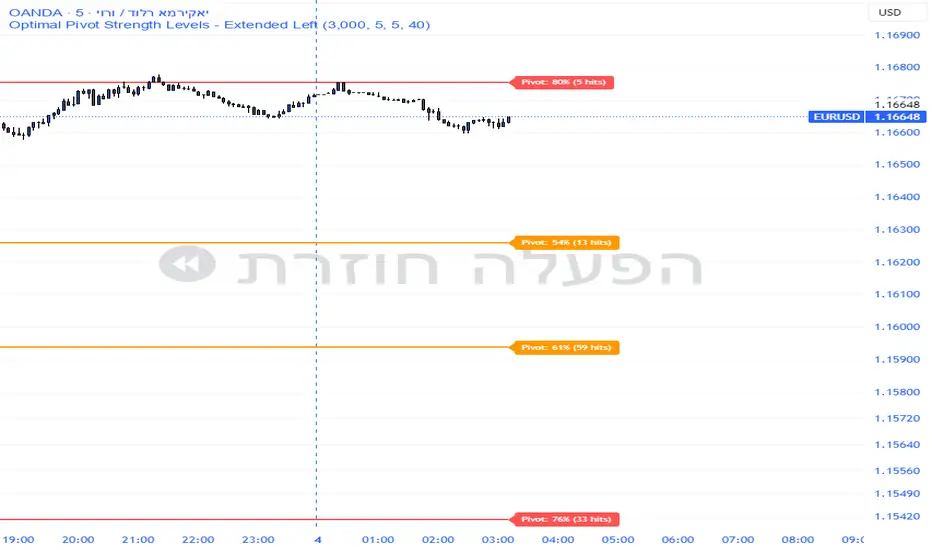
Pivot Edge ProOverview
Smart Pivot Analytics is a highly accurate technical analysis tool designed to identify and validate significant price levels. Unlike standard pivot indicators that only mark recent highs, this tool backtests each identified pivot against thousands of historical candlesticks to calculate its real-world “success rate.”
Key Features
Historical Backtesting: The indicator scans up to 4,900 historical columns to find every instance where price interacted with a specific pivot level.
Strength Score (%): Each level is assigned a percentage score based on its reversal rate. It calculates how many times the price has successfully reached and rejected the level, providing a statistical “hit rate.”
Dynamic Hit Counter: Displays the exact number of times a level has been tested (hit), helping traders distinguish between new levels and established “old” levels.
Smart Filtering: To keep the chart clean, the indicator automatically filters out weak levels and prevents “clutter” by merging levels that are too close together.
Infinite Left Projection: Lines extend left to infinity, allowing traders to see the historical significance of a level across the entire price history at a glance.
How to Trade with It
Red Levels (High Power > 75%): These are “Top Reaction Zones”. Expect a strong price rejection or significant breakout when these levels are tested.
Orange Levels (Medium Power): Suitable for profit targets or as secondary confirmation for entering a trade.
Encounter: Use these levels in conjunction with your existing strategy. When a high power pivot aligns with your entry signal, the probability of a successful trade increases significantly.
Technical Parameters
Lookback Period: Defines how far back in history the script calculates power.
Touch Radius: The "sensitivity" of the level (how close the price has to get to be considered a "hit").
Minimum Strength: A filter to show only the most reliable levels.
Volume-Weighted Fibonacci PivotThis indicator automatically plots dynamic Fibonacci retracement and extension levels based on a volume-weighted pivot point within a user-defined lookback period or date range. It intelligently calculates a central "pivot" price biased toward high-volume bars, then draws symmetric levels both upward (extensions) and downward (retracements) for balanced confluence analysis.
How It Works (Technical Methodology)
Lookback Period Determination
Multiple filter modes control the data range used for calculations:
"Last X Bars": Fixed number of recent bars (default 400, max 4999).
"Manual Date": User-specified start date.
"Interactive (Chart)": Confirmed start date via input.
"None": Full available history (falls back to max bars).
Optionally, when using "Last X Bars", calculations can pull data from a higher/lower user-selected timeframe via request.security() for multi-timeframe alignment.
A dotted vertical line marks the start point in date-based modes.
Range and Pivot Calculation
Within the selected period:
Highest high and lowest low define the full price range.
Average volume is computed across the period.
Volume-Weighted Pivot: Average close price only from bars where volume > average volume (fallback to simple midpoint if no high-volume bars).
This creates a "smart" central pivot that leans toward areas of greater participation, often aligning with institutional activity.
Fibonacci Level Generation
User-configurable ratios (default: 0.236, 0.382, 0.5, 0.618, 0.786, 1.0, 1.272, 1.414, 1.618).
Levels are calculated symmetrically around the volume-weighted pivot:
Upward: Pivot + (Range × Ratio × Correction Factor) – teal/cyan shades.
Downward: Pivot - (Range × Ratio × Correction Factor) – red shades.
Correction Factor (default 0.5): Scales level spacing for tighter/wider grids without altering ratios.
Only the user-defined number of active lines (default 9) are drawn.
Visual Construction
Central Pivot Line: Thick yellow horizontal line with label showing exact price.
Up/Down Levels: Dashed lines extended into the future, labeled with ratio direction ("Up" or "Dn").
All objects redraw only on the last bar for performance, clearing previous drawings.
Multi-Timeframe Option
When enabled with "Last X Bars":
Pulls high/low/volume data from specified timeframe.
Aligns the pivot and levels to higher-timeframe structure while displaying on current chart – ideal for intraday traders seeking HTF confluence.
How to Use
This tool provides clean, volume-aware Fibonacci grids for identifying potential support/resistance, reversal zones, and targets.
Volume-Weighted Pivot: Often acts as a strong mean reversion level or fair value area.
Upward Levels (Teal): Potential resistance/extensions in bullish moves; watch for reactions on retests.
Downward Levels (Red): Potential support/retracements in bearish moves.
Confluence: High probability when price reacts at levels aligning with other tools (order blocks, pivots, volume profile).
Correction Factor: Lower values (<0.5) for tighter grids in ranging markets; higher (>0.5) for trending markets.
Multi-Timeframe Mode: Use on lower charts (e.g., 15m) with HTF input (e.g., 4H or Daily) to project major structure levels.
Common Setups:
Pullbacks to 0.618–0.786 zones for continuation entries.
Breaks beyond 1.0–1.618 for extension targets.
Reactions near pivot line for mean reversion trades.
Adjust ratios and active line count to match your preferred Fibonacci style (classic retracement vs. extensions).
Disclaimer
This indicator is a technical analysis tool and should be used in conjunction with other forms of analysis. Past performance does not guarantee future results. Always use proper risk management.

TRharmonic Ultimate v8TRharmonic Ultimate v8: The Pinnacle of Automated Pattern Trading
TRharmonic Ultimate v8 represents the next evolution in harmonic trading, blending institutional-grade precision with a revolutionary "Smart Trade Tracking" engine. Powered by a highly optimized ZigZag algorithm, it instantly identifies over 25 complex harmonic structures—including Gartley, Bat, Shark, and 5-0 patterns—across any timeframe with zero latency. What sets v8 apart is its ability to go beyond simple detection; it actively monitors every trade for you, tracking price action against Take Profit and Stop Loss levels in real-time. The system features a professional-grade alert ecosystem that delivers instant, detailed notifications directly to Telegram, complete with entry prices, dynamic trailing stops, and trade results. We have engineered a sophisticated deduplication logic that eliminates signal noise and spam, ensuring you only receive valid, actionable trade opportunities. Integrated MACD confirmation filters add an extra layer of reliability, helping you distinguish high-probability reversals from false signals. The built-in risk management logic automatically trails your Stop Loss to breakeven upon hitting TP1, securing your profits while letting winners run. With fully customizable themes and an intuitive dashboard table, the indicator adapts seamlessly to your visual preferences. TRharmonic Ultimate v8 isn't just an indicator; it is a complete, automated trading assistant designed to elevate your technical analysis to a professional level.

Harmonic Patterns [kingthies]Harmonic Patterns
This indicator scans price swings for classic X-A-B-C-D harmonic patterns and plots the structure plus a PRZ (Potential Reversal Zone) to help you frame areas where reactions are statistically more likely. It supports both bullish and bearish setups and can trigger alerts when a new D pivot confirms a pattern.
What it does
Builds a pivot-based swing map (ZigZag-style) using a configurable Pivot Length .
Evaluates the most recent 5 swing points (X, A, B, C, D) against harmonic ratio rules with a user-defined tolerance .
Detects: Gartley, Bat, Butterfly, Crab, Deep Crab, Cypher, Shark (loose) .
Draws the pattern legs (X-A-B-C-D), labels the detection with ratio readouts, and projects a PRZ using 3 target levels (derived from XA/BC logic per pattern).
Offers two rendering modes:
Best only : picks the closest match (lowest score) to reduce clutter.
Show all : plots every valid match (uses filled PRZ boxes to keep object usage under control).
PRZ (Potential Reversal Zone)
PRZ is built from three target levels and expanded into a zone.
Optional padding uses ATR (ATR multiplier) to widen/narrow the zone for volatility.
Display modes: Off, Box, Lines, Both .
Zones can be extended forward by a configurable number of bars to keep the area visible as price develops.
How to use
Start with Confirm only when D pivot forms enabled (recommended) to reduce false positives while patterns are still forming.
Adjust Pivot Length based on timeframe:
Lower values = more swings, more signals, more noise.
Higher values = cleaner structures, fewer signals.
Use Ratio Tolerance to control strictness:
Lower tolerance = fewer, higher-confidence matches.
Higher tolerance = more matches, potentially lower quality.
Treat harmonics as context , not a standalone entry system:
Look for confluence (HTF levels, structure, volume, momentum/RSI divergence, etc.).
Use your own confirmation and risk plan (invalidations beyond PRZ / beyond D).
Settings overview
Swings (Pivot ZigZag)
Pivot Length: pivot sensitivity.
Use Wicks: uses High/Low; if off, uses Close.
Max Stored Swings: limits stored pivots for performance/object control.
Harmonic Detection
Ratio Tolerance (%): allowed deviation around ideal ratios.
Confirm only when D pivot forms: reduces repaint-like behavior.
When multiple match: Best only vs Show all.
Pattern Filters enable/disable each pattern type.
PRZ
PRZ Display: Off / Box / Lines / Both.
PRZ Padding (ATR multiplier): volatility-adjusted zone padding.
PRZ Extend (bars): how far to project the zone.
Visuals
Draw Legs: draws X-A-B-C-D.
Show Pattern Label: prints pattern name, direction, ratios, and score.
Label Offset: shift label forward if you want more space.
Alerts
“Bullish/Bearish Harmonic (Any)” triggers on any detected pattern.
Per-pattern alerts are included for each supported pattern type.
Notes
This indicator is educational and intended to assist with pattern recognition and confluence mapping.
Harmonic patterns do not guarantee reversals—always manage risk and confirm with your own process.

Harmonik PRZ MalibuThe Harmonik PRZ Malibu indicator includes 6 main features:
1. Harmonic Pattern Detection
2. PRZ (Potential Reversal Zone) Visualization
3. RSI Confluence System
4. Time Ratio Analysis
5. Quality Scoring
6. Automatic TP/SL Management
━━━━━━━━━━━━━━━━━━━━━━━━━━━━━━━━━━━━━━━━━━━━━━━━━━━━━━━━━━━━━━━━━━━
HARMONIC PATTERN DETECTION:
◆ What are Harmonic Patterns?
Harmonic patterns are geometric price structures that use Fibonacci ratios to identify potential reversal points. They represent natural market cycles where institutional buying and selling creates predictable XABCD formations.
◆ How does the indicator detect patterns?
The indicator uses a multi-layer ZigZag analysis system with 4 independent depth levels: Micro, Small, Medium, and Macro. Each layer scans for valid swing highs and lows simultaneously, ensuring no pattern is missed regardless of market volatility or timeframe.
When all required swing points align with harmonic geometry rules, the indicator confirms a valid pattern. Supported patterns include Gartley, Bat, Butterfly, Shark, Cypher, and AB=CD variations.
━━━━━━━━━━━━━━━━━━━━━━━━━━━━━━━━━━━━━━━━━━━━━━━━━━━━━━━━━━━━━━━━━━━
PRZ (POTENTIAL REVERSAL ZONE):
◆ What is PRZ?
The PRZ is not a single price level but a cluster zone where multiple Fibonacci projections converge. This confluence creates a high-probability reversal area.
◆ How is PRZ calculated?
The indicator calculates PRZ using three independent projections:
• BC Projection - Where the CD leg is expected to complete
• AB=CD Completion - Symmetry point of the pattern
• BA Retracement Extension - Additional confirmation level
When these three levels cluster tightly, the pattern receives a higher quality score.
━━━━━━━━━━━━━━━━━━━━━━━━━━━━━━━━━━━━━━━━━━━━━━━━━━━━━━━━━━━━━━━━━━━
RSI CONFLUENCE SYSTEM:
◆ Why use RSI with harmonic patterns?
Price reaching the PRZ alone is not enough. The RSI Confluence System adds momentum confirmation by checking if the market is actually oversold (for bullish patterns) or overbought (for bearish patterns) at the D point.
◆ What is RSI Divergence Check?
For extension patterns like Butterfly, the indicator also checks for RSI divergence - when price makes a new extreme but RSI does not. This divergence signals exhaustion and increases reversal probability.
The RSI value at entry is displayed on the pattern label with a ✓ (confirmed) or ✗ (not confirmed) symbol.
━━━━━━━━━━━━━━━━━━━━━━━━━━━━━━━━━━━━━━━━━━━━━━━━━━━━━━━━━━━━━━━━━━━
TIME RATIO ANALYSIS:
◆ What is Time Ratio?
Harmonic patterns are not only about price - TIME matters equally. The Time Ratio measures how long the CD leg takes compared to the AB leg.
◆ Why is it important?
A pattern where CD completes too quickly or takes too long compared to AB has lower reliability. The ideal time ratio falls within natural Fibonacci proportions, creating a balanced and symmetrical pattern in both price AND time.
The indicator displays the Time Ratio on each pattern label and can filter out patterns with abnormal timing.
━━━━━━━━━━━━━━━━━━━━━━━━━━━━━━━━━━━━━━━━━━━━━━━━━━━━━━━━━━━━━━━━━━━
QUALITY SCORING SYSTEM:
◆ How are patterns graded?
Each pattern receives a quality score from A+ to C based on multiple factors:
• PRZ Tightness - How closely the Fibonacci levels cluster
• RSI Confirmation - Whether momentum aligns with direction
• Time Ratio Balance - Whether timing is proportional
◆ How to use quality scores?
• A+ patterns: Highest probability setups - suitable for larger position sizes
• A patterns: Strong setups - standard position sizes
• B patterns: Moderate setups - reduced position sizes or skip
• C patterns: Weak setups - consider skipping or paper trading only
The statistics table tracks Win/Loss rate separately for each quality grade.
━━━━━━━━━━━━━━━━━━━━━━━━━━━━━━━━━━━━━━━━━━━━━━━━━━━━━━━━━━━━━━━━━━━
AUTOMATIC TP/SL MANAGEMENT:
◆ Where are TP levels placed?
Take-profit levels are calculated using CD leg retracement. The indicator displays TP1 and TP2 levels with clear price labels.
◆ Where is Stop-Loss placed?
Stop-loss placement is pattern-specific. For internal patterns (Gartley, Bat), SL is placed beyond the X point. For extension patterns (Butterfly, Shark), SL accounts for the extended structure.
All levels are drawn automatically with adjustable visual settings.
━━━━━━━━━━━━━━━━━━━━━━━━━━━━━━━━━━━━━━━━━━━━━━━━━━━━━━━━━━━━━━━━━━━
REAL-TIME STATISTICS:
The indicator includes a built-in statistics table that tracks:
• Total patterns detected per type
• Win/Loss count (TP1 hit vs SL hit)
• Win rate percentage
• Filter by quality score
This allows you to see actual performance directly on your chart.
━━━━━━━━━━━━━━━━━━━━━━━━━━━━━━━━━━━━━━━━━━━━━━━━━━━━━━━━━━━━━━━━━━━
📱 7-DAY FREE TRIAL: Contact via Telegram @lmaLibul
Send your TradingView username to get access.

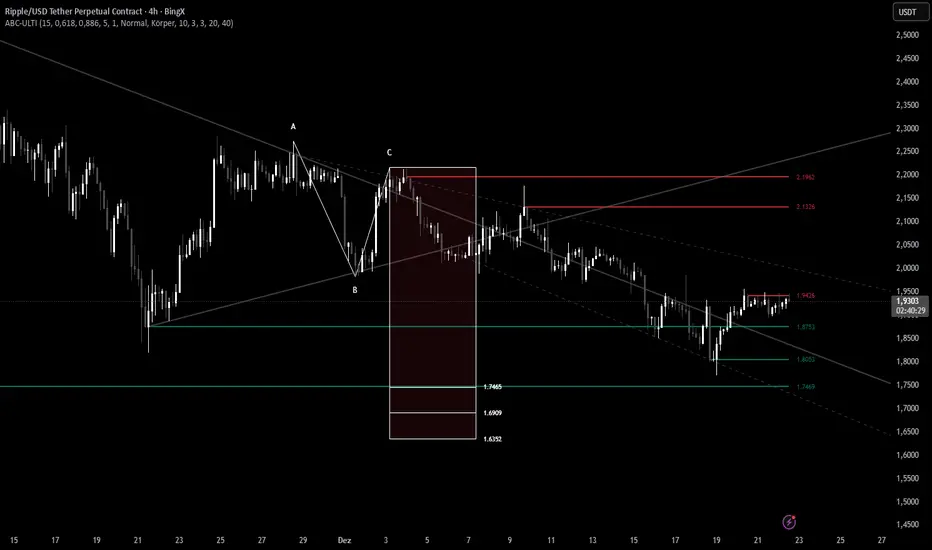
ABC Pro Ultimate S/RABC Pro Ultimate is a high-precision trading tool designed to identify harmonic ABC (Zigzag) patterns and combine them with institutional Support & Resistance levels. Unlike standard indicators that clutter your chart with noise, this script filters for high-relevance pivot points from the distant past to provide truly meaningful trade setups.
Pressure Windows [Lite]PRESSURE WINDOWS — Lite is a stripped-down time-cycle instrument based on Jim Hurst’s Time-Cycles method. It lets you define a primary cycle using two major lows and project basic harmonic subdivisions forward in time. The Lite version is designed to expose coarse timing pressure, not full cycle resolution. This is a structural timing tool — not a prediction engine.
What the Lite Version Shows :
A primary time cycle defined by two anchor points
Single-level harmonic subdivision only:
-1/2 (halves)
-1/3 (thirds)
Forward projection of the cycle into the future
Internal verification lines inside the base cycle to check fit
What it does not do (by design):
No chained subdivisions (no 1/2→1/2 or 1/3→1/2)
No higher-resolution nesting
No regime logic or shaded “windows”
Those belong to the full instrument.
How to Use (Lite Workflow) :
1. Define the Cycle :
Add the indicator to your chart
Select Time 1 at a major low
Select Time 2 at the next major low
(You can fine-tune both in the settings)
2. Choose a Subdivision :
In settings:
None → only the primary cycle
1/2 → midpoint timing pressure
1/3 → third-based rhythm
3. Verify Before Trusting :
Look at the subdivisions inside the base cycle:
Do intermediate lows align with halves or thirds?
If they don’t, don’t force it
The Lite version is intentionally coarse — its job is to answer:
“Is the market vibrating in 2s or 3s?”
Not to overfit timing.
Best Practices :
Works best on higher timeframes (Daily / Weekly)
Use Log scale for long-term structure (time remains linear)
Treat projections as zones of pressure, not turning points
Important Note :
Pressure Windows — Lite limits subdivision depth on purpose, if you need nested timing resolution and finer pressure mapping, that’s what the full version is built for.
*This script doesn't constitute investment advice and isn't created solely for qualified investors.

Bassi Enhanced Next Candle Prediction with Neural Network & SMCOverview
This advanced all-in-one indicator combines machine learning-based next candle direction prediction with comprehensive Smart Money Concepts (SMC/ICT) tools, classic technical indicators, and visual aids for price action traders. It predicts whether the next candle will close bullish (green), bearish (red), or neutral — with a confidence percentage — using either a logistic regression neural network approximation (pre-trained on historical data) or a rule-based decision tree ensemble.
Perfect for scalpers, day traders, and swing traders seeking confluence from multiple sources.
Key Features
Next Candle Prediction
Real-time probability and direction (BUY/SELL/HOLD) with confidence level (0-100%).
Visual simulated future candle (one bar ahead) based on ATR-scaled body size.
Background coloring for predicted up/down moves.
Large label on the chart showing prediction, strength, confidence, and recent patterns.
Machine Learning Models (toggle via inputs)
NN Mode: Logistic regression (single-layer neural net) using normalized features from RSI, MACD, Stochastic, EMA, Bollinger Bands, ATR, OBV, Ichimoku, VWAP, CCI, Williams %R, MFI, and volume.
Tree Mode: Ensemble of 6 decision trees incorporating trend, volume, oscillators, candlestick patterns, divergences, and SMC elements.
Smart Money Concepts (SMC/ICT)
Order Blocks (Bullish/Bearish) with auto-extension and labels.
Fair Value Gaps (FVG) with volume-confirmed 3-candle detection and minimum size filter.
Breaker Blocks (when OB is broken).
Liquidity Sweeps (fakeouts at recent highs/lows).
Market Structure: Break of Structure (BOS) and Change of Character (CHoCH) labels.
Mitigation Blocks, Equal Highs/Lows, Imbalances.
Divergence Detection (Regular & Hidden)
RSI, MACD, and Stochastic divergences with lines and labels.
Classic Indicators & Tools
EMA, Ichimoku Cloud, Bollinger Bands, Parabolic SAR, SuperTrend, VWAP with bands.
ADX trend strength, Volume confirmation, Candlestick patterns (Engulfing, Hammer, Shooting Star).
Fibonacci Retracement from recent fractals (auto-updating on last bar).
Volume Profile (POC, VAH, VAL) over lookback period.
Visual & Info Enhancements
Customizable info table (Full/Summary/Mobile modes) showing key metrics, predictions, and statuses.
Trend background coloring.
Auto-cleanup of old drawings to prevent chart clutter.
Alerts
Buy/Sell/Hold predictions.
Patterns, divergences, SMC events (OB, FVG, BOS, CHoCH, Liquidity Sweeps, etc.).
How to Use
Add to any chart/timeframe (best on 1-15min for predictions).
Watch the next-candle label and simulated candle for directional bias.
Use SMC zones for entries/exits, confirmed by prediction confidence >66% (STRONG).
Combine with table for quick confluence overview.
Enable alerts for real-time notifications.
Disclaimer
No indicator guarantees profits. This is a tool for confluence — always use proper risk management. Backtest thoroughly on your assets/timeframes.
